GitHub Pricing 2026: Free, Team & Enterprise Costs
GitHub pricing starts at $0. Compare Free, Pro, Team, and Enterprise costs, included usage, add-on fees, and which plan fits your team in 2026.
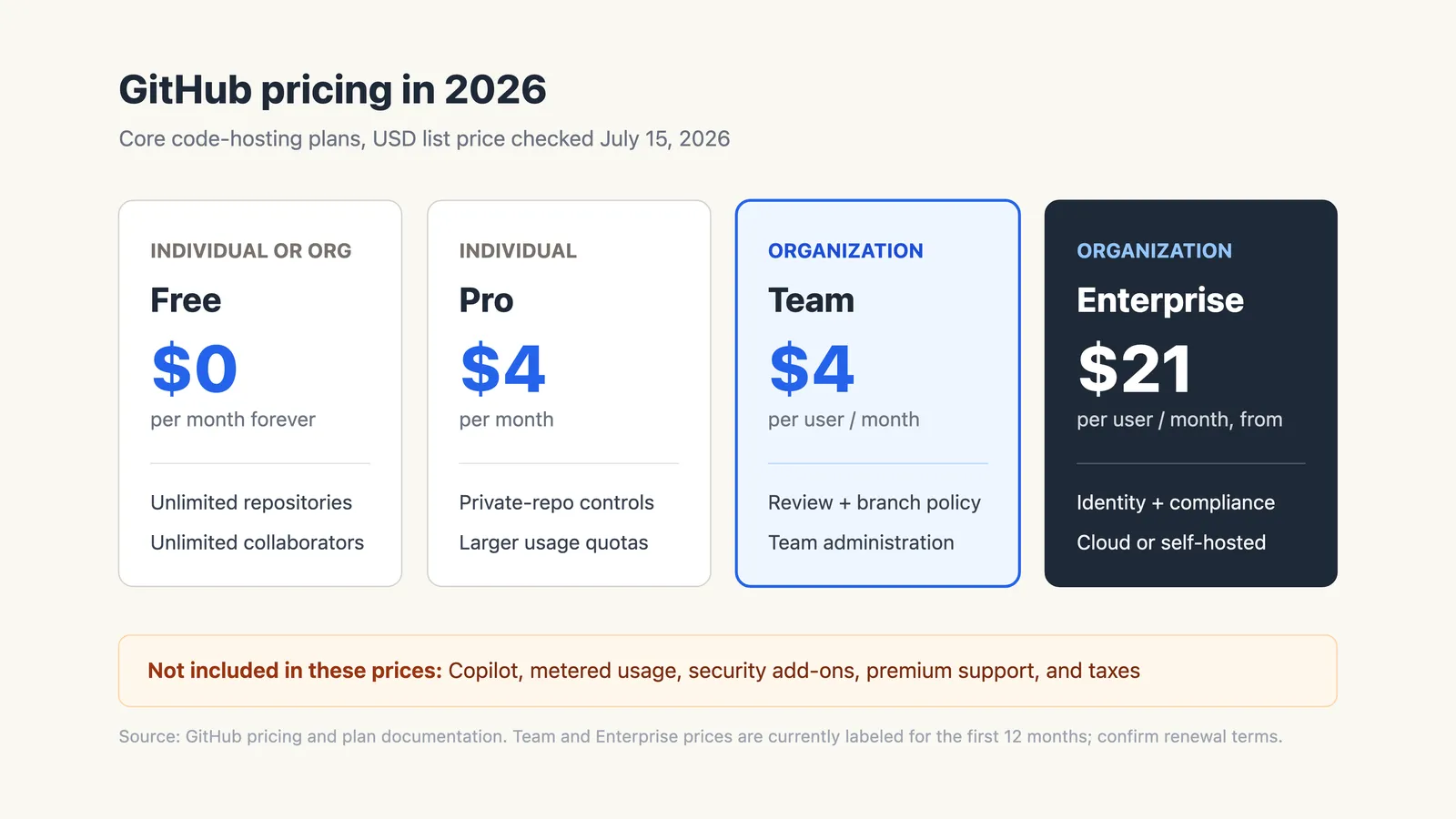
GitHub costs $0 for Free, $4 a month for personal Pro, $4 per user per month for Team, and starts at $21 per user per month for Enterprise as of July 2026. That is the short answer to the GitHub price question. The number on the invoice can be higher because Actions, Codespaces, Packages, Git LFS, Copilot, security products, and support are separate or metered once you cross the allowance included with your plan.
Most individuals never need to pay. GitHub Free already includes unlimited public and private repositories, unlimited collaborators, pull requests, issues, and a useful amount of Actions and Codespaces usage. The paid plans become rational when you need stronger controls on private repositories, centralized team administration, identity management, compliance, or much larger usage allowances, not simply because you want to keep code private.
This guide compares GitHub’s core code-hosting plans. It does not treat GitHub Copilot as part of the subscription: Copilot is a separate AI product with its own plans and usage meter. If that is the price you meant, use the dedicated GitHub Copilot pricing and AI Credits breakdown.
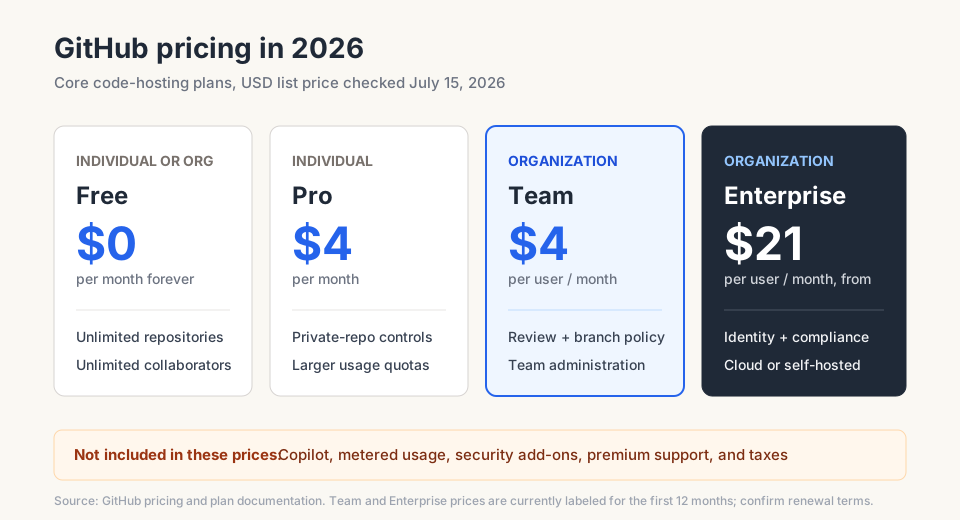
GitHub pricing at a glance
The plans split along an account boundary that GitHub’s headline pricing table does not make obvious. Free and Pro are personal-account plans. Free for organizations, Team, and Enterprise are organization plans. A developer can have a Pro personal account and also belong to an employer’s Team or Enterprise organization; GitHub bills those accounts separately.
| Plan | Current base price | Designed for | What changes versus Free |
|---|---|---|---|
| Free | $0 | Individuals and organizations | Unlimited public/private repositories and collaborators; basic allowances and community support |
| Pro | $4/month | Individual developers | Advanced private-repository review controls, email support, and larger Actions, Codespaces, and Packages allowances |
| Team | $4/user/month | Organizations | Team administration, protected branches and review controls for private repositories, organization-paid Codespaces, and standard support |
| Enterprise | From $21/user/month | Larger or regulated organizations | Enterprise-wide policy, identity and access controls, audit/compliance features, data-residency and self-hosting options, and much larger allowances |
These are US-dollar list prices checked against GitHub’s official pricing page on July 15, 2026. GitHub currently labels the Team and Enterprise prices on that page as applying to the first 12 months, so an organization making a multi-year decision should confirm its renewal quote rather than extrapolate the first-year figure. Enterprise is also a starting price; deployment, support, security products, and negotiated terms can change the total.
Is GitHub free?
Yes. GitHub Free is not a trial and does not limit how many public or private repositories you can create. Personal accounts can also invite unlimited collaborators. Organizations can use a Free organization with unlimited private repositories and members, which means a small team does not have to buy Team just to collaborate privately.
The free plan is surprisingly complete for side projects, open-source work, portfolios, small products, and teams that do not need formal enforcement. According to GitHub’s current plan documentation, a personal Free account includes community support, Dependabot alerts, GitHub Pages for public repositories, 2,000 Actions minutes per month for private repositories, 500 MB of Packages storage, 120 Codespaces core hours, and 15 GB of Codespaces storage.
The boundary is governance, not repository count. Free private repositories have a more limited control set than paid private repositories. If your team needs required reviewers, code-owner enforcement, protected-branch rules, private-repository Pages or wikis, or support beyond the community tier, that is where a paid plan begins to make sense.
GitHub Pro: the $4 personal plan
GitHub Pro is for one person’s account. It costs $4 per month, not $4 per repository and not $4 for every collaborator. Upgrading your personal account changes the features available to repositories owned by that account; it does not upgrade organizations you own or belong to.
The practical reason to buy Pro is advanced collaboration on private repositories. Pro adds required pull-request reviewers, multiple reviewers, protected branches, code owners, auto-linked references, GitHub Pages for private repositories, and email support. Its included monthly usage also rises to 3,000 Actions minutes, 2 GB of Packages storage, 180 Codespaces core hours, and 20 GB of Codespaces storage.
For an individual consultant, maintainer, or developer with serious private projects, $4 is inexpensive if even one of those controls matters. For a developer who mainly pushes code, opens pull requests, and uses public repositories, Free is enough. Pro does not include Copilot Pro; despite the shared word “Pro,” the two subscriptions are independent.
GitHub Team: $4 per user, not per repository
GitHub Team costs $4 per licensed user per month at the current list price. A five-person organization therefore starts at $20 a month, while a 50-person organization starts at $200. Repository count does not affect the base subscription because public and private repositories are unlimited across all three headline organization tiers.
Team is the paid governance layer for organizations. It adds the private-repository controls that engineering teams tend to standardize around: required and multiple reviewers, team review requests, code owners, protected branches, scheduled reminders, private GitHub Pages and wikis, and standard support. It also allows the organization to pay for Codespaces used by members and collaborators, although that Codespaces compute and storage is metered separately.
Seat counting deserves attention. GitHub bills organization members, owners, and outside collaborators who can access private repositories; pending invitations can also consume a seat. A contractor with access to three private repositories should count once, not three times, but a forgotten invitation or dormant external collaborator can still inflate the bill. GitHub documents the exact rules in People who consume a license.
GitHub Enterprise: $21 per user is the starting line
GitHub Enterprise starts at $21 per user per month. It comes in two deployment models: GitHub Enterprise Cloud, hosted by GitHub, and GitHub Enterprise Server, deployed on infrastructure the customer controls. Enterprise Cloud can also provide regional data residency, while Enterprise Server exists for organizations that require a self-managed environment.
The price jump from Team buys centralized control more than extra repository hosting. Enterprise adds an enterprise account that can govern multiple organizations, Enterprise Managed Users, SAML single sign-on, SCIM provisioning, enterprise policies, audit and compliance capabilities, and deployment choices. It also lifts included usage sharply: GitHub’s current allowance table lists 50,000 Actions minutes, 50 GB of Actions storage, 50 GB of Packages storage, 100 GB of monthly Packages transfer, and 250 GB each of Git LFS storage and bandwidth for Enterprise Cloud.
Enterprise is justified when identity, auditability, data location, centralized policy, procurement, or self-hosting is a requirement. It is rarely a cost-saving upgrade for a small team. A 10-person organization moves from a $40 Team base to a $210 Enterprise base before add-ons. The benefit has to come from reducing security and administration risk, not from storing more repositories.
What GitHub costs at different team sizes
The table below multiplies the current monthly list price by active seats. It is a base-plan estimate, not a total-cost forecast; it excludes taxes, Copilot, metered services, security products, premium support, negotiated discounts, and any renewal-price change after the first 12 months.
| Team size | Team at $4/user | Enterprise at $21/user | Annual difference at these rates |
|---|---|---|---|
| 5 users | $20/month | $105/month | $1,020/year |
| 10 users | $40/month | $210/month | $2,040/year |
| 50 users | $200/month | $1,050/month | $10,200/year |
| 100 users | $400/month | $2,100/month | $20,400/year |
The calculation is intentionally simple: seats multiplied by list price. Real enterprise contracts can be negotiated, and the cost of unused seats is often more actionable than a small percentage discount. Audit membership and pending invitations before comparing plans, then model add-ons separately rather than treating the headline subscription as an all-in platform fee.
The hidden costs outside the GitHub plan
GitHub describes a bill as three layers: the fixed account plan, fixed-price subscriptions, and metered usage. That distinction explains why a Free account can generate a charge and why a Team invoice can exceed $4 per person.
GitHub Actions
Actions usage for standard GitHub-hosted runners is free in public repositories. Private repositories receive a plan-specific monthly allowance (2,000 minutes on Free, 3,000 on Pro or Team, and 50,000 on Enterprise Cloud) plus storage. Usage beyond the allowance can become billable when a payment method and budget permit it. Runner operating system and size affect the rate, so workflow minutes are not interchangeable with the seat price.
GitHub Codespaces
Personal Free and Pro accounts receive monthly Codespaces quotas. Free includes 120 core hours and 15 GB-month of storage; Pro includes 180 core hours and 20 GB-month. Organization and enterprise plans do not include a comparable free organization quota. Team and Enterprise organizations can choose to pay for member usage, with current Codespaces pricing starting at $0.18 per hour for a two-core machine and $0.07 per GB-month of storage. Whether that meter beats buying hardware at 2026 memory prices is worked through in GitHub Codespaces vs buying a laptop.
Packages and Git LFS
Public package use is generally free, but private Packages storage and data transfer have plan allowances. Git Large File Storage has separate storage and bandwidth quotas. GitHub’s included-product table is the cleanest source because it puts Free, Pro, Team, and Enterprise Cloud in one grid. Once an allowance is exhausted, continued use can be billed if paid usage is enabled.
Copilot, security, and support
Copilot is a separate subscription. The core GitHub Team price does not include Copilot Business, and Enterprise does not automatically include Copilot Enterprise. The current AI plans also meter certain activity through GitHub AI Credits, so the Copilot cost analysis should be budgeted as its own line.
GitHub’s advanced security products and premium support are also separate from the base plan or available only under particular contracts. For a complete engineering-tools budget, compare those additions with the broader AI coding plan pricing table instead of adding Copilot’s sticker price to GitHub and assuming the total is capped.
Which GitHub plan should you choose?
Choose Free if you are an individual, an open-source project, a side project, or a small organization without formal review-enforcement requirements. Private code alone is no reason to upgrade.
Choose Pro if your personal private repositories need protected branches, required reviewers, code owners, private Pages, larger included quotas, or email support. It is an individual plan, not a team-management shortcut.
Choose Team if an organization needs consistent review and branch policies across private repositories, team-based administration, standard support, or organization-paid Codespaces. For most commercial teams that do not have enterprise identity or compliance requirements, this is the sensible paid tier.
Choose Enterprise when SAML/SCIM identity, managed users, enterprise-wide policy, multiple-organization governance, audit/compliance controls, data residency, or self-hosting is a requirement. If the only argument is “we have many developers,” calculate the dollar difference first; team size alone does not make the Enterprise controls valuable.
One exception is eligibility. GitHub offers education benefits and discounts for qualifying schools, nonprofits, and libraries. GitHub’s discount documentation currently says qualifying nonprofits can receive Team free or 25% off Enterprise Cloud. Check eligibility before buying at list price.
Frequently asked questions
How much does GitHub cost per month?
GitHub Free costs $0. GitHub Pro costs $4 per month for an individual. GitHub Team currently costs $4 per user per month, and GitHub Enterprise starts at $21 per user per month. Metered products and add-ons can make the total higher.
Is GitHub free for private repositories?
Yes. Both personal and organization Free accounts can create unlimited private repositories. Free private repositories have fewer advanced review, policy, support, and administration features than paid plans, but GitHub does not charge simply because a repository is private.
What is the difference between GitHub Pro and Team?
Pro upgrades a personal account and its repositories. Team upgrades an organization and is billed per licensed user. They currently share a $4 price point, but they solve different ownership and administration problems.
Does GitHub Team include Copilot?
No. GitHub Team covers code hosting and organization collaboration. GitHub Copilot Business is a separate subscription, and its metered AI usage is separate from the Team seat price.
How much is GitHub Enterprise for 100 users?
At the current starting list price of $21 per user per month, 100 Enterprise seats cost $2,100 per month or $25,200 per year before add-ons, taxes, discounts, usage charges, and negotiated contract terms.
Bottom line
GitHub’s price is lower than the product’s enterprise reputation suggests: $0 covers most individual and lightweight team use, and $4 buys either stronger personal controls through Pro or organization governance through Team. Enterprise’s $21 starting price is a different purchase: a control, identity, compliance, and deployment layer rather than more repositories.
Start with the cheapest tier that enforces the policies you actually need. Then budget Actions, Codespaces, storage, Copilot, security, and support as separate lines. That produces a useful GitHub cost estimate; multiplying seats by the headline price alone does not.
Sources
- GitHub. Pricing: plans for every developer. Prices and headline features, checked July 15, 2026. github.com/pricing
- GitHub Docs. GitHub’s plans. Account eligibility and plan features. docs.github.com
- GitHub Docs. Product usage included with each plan. Actions, Codespaces, Packages, and Git LFS allowances. docs.github.com
- GitHub Docs. How GitHub billing works. Fixed plans, subscriptions, and metered usage. docs.github.com
- GitHub Docs. GitHub Codespaces billing. Compute, storage, and organization billing. docs.github.com
- GitHub Docs. People who consume a license in an organization. Seat-counting rules. docs.github.com