Why Is My AI API Bill So High? 8 Causes and Fixes
Unexpected OpenAI or Claude API bill? Trace the cost to context growth, cache misses, reasoning tokens, tool calls, retries, or a runaway agent.
An unexpectedly high AI API bill usually comes from one of five places: a growing conversation is being sent again on every request, prompt-cache hits stopped, reasoning or output tokens expanded, paid tools ran more often than expected, or an agent repeated successful calls inside a loop. Start with the provider’s cost report by project and API key. Do not start by shortening prompts at random.
That order matters. A token counter tells you how much text moved. An invoice tells you which kind of token or tool call cost money. They are related, but they are not the same measurement. OpenAI explicitly recommends its Costs endpoint or the Costs tab in the Usage Dashboard for financial reconciliation because raw usage can differ slightly from the amount that lands on the invoice. Anthropic likewise separates standard input, cache creation, cache reads, output, and server-side tool charges.
Audit the bill before changing the code
Open the provider’s cost dashboard and narrow the date range to the first day the bill moved. Then group or filter by project, API key, model, and line item. On OpenAI, use the Costs view or the organization Costs API for the number that should reconcile to billing. Use the detailed Usage endpoints to explain that number: which key, project, model, and request class produced it. On Anthropic, use the Console’s cost and usage report and separate ordinary input from cache creation, cache reads, and output.
The first pass should answer four questions:
- Which project and key spent the money? If the answer is “all of them,” the application may be sharing one production key across environments.
- Which model and endpoint were used? A model alias, fallback, or routing change can move traffic to a more expensive tier.
- Which line item grew? Fresh input, cached input, cache writes, output, reasoning, web search, code execution, image/audio, or another tool each points to a different fix.
- Did request count rise, or did cost per request rise? More calls suggests traffic, duplication, retries, or a loop. A higher cost per call suggests context growth, cache misses, longer output, more reasoning, or a model change.
The billing fields that tell you what happened
The providers use different names, but the receipt has the same basic shape.
| Cost stream | What it represents | What a spike usually means |
|---|---|---|
| Standard input | New prompt and context processed at the normal input rate | History is growing, caching missed, or too much data is attached |
| Cached input / cache read | Reused prompt prefix processed at a discount | High token count may still be cheap; check dollars before optimizing |
| Cache creation / write | Context being stored for later reuse | Prefixes change often, cache expires, or sessions restart after gaps |
| Output | Visible answer plus provider-defined generated tokens | Responses are longer, an agent is verbose, or output limits are loose |
| Reasoning tokens | Internal reasoning counted within generated usage | Reasoning effort increased or a harder model/path is being used |
| Tool charges | Search, code execution, containers, images, audio, and similar tools | The agent calls paid tools more often or loops over them |
| Request count | Completed API calls | Traffic, duplicate workers, retries, polling, or a runaway loop increased |
Do not add these token counts together and multiply by one price. Input, cached input, output, and tools can have different rates. Some current long-context models also apply a multiplier after a threshold. For example, OpenAI’s GPT-5.6 Sol documentation says requests above 272,000 input tokens are priced at 2x input and 1.5x output for the full request, not merely for the tokens above the threshold.
Cause 1: the conversation is resent on every turn
A chat or agent request is not priced from the newest user sentence alone. It may include the system prompt, retrieved documents, conversation history, tool definitions, tool results, images, and the new message. If the application submits that entire state on every turn, input grows with the session.
This catches teams because the interface still looks like one short exchange. The user types “continue,” but the request can contain hundreds of thousands of earlier tokens. Agentic workloads make the curve steeper because every tool result becomes history that may be sent back on the next step.
Measure input_tokens or the provider’s equivalent by request over time. If the median stays flat but the 95th percentile climbs with session age, add a context budget. Summarize or retrieve only the history needed for the next step, cap tool-result size, and start a new session when the task changes.
Cause 2: the prompt cache stopped hitting
Prompt caching discounts a stable prefix. It does not make an entire conversation permanently cheap. A cache can miss when the reusable prefix changes, the provider’s retention window expires, content is reordered, or dynamic values are inserted near the beginning.
That is why a bill can jump while total tokens barely move. Yesterday’s one million repeated tokens may have been cache reads; today’s structurally identical traffic may be fresh input or cache creation. The token count looks stable. The unit price does not.
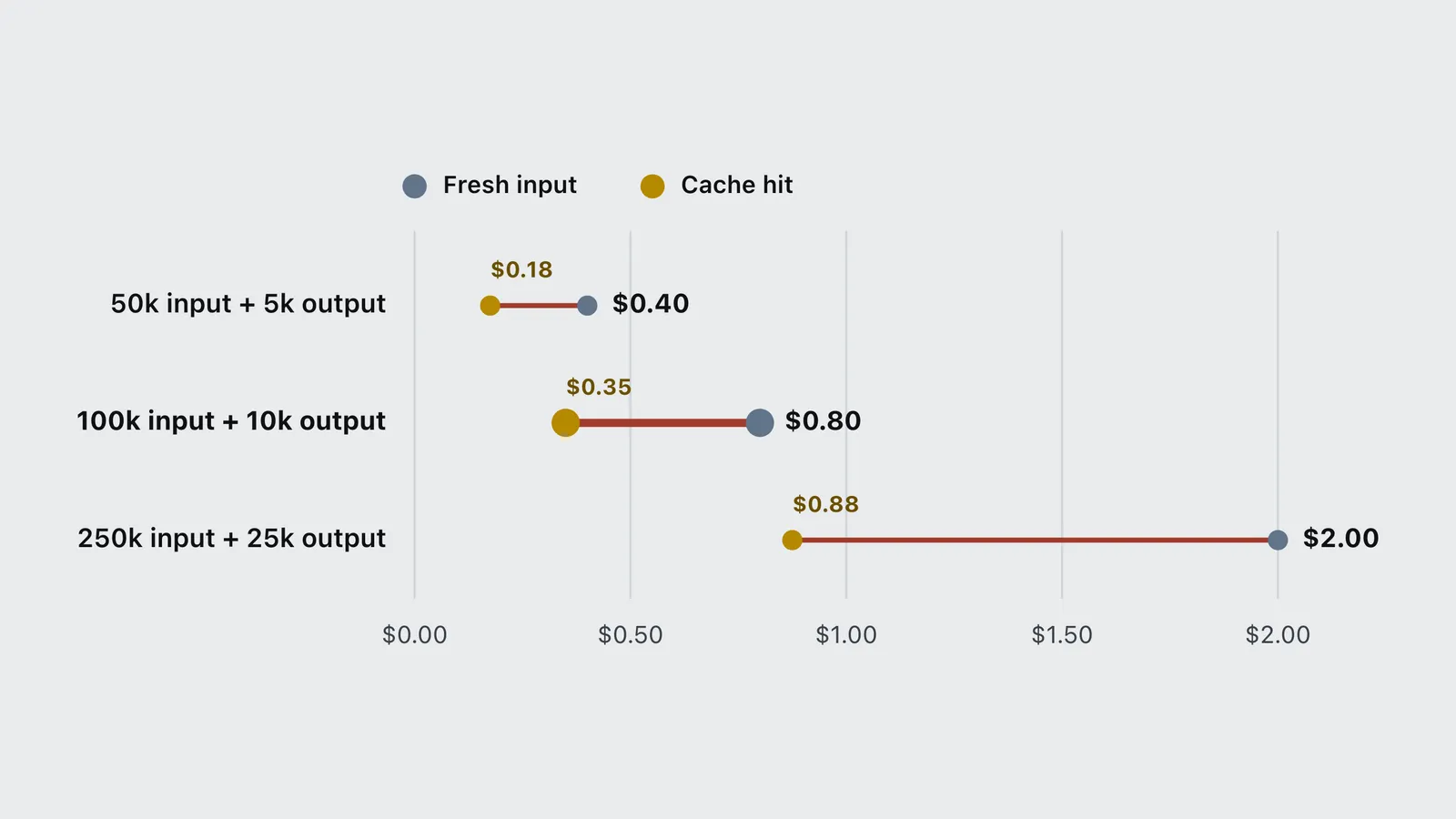
The following model uses GPT-5.6 Sol’s July 15, 2026 published rates: $5 per million standard input tokens, $0.50 per million cached input tokens, and $30 per million output tokens. Each row keeps output at 10% of input and stays below the model’s 272,000-token long-context pricing threshold.
| Item | Fresh input | Cache hit |
|---|---|---|
| 50k input + 5k output | $0.40 | $0.18 |
| 100k input + 10k output | $0.80 | $0.35 |
| 250k input + 25k output | $2.00 | $0.88 |
For the middle row, fresh input costs $0.50 and output costs $0.30, for an $0.80 request. With a cache hit, input falls to $0.05 while output stays $0.30, for $0.35 total. That distinction is the article’s recurring rule: reducing one cheap or discounted stream does not reduce the entire bill by the same percentage.
Track cache-hit tokens and cache-write tokens separately. Keep stable instructions, tools, and reference material at the beginning of the prompt. Put request-specific values later. Avoid changing tool definitions or switching settings mid-session unless necessary. For intermittent workflows, compare the provider’s available cache duration against the time between calls rather than assuming the cache will still be warm.
Cause 3: reasoning and output expanded
Input is often the biggest token count, but output frequently has the highest rate. Reasoning models can also generate internal reasoning tokens that do not appear as ordinary prose yet still contribute to generated usage under the provider’s rules.
Check output and reasoning tokens per successful request. If input is stable while generated usage rises, prompt compression will not solve the problem. Set an output limit, use lower reasoning effort for routine classification or extraction, and route only genuinely difficult tasks to the strongest model. Validate quality before lowering effort globally; the cheapest answer is not useful if it causes a retry or human rework.
Cause 4: the request crossed a long-context threshold
A large context window is a capacity limit, not a promise of one flat unit price. Current OpenAI documentation applies higher rates to GPT-5.6 Sol prompts above 272,000 input tokens. Crossing that boundary can raise the price of the full request.
Add an alert before the threshold rather than at the maximum context window. Log input tokens before dispatch. If a request is close, retrieve fewer documents, summarize old tool output, split independent work, or choose a model whose price and context policy fit the workload. Do not truncate blindly: dropping the one relevant document can turn one expensive call into several failed attempts.
Cause 5: a successful agent loop kept running
HTTP errors are visible. Successful calls that accomplish nothing are harder to notice. An agent can search, inspect, retry a plan, or poll for state through dozens of valid requests. Each call may return 200 OK and be billed normally even though the overall task never finishes.
The April 2026 study How Do AI Agents Spend Your Money? found that agentic coding tasks consumed roughly 1,000 times more tokens than code chat or code reasoning in its evaluated workloads. Runs of the same task varied by as much as 30x, and higher token use did not reliably mean higher accuracy. The per-model efficiency gap behind that is covered in which coding model burns the fewest tokens.
Set three budgets: maximum steps per task, maximum dollars per task, and maximum consecutive steps without measurable progress. Give every task an idempotency key so a queue or webhook cannot launch it twice. Log the terminal reason: completed, user-cancelled, budget-exceeded, duplicate, timeout, or error.
Cause 6: retry logic duplicated paid work
Not every failed network attempt creates a bill, and providers do not promise that every error class is free. The safe diagnostic is to count provider-acknowledged usage and completed responses, not to assume all retries were unbilled.
Retries become expensive when the first request actually completed but the client timed out before receiving the response, or when application validation rejects a valid model response and calls the model again. Automatic retries across multiple workers can amplify the same event.
Retry only transient errors, use exponential backoff with jitter, cap attempts, and attach an idempotency or task identifier. Record whether the provider returned usage. If a structured response fails validation, log the failure category and repair narrowly instead of resending the entire task to the most expensive model.
Cause 7: paid tools multiplied behind the model call
An API request can carry charges beyond text tokens. Web search, code execution, containers, images, audio, and other server-side tools may have their own units. The model can decide to call a tool several times unless the application constrains it.
Separate tool spend from model-token spend. Record tool name, call count, and task id. Cache search or retrieval results where policy permits, limit repeated queries, and require an explicit reason before a second expensive tool call. A cheaper language model does not offset ten unnecessary searches.
Cause 8: the wrong key, model, or environment owns the traffic
The cleanest optimization sometimes has nothing to do with prompts. A staging job may use the production project. A leaked key may be active. Two workers may consume the same queue. A model alias or fallback may route traffic differently after a deployment.
Use one project and scoped key per application and environment. Attribute spend by project and key, rotate anything exposed, and set alerts below the level that would hurt. Treat a budget as an alerting and governance control unless the provider explicitly documents it as a hard stop. Add an application-side circuit breaker for the actual ceiling.
Attribution often exposes a related waste: routing every classification through a frontier model. Routing, tagging, scoring and guardrail checks are closed-set decisions that do not need prose, and a decision model prices them on input alone. Outside tests in September 2026 measured between 8.6x and 580x cheaper per decision, depending entirely on what was being replaced, with the caveat that whatever the model declines to answer still escalates to the full model.
Fix the dollars in this order
- Stop unauthorized, duplicate, or runaway traffic. This removes whole requests, the largest possible saving.
- Restore attribution. Separate projects, keys, environments, models, and tools so the next spike explains itself.
- Repair cache behavior. Stable prefixes and a suitable cache window reduce repeated-context cost without removing useful information.
- Cap loops, retries, output, and reasoning. These controls bound cost per task.
- Route by task difficulty. Use the smallest model that passes your own evaluation, not the cheapest model in a generic leaderboard.
- Reduce irrelevant context and tool output. Do this after identifying which tokens are billed at expensive rates.
- Use batch or asynchronous discounts when latency does not matter. Recalculate with current provider terms before moving production work.
The order is deliberate. The site’s earlier replay of Claude Code token-saving tools found that large per-payload token reductions translated into only a small bill reduction because the tools mostly touched discounted traffic. If you are estimating a normal workload rather than investigating a surprise, use the AI agent production-cost model and the live AI API pricing tracker. For coding tasks, the cost-per-task calculator turns the same rate-card inputs into a workload estimate.
OpenAI and Anthropic differ at the edges
The diagnostic sequence is shared, but the invoice fields and pricing rules are not interchangeable.
- OpenAI: reconcile money with the Costs endpoint or Costs dashboard, then use Usage endpoints to break activity down by project, API key, model, batch status, and token category. Current model pages document input, cached input, output, long-context, and tool-specific pricing.
- Anthropic: separate ordinary input, cache creation, cache reads, and output. Cache writes can carry a premium, cache reads a discount, and cache duration affects which one appears. Server-side tools can add their own charges. The Console provides cost and usage reporting for investigation.
Do not copy a cache multiplier, field name, or threshold from one provider into code for the other. Store the raw provider usage object, normalize it into your own internal categories, and keep the source fields for auditability.
Frequently asked questions
- Why did my AI API bill suddenly increase?
- First compare request count with cost per request. More requests usually indicate traffic, retries, duplicate workers, polling, or an agent loop. A higher cost per request usually indicates longer context, cache misses, more output or reasoning, paid tool calls, a model change, or a long-context pricing threshold.
- Are failed or retried AI API requests charged?
- Do not assume every error is charged or every failure is free. Check the provider usage record. A common expensive case is a request that completed at the provider but timed out at the client, followed by a retry that repeats the work. Count completed responses and provider-reported usage by task id.
- Why are cached tokens still appearing on my bill?
- Cached input is discounted, not free. The output and any tool calls are still billed normally, and the first cache creation can cost more than a normal input token depending on the provider and cache duration. Compare dollars by token category rather than treating cached-token volume as waste.
- Do reasoning tokens cost extra?
- Reasoning tokens contribute to generated usage under provider-specific rules even when they are not shown as ordinary answer text. Check the response usage fields and current model documentation, then lower reasoning effort only on tasks that still pass your quality evaluation.
- How can I identify which API key or project caused the spend?
- Use the provider cost and usage dashboard or API grouped by project and API key. Give each application and environment a separate scoped key, log a task identifier with every request, and rotate any key that cannot be attributed or may have been exposed.
Bottom line
When an AI API bill is too high, find the line item before reaching for a compression library. Attribute the spend, separate request volume from cost per request, and inspect cache, input, output, reasoning, and tool usage independently. Whole requests lost to a duplicate worker or agent loop matter more than shaving tokens from an already-discounted cache read.
The durable control is a dollar budget per task backed by provider usage data: one project and key per environment, a maximum step count, a cost ceiling, and a logged terminal reason. That turns an unexplained invoice into a traceable operating metric.
At organization scale, the same controls become governance. The analysis of Uber and Walmart’s AI token caps explains how to join user and team budgets to workload routing and cost per completed outcome.
Sources
- OpenAI. Usage API reference. Costs endpoint and Usage Dashboard guidance for financial reconciliation. platform.openai.com/docs/api-reference/usage
- OpenAI. GPT-5.6 Sol model documentation. Input, cached-input, output, cache-write, and long-context pricing. Verified July 15, 2026. developers.openai.com
- Anthropic. Claude API pricing. Standard input, cache creation, cache reads, output, regional, batch, and server-side tool pricing. platform.claude.com
- Anthropic. Cost and usage reporting in Console. support.anthropic.com
- Bai, L., et al. (2026). How Do AI Agents Spend Your Money? Analyzing and Predicting Token Consumption in Agentic Coding Tasks. arXiv:2604.22750
- Yongkyun et al. (2026). Token Reduction Is Not Cost Reduction. arXiv:2607.12161