Stop Slop vs Humanizer: Which Claude Skill to Install
stop-slop bans passive voice, adverbs and triads outright. Humanizer weighs 25 tells and guards your facts. Which one fits drafting and which fits editing.
Install Humanizer when you are editing text that already exists and has to keep its facts: a document someone handed you, a pull request description, a page that is already live. Install stop-slop when you want a short rulebook sitting in the context while an agent drafts, and you are willing to trade some naturalness for a hard line on filler. Both are free, MIT licensed Claude skills that work in Claude Code, Claude Desktop and any agent that reads a SKILL.md file.
That is the short answer. The longer one matters because the two files disagree on more rules than they share, and the disagreements decide what your prose comes out sounding like.
- 17,567
- 51,967
- 1,280
- 4,155
- 17 Mar 2026
- 6 Sep 2026
- 1,995 words, 4 files
- 4,593 words, 1 file
- 5 scores, revise under 35/50
- 25 tells, ranked by strength
- None stated
- Explicit rule
- No
- Yes
- None
- Wikipedia
- MIT
- MIT
What each file actually contains
Both are skills: plain Markdown that an agent reads before it touches your text. There is no runtime and no service, so everything below comes from reading the files themselves rather than from the directory listings that dominate search results for both names.
stop-slop by Hardik Pandya is a 361-word SKILL.md with eight core rules, a quick checklist and a scoring table, plus three reference files the agent loads on demand: phrases.md (banned phrases and a jargon replacement table), structures.md (sentence shapes to avoid) and examples.md (five before-and-after rewrites). All four together run to 1,995 words. The scoring step asks the agent to rate a draft from 1 to 10 on directness, rhythm, trust, authenticity and density, and to revise anything under 35 out of 50.
Humanizer by blader is one 4,593-word file at version 3.0.0. It sorts 25 numbered patterns into five groups, strongest first, marks four of them weak alone so the agent only acts when other tells share the passage, and ends with a section on when not to act at all. Its rules are drawn from Wikipedia’s Signs of AI writing, the editor guideline maintained by WikiProject AI Cleanup. The full rule-by-rule breakdown is in the Humanizer skill explainer, so this piece sticks to where the two part ways.
The size gap has a practical cost. Humanizer is about 2.3 times as much text as every stop-slop file combined and 12.7 times stop-slop’s core file, and an agent reads all of it each time the skill fires. On a single document that is noise. Wired into every commit message or pull request an agent writes, it adds up.
Where the rules disagree
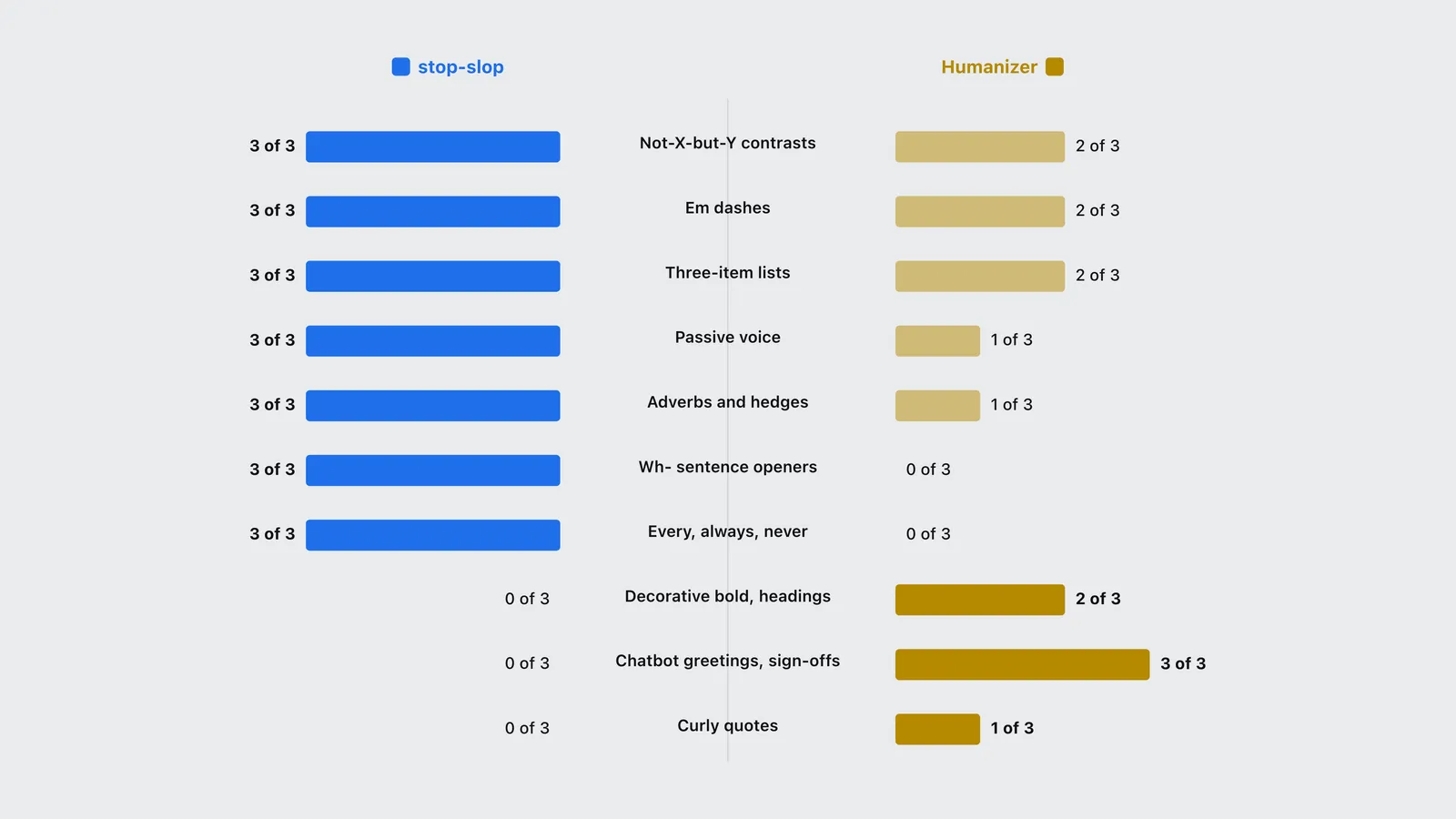
Put the two files side by side and the difference is posture. stop-slop states almost every rule as an absolute. Humanizer states most of its rules with an exception attached, and says outright that a person can make any one of these choices on purpose.
| Metric | stop-slop | Humanizer |
|---|---|---|
| Not-X-but-Y contrasts | 3 of 3 | 2 of 3 |
| Em dashes | 3 of 3 | 2 of 3 |
| Three-item lists | 3 of 3 | 2 of 3 |
| Passive voice | 3 of 3 | 1 of 3 |
| Adverbs and hedges | 3 of 3 | 1 of 3 |
| Wh- sentence openers | 3 of 3 | 0 of 3 |
| Every, always, never | 3 of 3 | 0 of 3 |
| Decorative bold, headings | 0 of 3 | 2 of 3 |
| Chatbot greetings, sign-offs | 0 of 3 | 3 of 3 |
| Curly quotes | 0 of 3 | 1 of 3 |
Four disagreements do most of the work.
Passive voice. stop-slop: “Every sentence needs a human subject doing something. No passive constructions.” Humanizer files passive voice under weak alone and tells the agent to use active voice “when it makes the actor and action clearer.” Technical writing leans on the passive for good reason (“the file is loaded on demand”), so on documentation stop-slop will force a rewrite Humanizer would leave alone.
Adverbs and hedges. stop-slop says to kill all adverbs, no -ly words, no softeners and no hedges, and lists “really”, “just” and “actually” among the offenders. Humanizer keeps a single vocabulary list of 28 entries that models overuse, says a formal word outside that list is not a tell, and states that ordinary hedges such as perhaps or tends to “are human habits and not tells.” If your claims carry real uncertainty, stop-slop will strip the words that say so.
Lists of three. stop-slop’s rhythm table says to use two items or one, and its core rules say “two items beat three.” Humanizer flags forced triads but adds: “Keep three real items when the meaning needs three.” A comparison of three pricing tiers has three items. Only one of these files will let you say so.
Dashes. Both ban em dashes, the closest the two files come to agreeing. Humanizer adds an escape hatch: if you supply a writing sample that uses dashes, it matches your rate instead.
stop-slop also carries two rules with no Humanizer counterpart: no sentences opening with What, When, Where, Which, Who, Why or How, and no “lazy extremes” such as every, always and never. Humanizer, for its part, has a whole group stop-slop ignores: leftovers from the chat window, such as a greeting, an offer to help or a sign-off stuck to otherwise usable text. Humanizer calls that “the most certain tell in this list.” If you are cleaning up text pasted straight out of a chat, that group matters more than any word list.
The examples each file ships break its own rules
Both files teach by example, and both examples slip.
stop-slop’s fourth example rewrites a fragmented passage into a single line that joins “Speed, quality, cost” to “pick two” with an em dash, in a file whose rhythm table says “No em dashes at all.” Its second example ends on “Nobody admits confusion”, using one of the lazy extremes the same file bans, after deleting the word “most” from “most teams struggle with alignment.” Removing that hedge turns a claim about most teams into a claim about all of them.
Humanizer’s vocabulary example turns a sentence about Somali cuisine into one that says camel meat “is considered a delicacy” and that pasta is common “especially in the south.” Neither detail appears in the before text, and the file’s own step two forbids adding a fact that does not come from the source or the user.
The difference is that Humanizer has a check step aimed at exactly its failure. After drafting, the agent is told to ask whether the rewrite “added or dropped any fact, name, number, date, quote, citation, ranking, or claim,” and to treat an unsupported addition as an error. stop-slop’s checklist has no equivalent question, so nothing in the process catches a rewrite that makes a claim stronger than the source.
One is maintained, one is a snapshot
stop-slop’s last commit landed on 17 March 2026. Its changelog records only additions: new banned phrases, new structures, new absolute words. Nothing has been retired.
Humanizer shipped version 3.0.0 on 6 September 2026. The release notes say it consolidated 35 patterns into 25 and dropped two tells, false ranges and synonym cycling, because the current Wikipedia article now lists them as human habits or historical. A tool that removes a rule when the evidence moves is tracking its source, and that source is edited by people who review suspected AI text on Wikipedia every day. The rules in stop-slop did not stop being true in March, but new tells since then are not on its list, and none of its tells can come off it.
Momentum follows maintenance. Between 17 September and 25 September 2026, Humanizer gained 2,779 GitHub stars and stop-slop gained 324.
Which one to install for which job
| Your job | Install | Why |
|---|---|---|
| Editing a document, page or reply you did not write | Humanizer | Fact guard, severity model and a when-not-to-act section built for text you cannot regenerate |
| Rewriting live pages or client copy | Humanizer | You cannot afford a rewrite that strengthens a claim; its check step looks for that |
| Matching a particular writer’s voice | Humanizer | Paste two or three paragraphs of theirs and the sample overrides the rules, dashes included |
| Drafting with an agent you control | stop-slop | 361 words of core rules fit in a system prompt; the README supports that route and loads references only when needed |
| Punchy marketing copy or social posts | stop-slop | Its bias toward short, direct, absolute statements suits the format |
| Technical documentation | Humanizer | stop-slop bans the passive voice and hedges that accurate documentation often needs |
| Prose in Japanese or Chinese | Neither | Use a skill built for the language, such as stop-ai-slop-jp or one of the stop-slop-zh forks |
Running both is possible and usually not worth it. They conflict on triads, passive voice and hedges, so the second pass partly undoes the first. If you do chain them, run Humanizer last, since it is the one with a step that checks the rewrite against the original.
How to install each
Humanizer. The maintainer documents four routes. The Skills CLI: npx skills add blader/humanizer --global. Claude Code 2.1.142 or newer as a plugin: /plugin marketplace add blader/humanizer, then /plugin install humanizer@humanizer. Claude Desktop takes the repository as a ZIP upload. Any other agent: copy SKILL.md into its skill folder.
stop-slop. The README says to add the folder as a skill in Claude Code, upload SKILL.md and the reference files to a Claude Project, copy the core rules into custom instructions, or include SKILL.md in an API system prompt. In Claude Code, personal skills live at ~/.claude/skills/<skill-name>/SKILL.md according to the Claude Code skills documentation, so cloning the repository into ~/.claude/skills/stop-slop does the job.
Neither skill touches code. Generated source has its own failure modes and its own tooling, covered in what AI slop in code actually costs. For design, merge gates and the thirty-odd other tools in this category, start with the guide to unslopping AI output, and every tool named here has a row in the directory of Claude and agent skills.
Frequently asked questions
- Is stop-slop or Humanizer better?
- It depends on the job. Humanizer is the better editor for text that already exists: it forbids invented facts, ranks tells by strength and lists cases where it should leave a pattern alone. stop-slop is the lighter option for drafting, with 361 words of core rules that fit in a system prompt, but it bans passive voice, adverbs and lists of three outright, which suits punchy copy and hurts technical writing.
- How do you install stop-slop in Claude Code?
- Clone the repository into your personal skills folder, for example git clone https://github.com/hardikpandya/stop-slop ~/.claude/skills/stop-slop, or into .claude/skills in a project to share it with that repository. Claude Code reads skills from those two locations. For the API, the stop-slop README says to include SKILL.md in the system prompt; the reference files load on demand.
- Can you use stop-slop and Humanizer together?
- You can, but the two files disagree on lists of three, passive voice and hedging words, so the second pass partly reverses the first. If you chain them, run Humanizer last, because it is the one with a check step that compares the rewrite against the original for added or dropped facts.
- Is stop-slop still maintained?
- Its last commit was on 17 March 2026, and its changelog only ever adds rules. It still works, since a banned phrase stays banned, but it is a snapshot of early 2026. Humanizer, by contrast, shipped version 3.0.0 on 6 September 2026 and retired two tells that Wikipedia no longer treats as signs of AI writing.
- How does the stop-slop scoring rubric work?
- The agent rates the draft from 1 to 10 on five questions: directness (statements or announcements), rhythm (varied or metronomic), trust (does it respect the reader), authenticity (does it sound human) and density (is anything cuttable). A total under 35 out of 50 means revise. The rubric is useful on its own, even if you never install the rest of the skill.
The bottom line
Humanizer is the safer default because its failure mode is caught by its own process and stop-slop’s is not. It is also the one still being corrected against a maintained source. stop-slop earns its place as a compact drafting rulebook, and its 35-out-of-50 rubric is worth borrowing on its own. Pick by the job: editing text you must not distort goes to Humanizer, drafting short copy with an agent you control can go to stop-slop.
Sources
Pandya, H. (2026). stop-slop: a skill file for removing AI tells from prose, SKILL.md, references/phrases.md, references/structures.md, references/examples.md and CHANGELOG.md (documentation). https://github.com/hardikpandya/stop-slop
blader (2026). Humanizer: remove AI writing patterns, SKILL.md version 3.0.0 and README release notes (documentation). https://github.com/blader/humanizer
Wikipedia contributors (2026). Wikipedia:Signs of AI writing. Wikipedia editor guideline, maintained by WikiProject AI Cleanup. https://en.wikipedia.org/wiki/Wikipedia:Signs_of_AI_writing
Anthropic (2026). Extend Claude with skills. Claude Code documentation. https://code.claude.com/docs/en/skills
iKora128 (2026). stop-ai-slop-jp (documentation). https://github.com/iKora128/stop-ai-slop-jp
GitHub API (2026). Repository star counts, fork counts and commit dates for hardikpandya/stop-slop and blader/humanizer, retrieved 25 September 2026. https://docs.github.com/en/rest