Best Claude Code Mods and Where to Find Them
Where to find Claude Code mods: five directories compared, the mods worth installing first by job, what each can reach, and how to vet one before you run it.
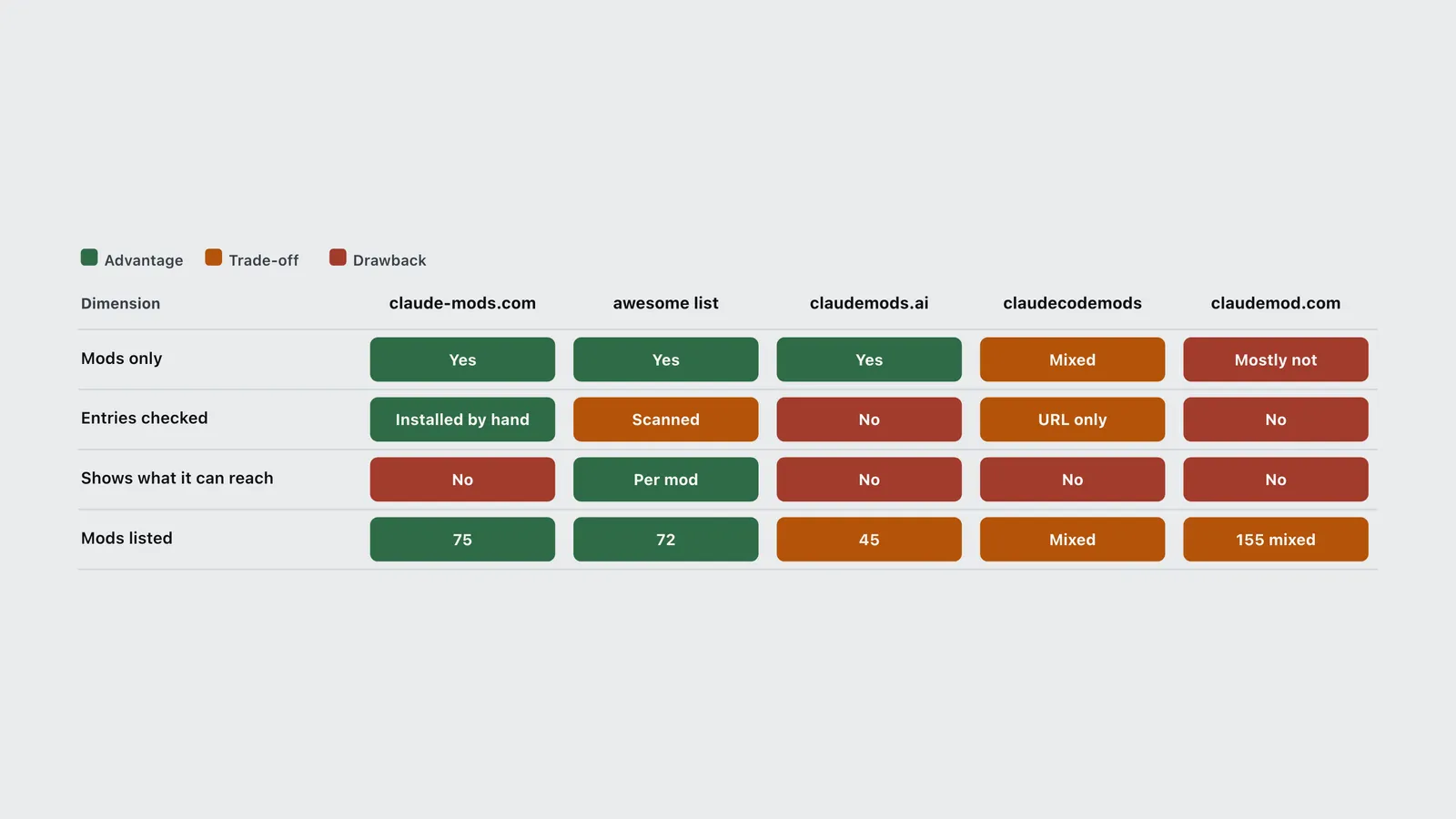
The short answer. Browse claude-mods.com to see what exists, then check any mod you like against the awesome-claude-code-mods list, which prints what each mod’s code can reach. For a first install, pick a mod that solves a money or safety problem and touches little: token-ledger for spend, secret-redactor for keys in tool output, firstmate-calm if you just want a quieter screen. Install it with /plugin, and run claude plugin validate on it first.
Anthropic launched Claude Code mods on 1 October 2026 and described them as “small TypeScript functions that change how Claude Code works.” The community had a head start. Mods ran in early access through September behind an environment flag, so by launch day there were already more than 70 of them on GitHub and at least five sites trying to list them. Those sites are not equal. One hand-checks every entry, one scans every entry’s code, one is a popularity vote, and one is mostly not about mods at all.
What are Claude Code mods?
A mod is a plugin that changes how Claude Code looks and behaves, written as JavaScript or TypeScript event handlers. Claude Code fires an event each time it does something (calls a tool, takes a prompt, draws the spinner), and the mod’s handler can watch it, rewrite it, or answer it so the normal behavior never runs.
That last part is the new thing. In practice it means a mod can:
- draw a pane beside the transcript or a band above the prompt, with buttons and text fields
- redraw parts of Claude Code itself, such as a tool row or the spinner
- hold a tool call, rewrite it, or refuse it
- add a
/commandthat runs your code instantly, with no Claude turn and no tokens
Mods need Claude Code v2.1.287 or later and are on by default, per Anthropic’s mods documentation. Hooks run everywhere Claude Code runs, including the VS Code extension, claude -p and cloud sessions, but only the terminal and the Desktop app’s Code tab draw what a mod draws.
Some of Claude Code’s own features are now mods. /diff is one; so is AGENTS.md support. The source of four built-ins (diff, agents-md, sec-default, telemetry) is public in the mods folder of the Claude Code repository, and it is the best reference code there is if you plan to write your own.
Claude Code mods vs hooks: what changed?
Claude Code already had hooks: shell commands, HTTP requests or prompts you set in a settings file, run at fixed lifecycle points. Mods don’t replace them. The difference is where the code lives.
| Mod | Settings hook | |
|---|---|---|
| Runs as | Functions inside the Claude Code process | A separate shell command, HTTP request or prompt |
| Keeps state between events | Yes, in the module’s variables | No, one process per call |
| Can draw in the interface | Yes | No |
| Can change | Tool calls, prompts, commands, turns, the UI | Whether a call goes ahead, its arguments and result, added context |
| Written in | JavaScript or TypeScript | Any script plus a settings.json entry |
Order matters when both exist. A PreToolUse hook in managed settings runs first and its block is final; then mods run; then the PreToolUse hooks from other settings files and plugins, according to the admin documentation. So a mod that answers a tool call itself can stop your own project-level hooks from ever seeing it. If you rely on a hook as a guard, keep that in mind. (The Claude Code harness guide covers where settings hooks sit among skills, subagents and MCP.)
Where to find Claude Code mods
There is no official mods-only gallery yet. Anthropic points to the Claude directory and /plugin, where mods appear as plugins alongside everything else, and to its own official plugins repository, which does not separate mods out. Discovery has moved to community sites. These are the ones that existed on 2 October 2026, checked that day.
| Directory | Mods listed | How entries get in | Safety information | Best for |
|---|---|---|---|---|
| claude-mods.com | 75 in 8 categories | Daily GitHub scan, then each mod installed and checked by hand against its README; needs a license or a clear author | Category only | Browsing what exists |
| awesome-claude-code-mods | 72, from 142 candidate repos | Nightly scan of every repo with a hooks module | Footprint per mod: events hooked, API calls, reach level | Vetting a mod before install |
| claudemods.ai | 45 in 9 categories | Submissions, plus a daily vote for “mod of the day” | None | Light browsing |
| claude-code-mods (claudecodemods.com) | Mixed with plugins, skills, agents and MCP | Pull request; CI checks the source URL responds | None, by its own statement | Wider extension catalogue |
| claudemod.com | 155 entries, mostly skills and MCP servers | Community listings | None | Not mods specifically |
| Claude directory | Not separated | Anthropic’s plugin submission flow | Plugin-level | Official installs |
| Dimension | claude-mods.com | awesome list | claudemods.ai | claudecodemods | claudemod.com |
|---|---|---|---|---|---|
| Mods only | Yes | Yes | Yes | Mixed | Mostly not |
| Entries checked | Installed by hand | Scanned | No | URL only | No |
| Shows what it can reach | No | Per mod | No | No | No |
| Mods listed | 75 | 72 | 45 | Mixed | 155 mixed |
Two traps. First, the GitHub repo that ranks first in search for “best Claude Code mods”, 0xDarkMatter/claude-mods, is not about mods in this sense. It was created in November 2025 and bundles skills, agents, commands and settings hooks; the name collision is an accident of timing. Second, the aitmpl.com mods page still showed the early-access instructions and an empty list when checked. Neither is wrong. Neither is what you are looking for.
The best Claude Code mods, by job
Seeing what a session costs
This is where mods earn their keep first, because Claude Code’s own /cost command only answers when you ask.
- token-ledger pins a status line with the session cost, the last turn’s tokens and the cache hit ratio, and adds
/ledgerfor the full table. The scanner lists it as touching only what it hooks. Start here. - budget-guard, from the same author, watches session dollars and both plan windows (5-hour and 7-day). At 80% of a limit it warns once; past the limit, by default, it refuses tool calls and asks before the next prompt. That is a hard stop a settings hook can’t draw or explain. The repo has no license file yet, so read it before you depend on it.
- cctop opens a btop-style pane with context fill, tokens, cost, cache hit ratio, rate limits, per-tool latency and subagents. More data, more reach: it watches every tool call and compaction.
- cache-keepalive is a day old and does one clever thing. When a background task outlives the prompt cache, the next request rewrites the whole context at 2x the input price; this mod pings the cache with a one-line fork every 50 minutes instead, and stops once the pings have cost what one rewrite would. The savings logic is the author’s own, so treat it as a claim.
None of these change the bill by themselves. They change when you notice it, which is the variable that matters (an earlier replay of 500 sessions found that token-saving tools cut a bill by far less than claimed).
Keeping secrets out of the model
- secret-redactor swaps secrets, email addresses and IPs for stable placeholders before the model reads them, then restores the real values on the way back into a tool call, so commands still work. MIT licensed.
- honmoon-redact redacts API keys and sensitive identifiers from Read, Bash and Grep output. Apache-2.0, pushed 28 September.
- git-gates refuses a commit, push or merge unless your latest message said so. The idea is right; the repo has no stars and no license, so it is a pattern to copy more than a dependency.
A redactor is the clearest case for a mod over a hook: it has to read every tool result and every prompt, which is a lot of reach, granted for a narrow job. Read the code.
Keeping context and memory
lcm stores every message and compacts old turns into a tree of summaries, so nothing is lost outright. storybloq (762 stars) keeps tickets, issues, handovers and lessons in a project folder and works across Claude Code and Codex. Both see every tool call; lcm also sees the system prompt and every prompt. These are the heaviest mods on this list, so they come last.
Changing what you see
- firstmate-calm hides tool rows and swaps the spinner for a sailboat, toggled with
/calm. It is the most-starred entry on claude-mods.com, but the 7,423 stars belong to the parent Firstmate project, not the mod alone. - terminal-browser puts a Chromium browser in a pane beside the transcript, for previews and for letting the agent browse. 3,582 stars, MIT.
- agent-flow draws a live tree of subagents and teammates with
/flow. - cc-pr-tracker shows watched pull requests above the prompt, with merge state, review and required checks. It calls the GitHub API, so it needs network reach.
While you wait
cc-arcade runs nine games above the prompt (Snake, Tetris, 2048, Minesweeper and more) and pauses them when Claude finishes. Mindful-Claude draws a guided breathing band while a turn runs, with four timings. Both are harmless in reach terms and are the fastest way to see what a mod can draw.
Are Claude Code mods safe?
Not by default. Anthropic’s own documentation says it plainly: “Mods aren’t sandboxed.” Once loaded, a mod can read and write any file your account can, read environment variables and settings (where API keys live), see every prompt and tool call, approve a tool call before you’re asked, and spend your usage on model calls. Turning on Claude Code’s sandbox doesn’t help: it isolates the Bash commands Claude runs, and a process a mod starts runs outside it.
The footprint scan shows how much of the ecosystem uses that reach.
| Item | Value |
|---|---|
| L0: draws and remembers | 20 |
| L1: reads files | 6 |
| L2: writes, runs or drives Claude | 32 |
| L3: reaches the network | 14 |
Reach is a footprint, not a verdict. A pull-request tracker has to call GitHub; a redactor has to read tool output. The question is whether the reach matches the job.
Pluto Security’s analysis, published 22 September 2026 during early access, named four risks: silent access to secrets, no capability disclosure at install time, spoofed prompts drawn inside the terminal, and code fetched after you reviewed it. Some of that has since been narrowed. The documentation now says a mod cannot restyle the permission prompt, though it can still redraw the dialog Claude uses to ask you questions. The fetched-code risk is unchanged.
Four habits cover most of it:
- Run
claude plugin validate ./some-modbefore installing. Itshooks:line lists every event the mod receives and itscalls:line lists what it asks Claude Code to do. Look for$.process.run,$.http.fetch,$.env.getandtool.check(which approves calls). - Prefer mods whose reach matches the job. A status line that also spawns processes deserves a question.
- Pin the version you reviewed. A mod that downloads code at runtime can change after you read it.
- Know the off switches.
claude --safe-moderuns one session without installed mods;"disableAllHooks": trueturns them off everywhere. On a Team or Enterprise plan, a built-in guard calledsec-defaultloads ahead of user mods, keeps your deny rules in force, and lets an admin allow only the organization’s own mods.
How to install your first mod
Mods install like any plugin, from a marketplace (often just a GitHub repo with a marketplace file).
- Check your version with
claude --version; you need 2.1.287 or later. - Add the marketplace:
/plugin marketplace add <owner>/<repo>. - Install the mod:
/plugin install <mod-name>@<marketplace-name>. - Run
/reload-plugins. Then run/plugin; a dim line under the tabs names the active mods.
To write one, ask Claude Code. A built-in skill, plugin-authoring, exists for exactly that, and Addy Osmani’s getting-started walkthrough on the claude.dev blog builds a small mod from scratch. For a pack built and run on a real project, see the eight Claude Code mods we built for monitoring a session, part of our own Claude Code harness. If what you want is instructions or tools for Claude rather than code inside Claude Code, a skill or an MCP server is still the lighter choice; the Claude Skills vs agent skills vs MCP breakdown covers those, and the Claude Skills directory lists them.
Frequently asked questions
- What is the best Claude Code mod to install first?
- A mod that solves a real problem with little reach. token-ledger pins your session cost, last-turn tokens and cache hit ratio in a status line and touches only what it hooks. secret-redactor is the pick if API keys or customer data pass through tool output. Check either with claude plugin validate before installing.
- Is there an official Claude Code mods directory?
- Not a mods-only one. Mods install as plugins through /plugin or the Claude directory, where they sit alongside other plugins. The mods-specific directories are community sites: claude-mods.com lists 75 hand-checked mods and the awesome-claude-code-mods list on GitHub scans 72 for what each can reach. Neither is affiliated with Anthropic.
- Do Claude Code mods cost tokens?
- A mod runs as code inside Claude Code, so drawing a pane or running a mod command uses no tokens. A mod can still spend your usage if its code calls a model through the mods API, and claude plugin validate lists that call as $.model.complete.
- Can I turn Claude Code mods off?
- Yes. Disable one mod from the Installed tab in /plugin, start a single session without installed mods using claude --safe-mode, or set disableAllHooks to true in ~/.claude/settings.json to turn off every installed mod. Built-in mods such as /diff have their own switches.
Sources
- Anthropic (2026). Customize Claude Code with mods in TypeScript. Claude blog. https://claude.com/blog/claude-code-mods
- Anthropic (2026). Mods overview. Claude Code documentation. https://code.claude.com/docs/en/plugins/mods/overview
- Anthropic (2026). Manage mods for your organization. Claude Code documentation. https://code.claude.com/docs/en/plugins/mods/admin
- Anthropic (2026). Claude Code repository, mods folder. GitHub. https://github.com/anthropics/claude-code/tree/main/mods
- Osmani, A. (2026). Getting started with Claude Code mods. claude.dev blog. https://claude.dev/blog/getting-started-with-claude-code-mods/
- Melzer, E. (2026). Claude Code Mods Security: 4 Function Hook Risks. Pluto Security (vendor analysis). https://pluto.security/blog/claude-code-function-hooks-security/
- Bansal, K. (2026). Awesome Claude Code Mods. GitHub. https://github.com/karanb192/awesome-claude-code-mods
- Claude Mods (2026). A directory of mods for Claude Code. https://claude-mods.com/
- Claude Mods (2026). The voted catalog of Claude Code mods. https://claudemods.ai/mods