Claude Opus 5.5 Motion Graphics: Best Tools, Free and Paid
Opus 5.5 writes the code, a render engine makes the video. Ten open-source tools, five paid ones, and two free defaults that are not open source.
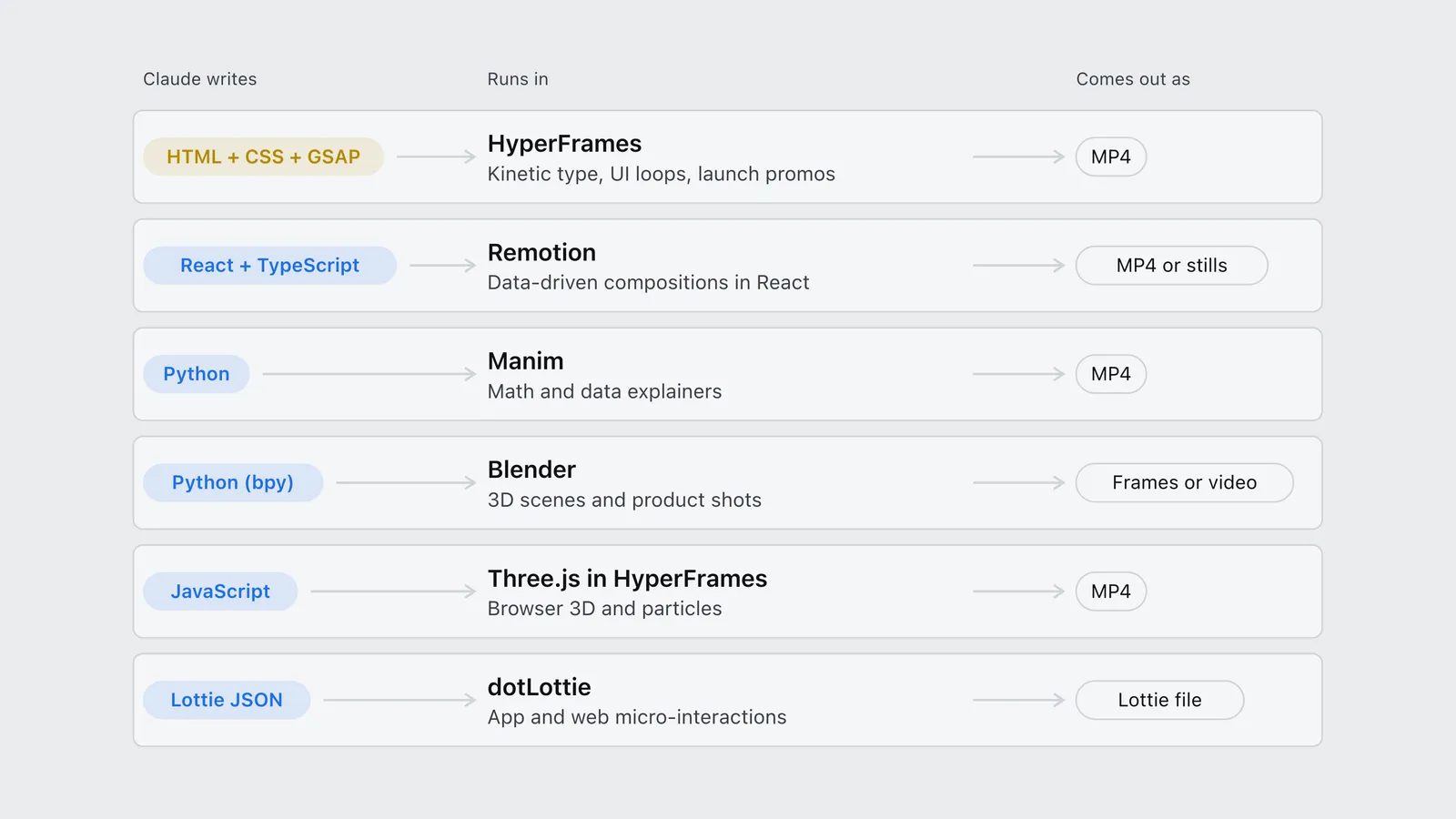
Claude Opus 5.5 doesn’t make video. It writes code, and a separate tool turns that code into frames. The best tools for Claude Opus 5.5 motion graphics are HyperFrames for HTML and GSAP work, Manim for math and data explainers, Blender through its official Claude connector for 3D, and Remotion if you already write React. Pick by the kind of motion you want, then check the license, because two of the defaults people reach for first are free but not open source.
That second point is where most of the coverage stops short. The clips going around this week show that Opus 5.5 can do it. They rarely say what the code was running in.
What changed with Opus 5.5
Anthropic released Opus 5.5 on September 22, 2026, at $4 per million input tokens and $20 per million output (the rate card and what it means are covered here). Read the Opus 5.5 announcement looking for motion graphics and you won’t find the phrase. The only visual claim in it is a tester’s game, where Opus 5.5 “scored higher than any other model on the strength of its graphics and polish.”
Everything else came from users. By September 27, OfficeChai had compiled ten examples from X, with creators reporting one-shot clips in 15 minutes, a showreel “in 45 minutes,” and in one case 12 hours of unattended work from a five-minute voice brief. Those are self-reports gathered by a news site, not measurements. But the same pattern sits under nearly all of them. The model wrote HTML, CSS and a JavaScript animation library, or React, and a render engine captured the frames.
Charlie Hills, whose Substack post on Claude Code motion graphics is one of the most shared write-ups, compresses the method into three steps in his X post: pick one motion (a chart that morphs, say), show Claude a reference and name every state, then ask for HTML and SVG and fix it round by round. Notice what’s missing from that recipe. There’s no video tool at all until the end. The engine is a delivery step, which is exactly why people skip past the choice and inherit whatever the tutorial used.
Which tool runs which kind of motion
| Kind of motion | Claude writes | Runs in | Comes out as |
|---|---|---|---|
| Kinetic type, UI loops, launch promos | HTML + CSS + GSAP | HyperFrames | MP4 |
| Data-driven compositions in React | React + TypeScript | Remotion | MP4 or stills |
| Math and data explainers | Python | Manim | MP4 |
| 3D scenes and product shots | Python (bpy) | Blender | Frames or video |
| Browser 3D and particles | JavaScript | Three.js in HyperFrames | MP4 |
| App and web micro-interactions | Lottie JSON | dotLottie | Lottie file |
Most of the viral clips live in the first row. That isn’t an accident: HTML and CSS are the surface Opus 5.5 has seen the most of, and a DOM is easy for an agent to inspect and correct between rounds.
How the ranking works
The 10 best open-source motion graphics tools for Claude
| Rank | Tool | License | GitHub stars | Last push | Claude writes |
|---|---|---|---|---|---|
| 1 | HyperFrames | Apache-2.0 | 53,647 | Sep 28, 2026 | HTML, CSS, GSAP |
| 2 | Manim Community | MIT | 41,088 | Sep 27, 2026 | Python |
| 3 | Blender + Claude connector | GPL | 20,568 (mirror) | Sep 27, 2026 | Python (bpy) |
| 4 | Three.js | MIT | 115,993 | Sep 27, 2026 | JavaScript |
| 5 | Motion Canvas | MIT | 19,187 | Jul 2, 2026 | TypeScript |
| 6 | Anime.js | MIT | 73,152 | Aug 21, 2026 | JavaScript |
| 7 | Revideo | MIT | 4,066 | Jul 15, 2026 | TypeScript |
| 8 | dotLottie | MIT | 888 | Sep 16, 2026 | Lottie JSON |
| 9 | OpenMontage | AGPL-3.0 | 61,553 | Sep 6, 2026 | Pipeline config |
| 10 | TiXL | MIT | 5,116 | Sep 23, 2026 | Node graphs |
1. HyperFrames
HyperFrames is HeyGen’s renderer, and its README pitches it in six words: “Write HTML. Render video. Built for agents.” A composition is an HTML page with timing attributes. HyperFrames seeks through it frame by frame in headless Chrome and hands the frames to FFmpeg, so the same file renders the same MP4 every time.
It ranks first because it’s the only tool here whose maintainer ships an official Claude Code plugin (claude plugin install hyperframes@hyperframes). That plugin carries 21 skills, routed through a /hyperframes command, and GSAP, Lottie, Three.js and Anime.js all plug in as animation adapters. It needs Node 22 or later and FFmpeg. Apache-2.0 means no seat count, ever.
2. Manim Community
Manim is the Python engine behind 3Blue1Brown’s math videos, and Manim Community is the documented, community-maintained fork (Grant Sanderson’s own 3b1b/manim has more stars, at 94,321). For equations that morph, graphs that draw themselves, or a bar chart that re-sorts, it’s the most direct route. Scenes are plain Python classes, which is about the easiest thing you can ask Opus 5.5 to write and debug.
3. Blender, through the official Claude connector
This is the only 3D entry with first-party support on both sides. Anthropic’s Claude for Creative Work announcement (April 2026) says Blender’s developers built an MCP connector for Claude, and Claude’s own Blender connector tutorial confirms it runs from Claude Desktop on any plan, including Free, against Blender 4.2 or later. You describe the shot. Claude writes and runs Python through Blender’s bpy API on the scene you have open.
Read one sentence before you try it. Blender’s own MCP server page warns that it “will execute LLM generated code in Blender without any guards in place” and recommends a virtual machine. Work on a copy of the file. The older community option, mcp-for-blender (MIT, 29,488 stars), is still active and works with other models too.
4. Three.js
Three.js (MIT, 115,993 stars) is the browser’s 3D library. On its own it draws to a canvas in real time. Running it inside HyperFrames is what makes it deterministic video. Pick it for particles, product spins and camera moves that don’t need Blender’s renderer.
5. Motion Canvas
Motion Canvas (MIT) writes animations as TypeScript generator functions: do this, wait, then do that. It suits technical explainers, and the code reads well when an agent has to revise the third beat without touching the first two. Its last push was July 2, 2026, almost three months ago, which is slow next to the top four.
6. Anime.js
Anime.js (MIT, 73,152 stars) is the genuinely open-source alternative to GSAP for timeline animation in the browser. Ask for it by name, because Opus 5.5 reaches for GSAP by default, and HyperFrames supports both.
7. Revideo
Revideo (MIT) describes itself as borrowing concepts from Remotion and Rive, and it adds a headless render API, so it fits a pipeline that renders on a server rather than a laptop. It’s the engine behind the commercial Midrender product, which is worth knowing when you weigh where its roadmap goes.
8. dotLottie
Not every motion graphic ends up as an MP4. App onboarding, loading states and web micro-interactions ship as Lottie JSON, which stays sharp at any size and weighs kilobytes. dotLottie is the maintained player (MIT, pushed September 16, 2026). The older lottie-web has 32,128 stars but hasn’t had a push to its default branch since September 1, 2025, a detail most roundups leave out.
9. OpenMontage
OpenMontage (AGPL-3.0, 61,553 stars) sits a layer above everything else here. It’s an agentic pipeline for scripts, narration, assets and edits, and it hands the final render to Remotion or HyperFrames. The catch is that Remotion is its default for React work, so a company of four or more running it out of the box inherits a paid license. That trap is traced in full in the open-source AI video tools comparison.
10. TiXL
TiXL (MIT, formerly Tooll 3) is a real-time motion graphics tool built on node graphs, closer to TouchDesigner than to a code library. Opus 5.5 can reason about its graphs but can’t drive it as directly as the tools above, which is why it’s last. It’s still actively maintained, with a push on September 23.
Two GUI-first classics also clear the maintenance bar, Synfig (GPL-3.0) for 2D and Natron (GPL-2.0) for compositing. Neither gives an agent much to write, so they sit outside the ten.
Free, but not open source: Remotion and GSAP
These two show up in most Claude Code motion graphics tutorials, and a lot of them call both “open source.” Neither is.
Remotion renders React components to video, and it’s the most mature option for data-driven compositions. Its license FAQ says it is “source-available software, but it is not open source software” by the Open Source Initiative definition. It’s free for individuals and teams of up to three. After that it costs $25 a month per person “who writes Remotion code themselves or using agentic coding tools.” The agent writing the code doesn’t remove the seat. Remotion also ships its own agent skills (npx skills add remotion-dev/skills), which is why so many first attempts land on it.
GSAP is the animation library behind most of the HTML clips. Webflow made it free in 2025, commercial use included, under a Standard No Charge license. The license is proprietary and makes no open-source claim. It also bars using GSAP in no-code visual animation builders that compete with Webflow. For a video or a website, that won’t touch you. For a product that lets users build animations, read the clause, or swap in Anime.js.
The best paid motion graphics tools
The proprietary tools are still where professional motion designers work. The difference is how much of them Claude can reach.
| Tool | Price (checked Sep 28, 2026) | Claude access | Best for |
|---|---|---|---|
| Remotion Company License | $25 per person per month, from 4 people | Official agent skills | React teams shipping video in-product |
| Adobe After Effects | US$22.99/mo (annual, billed monthly) | No named connector | Finishing and compositing |
| Cavalry | Free for individuals; Enterprise via Canva | None | Procedural 2D and Lottie export |
| Rive | Free, $9, $32 or $120 per seat/month | Rive has its own built-in agent | Interactive app animation |
| Jitter | Free tier; paid tiers unlock ProRes and transparency | None | Fast UI motion for designers |
After Effects is the industry default, at US$22.99 a month on an annual plan billed monthly, or inside Creative Cloud Pro at US$69.99. Anthropic’s creative-work launch lists an Adobe connector covering “50+ tools across Creative Cloud apps including Photoshop, Premiere, Express, and more.” After Effects isn’t named. For now, the working split is to generate in code and finish in After Effects.
Cavalry, now part of Canva, says it “really is free for individuals”, needs a Canva account, and exports Lottie. For a solo designer it’s the best-value proprietary tool on this list.
Rive charges per seat (Free, Cadet at $9, Voyager at $32, Enterprise at $120 a month), and the free plan can’t export .riv files. Its own editor agent is included on every plan, so it’s the one paid tool here with AI built in rather than bolted on.
Jitter’s free plan exports video, GIF and Lottie at 720p and 30fps. ProRes and WebM start on Pro, and transparent export on Max. Its dollar prices load in the browser and couldn’t be read from the page source, so none are quoted here.
How to make motion graphics with Claude Code, in five steps
- Pick the engine first. HyperFrames for HTML, Remotion if you write React and are three people or fewer, Manim for math. Install its skills so Claude knows the API.
- Give one reference and name its states. “Title slides in, bar grows to 64%, logo resolves” beats “make it pop.”
- Ask for one motion at a time. A 15-second reel is five small scenes, not one prompt.
- Review in the preview, not the MP4. Both HyperFrames and Remotion preview in a browser, and fixes are cheaper before a render.
- Add sound and polish yourself. Timing to music is still where most of the viral clips needed a human pass.
For more skills worth installing next to these, the Claude Skills directory lists them by task. For the connector side, see the MCP server roundup.
Frequently asked questions
- Can Claude Opus 5.5 make motion graphics?
- Yes, by writing code. Opus 5.5 writes HTML, CSS and JavaScript, React, or Python, and a render engine such as HyperFrames, Remotion or Manim turns it into video. Anthropic did not announce motion graphics as a feature; the examples circulating since September 22, 2026 are user-made.
- What tool does Claude use to render motion graphics?
- Claude does not render video itself. The most common engines are HyperFrames, which renders HTML to MP4 and ships an official Claude Code plugin, and Remotion, which renders React. Manim covers math explainers and Blender covers 3D through its official Claude connector.
- Is GSAP open source?
- No. GSAP has been free for everyone since 2025, including commercial use, under the Webflow Standard No Charge license. That license is proprietary, and it bars using GSAP in no-code visual animation builders that compete with Webflow. Anime.js is an MIT-licensed alternative.
- Does Claude work with After Effects?
- Not directly, as of September 28, 2026. Anthropic lists an Adobe connector covering more than 50 Creative Cloud tools including Photoshop, Premiere and Express, but After Effects is not named. The common workflow is to generate motion in code and finish in After Effects.
- Do I need to know how to code to make motion graphics with Claude?
- No, but you need to review what it makes. Claude writes and fixes the code, and tools like HyperFrames and Remotion show a live browser preview. What helps most is describing each state of the motion precisely and asking for one change per round.
The bottom line
Start with HyperFrames. It’s Apache-2.0, it’s maintained by a company that builds video for a living, and it’s the only open-source engine with an official Claude Code plugin. Add Manim for anything with an equation in it, and Blender through the Claude connector when the shot needs real 3D. Use Remotion if you write React and your team is small enough that the license stays free. And when a tutorial says GSAP or Remotion is open source, you now know to check.
Sources
Anthropic (2026). Introducing Claude Opus 5.5. Anthropic announcement. https://www.anthropic.com/claude-opus-5-5
Anthropic (2026). Claude for Creative Work. Anthropic announcement. https://www.anthropic.com/news/claude-for-creative-work
Anthropic (2026). Using the Blender connector in Claude. Claude Academy tutorial. https://academy.claude.com/tutorials/using-the-blender-connector-in-claude
Blender Foundation (2026). MCP Server. Blender Lab documentation. https://www.blender.org/lab/mcp-server/
OfficeChai (2026). Claude Opus 5.5 Is Generating Incredible Animated Motion Graphic Videos: 10 Best Examples. Secondary compilation of X posts. https://officechai.com/ai/claude-opus-5-5-motion-graphic-videos/
Hills, C. (2026). Claude Code motion graphics and video with Opus 5.5. Substack. https://charliehills.substack.com/p/claude-code-motion-graphics
HeyGen (2026). HyperFrames. Project repository and README (Apache-2.0). https://github.com/heygen-com/hyperframes
Remotion (2026). License FAQ and Agent Skills. Vendor documentation. https://www.remotion.dev/docs/license/faq
Webflow (2025). GSAP Standard No Charge License. Vendor license. https://gsap.com/standard-license/
Manim Community (2026). Manim. Project repository (MIT). https://github.com/ManimCommunity/manim
Adobe (2026). After Effects plans and pricing. Vendor pricing page. https://www.adobe.com/products/aftereffects/plans.html
Canva (2026). Cavalry. Vendor site. https://cavalry.studio/
Rive (2026). Pricing. Vendor pricing page. https://rive.app/pricing
Jitter (2026). Pricing. Vendor pricing page. https://jitter.video/pricing/
GitHub REST API (2026). Repository metadata for every project listed, read September 28, 2026. https://docs.github.com/en/rest/repos/repos