Claude Motion: Pricing, Plans and Pro Alternatives
Claude Motion is in beta on Team and Enterprise only, not Pro or Max. What access costs per seat, what it makes, and the cheaper Claude Code route.
Claude Motion has no separate fee, but only Team and Enterprise plans include it. The cheapest way in is a two-seat Team plan at $480 a year, and Pro and Max subscribers can’t turn it on at all. For one person, the Claude Code route costs less than half that and makes the same kind of animation.
That is the whole pricing story in two sentences, and it’s the part the launch coverage mostly skips. Anthropic shipped Motion as a beta on October 8, 2026, and the questions people ask next are practical ones: which plan, how much, and what to do if you’re on Pro.
What is Claude Motion?
Claude Motion is a Claude feature that turns a prompt, a report or a chart into a short animated explainer you can download as an MP4. Anthropic’s launch article, Build live dashboards and animate explainers with Claude (October 8, 2026), describes the mechanism in one line: “Claude writes code that animates your text, charts, shapes, and images, so you can change any word, number, or timing.”
That sentence matters more than the feature name. Motion is not a video model. The same article says “It doesn’t use a video generation model, so there’s no generated footage and no AI-generated people.” What you get is motion graphics: kinetic text, bars that grow, shapes that move, your own images animated. Because the output is code, you can change one number in a finished clip and the rest stays put, which a generated video can’t do.
Anthropic’s examples are corporate ones: a quarterly report turned into a 30-second all-hands explainer, motion added to a board-deck chart, a product walkthrough for onboarding. Finished clips can be opened in Adobe, Descript, HeyGen, Higgsfield, invideo, Luma AI and Runway, with Canva and Captions listed as coming soon.
Motion launched the same day as Claude Dashboards, and the same announcement moved Docs, Slides and Design out of beta for every plan, Free included. Motion did not get that treatment.
Which Claude plans include Motion?
Only Team and Enterprise. The Claude pricing page, read on October 16, 2026, marks “Claude Motion (beta)” as No for Free, Pro, Max 5x and Max 20x, and lists “Claude Motion and Dashboards (beta)” in the Team feature list. Dashboards, by contrast, reaches Pro.
| Plan | Price billed annually | Price billed monthly | Seat minimum | Claude Motion | Claude Dashboards |
|---|---|---|---|---|---|
| Free | $0 | $0 | n/a | No | No |
| Pro | $17/month | $20/month | 1 | No | Yes (beta) |
| Max 5x / 20x | n/a | From $100/month | 1 | No | Yes (beta) |
| Team, Standard seat | $20/seat/month | $25/seat/month | 2 | Yes (beta) | Yes (beta) |
| Team, Premium seat | $100/seat/month | $125/seat/month | 2 | Yes (beta) | Yes (beta) |
| Enterprise | $20/seat/month | Annual only | 20 | Yes (beta) | Yes (beta) |
On Team, Motion is on by default. On Enterprise it starts off: Anthropic’s help article, Get started with Claude Motion, says an owner has to enable it under Organization settings, then Artifacts, and can limit it to specific groups with custom roles.
How much does Claude Motion cost?
Nothing on top of the seat. The same help article says Motion “counts toward your plan’s usage limits, like the rest of your work with Claude,” and that longer or more complex animations use more of the limit than a typical message. Anthropic doesn’t publish how much more, so there is no honest per-clip figure yet. Anyone quoting one is guessing.
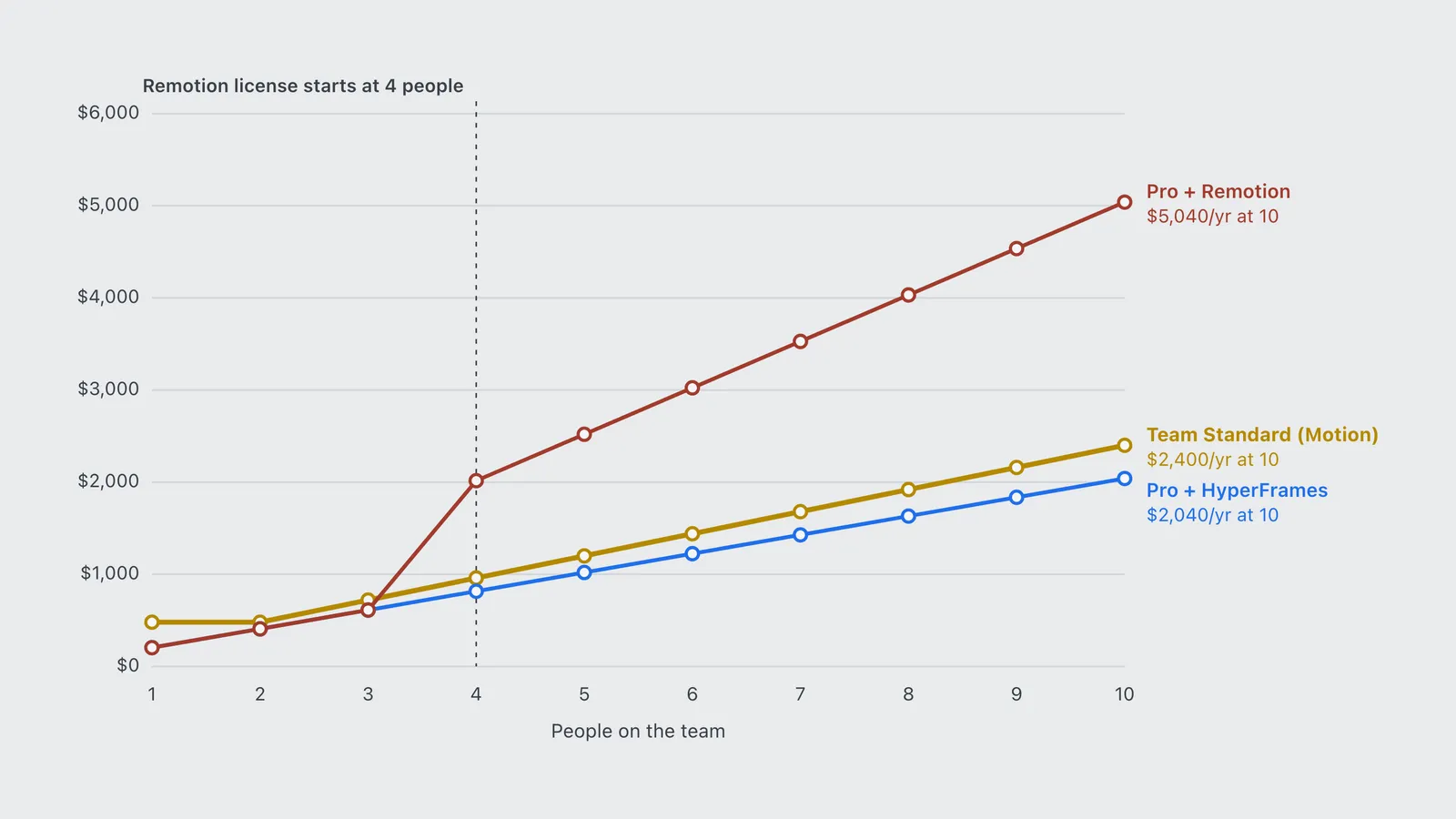
So the real price is the cost of getting a seat that has the feature, and that depends on how many people you are. The chart compares three routes to code-built animation over a year, all billed annually: Team Standard (Motion included), Pro plus Claude Code with the HyperFrames engine, and Pro plus Claude Code with Remotion.
| People | Team Standard (Motion) | Pro + HyperFrames | Pro + Remotion |
|---|---|---|---|
| 1 | $480 | $204 | $204 |
| 2 | $480 | $408 | $408 |
| 3 | $720 | $612 | $612 |
| 4 | $960 | $816 | $2,016 |
| 5 | $1,200 | $1,020 | $2,520 |
| 6 | $1,440 | $1,224 | $3,024 |
| 7 | $1,680 | $1,428 | $3,528 |
| 8 | $1,920 | $1,632 | $4,032 |
| 9 | $2,160 | $1,836 | $4,536 |
| 10 | $2,400 | $2,040 | $5,040 |
Three things fall out of it.
Solo, Motion costs 2.4 times the DIY route. Team Standard’s two-seat minimum makes one person pay $480 a year. Pro is $204 a year billed annually, includes Claude Code, and HyperFrames is an Apache-2.0 engine from HeyGen that renders HTML to MP4 for free.
At two or more people, the gap nearly closes. Team Standard is $240 a seat a year against $204 for Pro, so the difference is $36 a seat. If a team is already paying for Claude, Motion is close to free on top.
Remotion flips the picture from the fourth person. Remotion’s license FAQ makes it free for “an organization or team of individuals with up to 3 people,” then charges “$25/month per person who writes Remotion code themselves or using agentic coding tools.” Agent-written code counts. At four people, Pro plus Remotion costs $2,016 a year against $960 for Team.
How do you turn on and use Claude Motion?
On a Team plan there’s nothing to turn on. On Enterprise, an owner enables it first. Then, per Anthropic’s launch article and help article:
- Start a Motion artifact. Type
/motionin the message box, pick Output and then Motion, or open the Artifacts tab and choose a Motion template. - Say who it’s for and where it plays. The help article suggests naming the audience, the setting and the rough length, for example a 30-second clip for an all-hands screen.
- Attach your own material. A report, a spreadsheet or images, so the animation uses your numbers rather than placeholders.
- Edit in chat or in the editor. Ask Claude to slow a scene or change a figure, or change it directly. One edit leaves the rest of the clip as it was.
- Export and share. The Export button downloads an MP4. Animations are private until you click Share.
What can’t Claude Motion do?
Three limits are stated, and three are simply unpublished.
The stated ones: no realistic footage or people, since there is no video model; Team and Enterprise only; and beta status, so the plan gates can change. Anthropic made exactly that move with Docs, Slides and Design, which went from beta to every plan on launch day.
The unpublished ones: the help article gives no maximum length, no export resolution and no aspect ratios, and MP4 is the only export format it names. If you need vertical 9:16 clips or 4K, test before you commit a team to it.
Claude Motion vs Remotion and HyperFrames: which should you use?
Use Claude Motion if your team already has Team or Enterprise seats and you want explainers made by people who don’t write code. Use Claude Code with HyperFrames if you’re on Pro or Max, work alone, or need control over resolution and length.
The two routes produce the same kind of thing. Motion writes code and renders it inside Claude. The DIY route has Claude Code write the code and an engine on your machine render it. The differences are who can run it, what it costs at your team size, and how much you can control. Motion is the easy version, an artifact with an editor and a share button. The DIY route asks you to install Node and FFmpeg and review a browser preview, but nothing about the output is hidden from you.
The full DIY setup, with ten open-source engines ranked by license and maintenance, is in the guide to Claude motion graphics tools. It covers HyperFrames’ official Claude Code plugin, Remotion’s agent skills, Manim for math explainers and Blender for 3D.
Claude Motion alternatives if you’re on Pro or Max
These are routes that make the same code-built animation, checked against each project’s own repository or documentation on October 16, 2026. Ranked by cost to a Pro subscriber, then by how close the output is to Motion.
- Claude Code + HyperFrames. Apache-2.0, no extra cost, renders HTML, CSS and GSAP to MP4, and ships an official Claude Code plugin. The closest match to Motion’s output.
- Claude Code + Manim. Manim Community is MIT-licensed and free. Best for math and data explainers rather than corporate promos.
- Claude Code + Remotion. React-based and the most common engine in tutorials. Free up to three people, then $25 a person a month. Source-available, not open source.
AI video generators such as Runway are a different category: they make footage, which Motion deliberately doesn’t. They are where Anthropic sends finished Motion clips, not a replacement for them. If you just want Claude to build charts from data, Dashboards is on Pro.
For the skills that make these engines work well with Claude, the Claude Skills directory lists them by task.
Frequently asked questions
- Is Claude Motion free?
- No. Claude Motion is not on the Free plan. It is a beta included in Team and Enterprise plans at no extra charge, and it counts toward the plan usage limits. The cheapest way to get it is a Team Standard plan at $20 per seat per month billed annually, with a two-seat minimum.
- Can I use Claude Motion on Claude Pro or Max?
- No. As of October 16, 2026, the Claude pricing page marks Claude Motion as not included on Pro, Max 5x or Max 20x. Pro and Max do include Claude Dashboards and Claude Code, and Claude Code can produce similar code-built animation with an engine such as HyperFrames.
- Does Claude Motion generate video with AI?
- Not in the video-model sense. Claude writes code that animates text, charts, shapes and images, and exports it as an MP4. Anthropic says it does not use a video generation model, so it cannot make realistic footage or AI-generated people.
- How do I enable Claude Motion on an Enterprise plan?
- An organization owner turns it on in Organization settings, under Artifacts. It is off by default on Enterprise and on by default on Team. Owners can also restrict it to specific groups using custom roles.
- When did Claude Motion launch?
- Anthropic launched Claude Motion in beta on October 8, 2026, together with Claude Dashboards. The same announcement took Claude Docs, Slides and Design out of beta on every plan.
The bottom line
If your company already pays for Claude Team, Motion is a free extra and the easiest way to turn a report into a clip. If you’re a single Pro subscriber, don’t buy two Team seats for it: Claude Code with HyperFrames does the same job for the $204 a year you already pay. And if you’re a team of four or more choosing between Motion and a Remotion setup, Team costs less than half as much.
Sources
Anthropic (2026). Build live dashboards and animate explainers with Claude. Anthropic product article. https://claude.com/resources/articles/dashboards-and-motion
Anthropic (2026). Get started with Claude Motion. Claude Help Center documentation. https://support.claude.com/en/articles/17454997-get-started-with-claude-motion
Anthropic (2026). Plans and pricing. Claude pricing page. https://claude.com/pricing
Remotion (2026). License FAQ. Vendor documentation. https://www.remotion.dev/docs/license/faq
HeyGen (2026). HyperFrames. Project repository (Apache-2.0). https://github.com/heygen-com/hyperframes
Manim Community (2026). Manim. Project repository (MIT). https://github.com/ManimCommunity/manim