Claude Agent SDK vs Managed Agents: Which to Run?
Managed Agents is the least work for a long-running Claude agent; the Agent SDK wins when data must stay on your servers. Costs, setup, and a research agent.
For a long-running Claude agent that browses the web and saves findings for you to review, Claude Managed Agents is the least work. The Claude Agent SDK is the better fit once the findings have to land on your own servers. Either way, tokens are most of the bill.
Both options run the same harness. The Claude Agent SDK documentation (Anthropic, 2026) says that when your code calls query(), “the SDK spawns a separate claude CLI process and talks to it over stdio”. So the SDK is Claude Code, packaged as a library. Claude Managed Agents is Anthropic’s hosted version: in its own words, a “pre-built, configurable agent harness that runs in managed infrastructure”. It is still in beta. The model is the same in both, and so are the tools and the agent loop. The difference is who runs the computer, the session history and the schedule.
The quick pick, by reader:
- You want a nightly research agent running this week, with little ops work: Managed Agents, with a scheduled deployment.
- The agent must reach private systems, or its output must never leave your storage: the Agent SDK, self-hosted.
- You want to try the job first, today, on your own machine:
claude -p(the headless CLI) and a cron entry.
What are the ways to run Claude Code’s harness?
There are three serious options, plus a few hosted conveniences covered further down. The table leads with what each one costs and who can use it. “Plan usage limits” means a Claude subscription login; the subscription section below covers exactly when that applies.
| Option | What you pay | Who can use it | Where the agent runs | Session history | Scheduling |
|---|---|---|---|---|---|
Headless CLI (claude -p) |
Plan usage limits or API tokens, + your machine | Any Claude plan, or an API key | Your machine or server | JSONL files on that machine | You bring cron or systemd |
| Agent SDK (TypeScript, Python) | Plan usage limits or API tokens, + your machine | Any Claude plan, or an API key | Any machine: laptop, VPS, VM or container | JSONL files, or a SessionStore you provide |
You bring it |
| Managed Agents | API tokens + $0.08 per running session-hour + $10 per 1,000 searches | API key only, public beta | Anthropic’s container (or your own sandbox) | Stored server-side as events | Built-in scheduled deployments |
Prices come from the Claude pricing page (Anthropic documentation, checked 13 October 2026). That page also says the runtime meter counts only the running status: “Time spent idle (waiting for your next message or a tool confirmation), rescheduling, or terminated does not count toward runtime.”
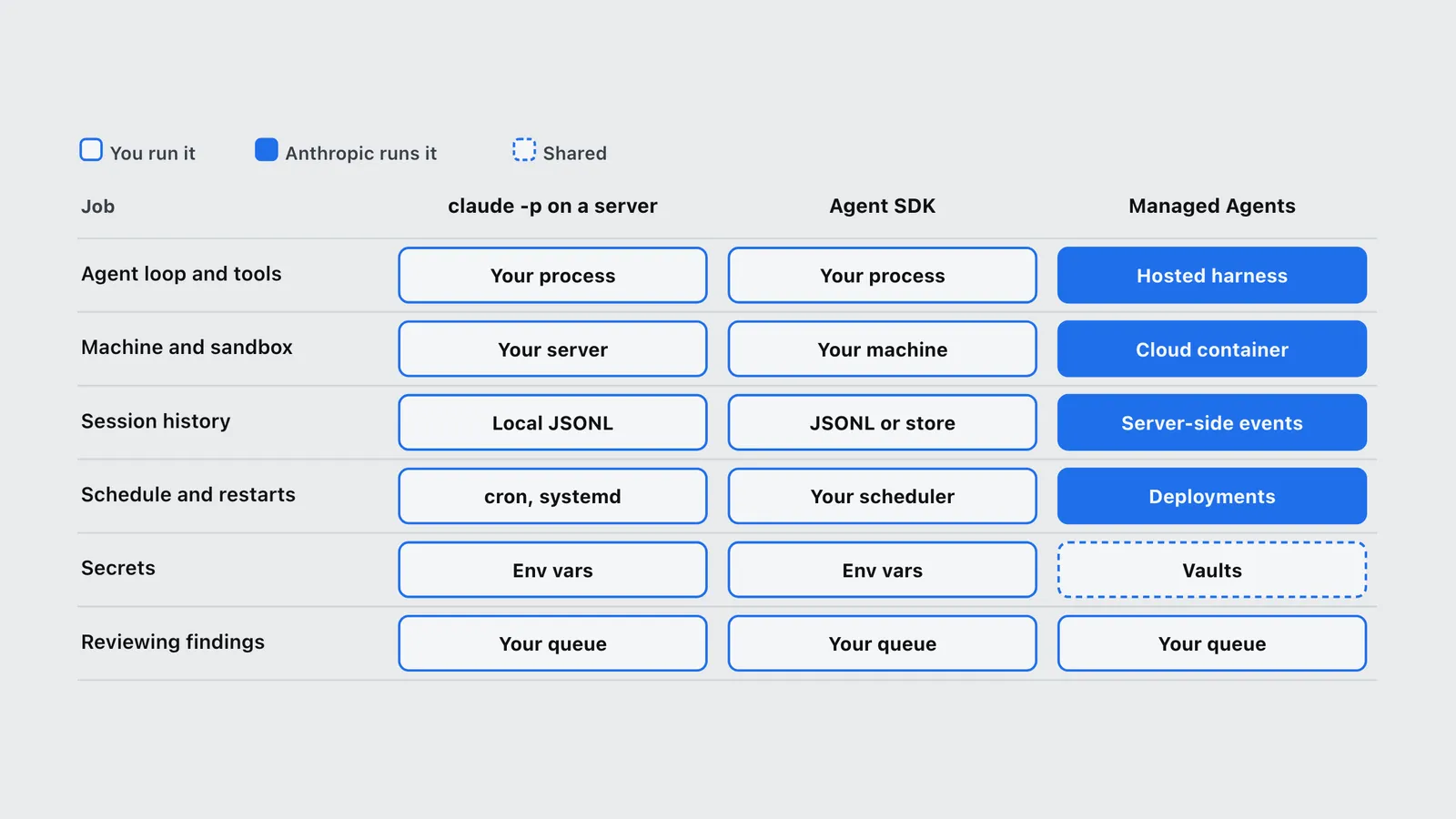
One way to picture it: you either run the robot yourself, or Anthropic runs it for you. The chart below splits that out by job, because the split is not all or nothing.
| Job | claude -p on a server | Agent SDK | Managed Agents |
|---|---|---|---|
| Agent loop and tools | You: Your process | You: Your process | Anthropic runs it: Hosted harness |
| Machine and sandbox | You: Your server | You: Your machine | Anthropic runs it: Cloud container |
| Session history | You: Local JSONL | You: JSONL or store | Anthropic runs it: Server-side events |
| Schedule and restarts | You: cron, systemd | You: Your scheduler | Anthropic runs it: Deployments |
| Secrets | You: Env vars | You: Env vars | Shared: Vaults |
| Reviewing findings | You: Your queue | You: Your queue | You: Your queue |
The last row is the one people forget. No option reviews the data for you. Managed Agents has a grader feature (covered below), but a grader checks the work against a rubric. It does not take responsibility for whether the claims are true.
If you are still deciding whether to use Claude’s harness at all or build your own, start with Build Your Own Agent Harness or Buy Claude Code? first. This guide assumes you are adopting it and only need to decide where it runs.
How does self-hosting with the Agent SDK work?
You install @anthropic-ai/claude-agent-sdk from npm or claude-agent-sdk from pip. Per the Agent SDK quickstart, you need Node.js 18+ or Python 3.10+, and “both the TypeScript and Python SDKs bundle a native Claude Code binary”. Your code calls query() with a prompt and options, and the SDK runs the full Claude Code loop: built-in tools (Read, Write, Bash, WebSearch, WebFetch and the rest), context management, hooks, subagents and permissions.
It runs anywhere Node.js or Python runs: your laptop, a VPS, a VM or a container. The quickstart runs it on your own machine. The hosting guide writes its production patterns for containers (“Docker, Kubernetes, and sandbox providers”). That is a recommendation, not a requirement. A container is the cleanest boundary around an agent that can run shell commands and write files, and each pattern’s lifecycle maps onto one. The research agent built below has neither tool, so a plain VPS is enough for it.
The hosting guide sets out what running it in production means:
- Size. “1 GiB RAM, 5 GiB disk, and 1 CPU per agent is a reasonable starting point.” The guide calls that “a floor, not the ceiling.”
- One process per session. “One agent session maps to one subprocess.”
- No built-in timeout. “A session does not time out on its own.” You set
maxTurns(andmaxBudgetUsd) yourself, or a stuck run will keep spending. - Four deployment patterns. Ephemeral, long-running, hybrid and multi-agent container. Hybrid is the one written for research that pauses: “Ephemeral containers that hydrate from a
SessionStoreon startup”, including “deep research that pauses and resumes over hours”. The guide adds that the store “is required for this pattern, not optional.” - Cost. “Anthropic token cost typically dominates container infrastructure cost by an order of magnitude or more. A minimally provisioned container runs roughly $0.05 per hour.”
Session history is plain files. The sessions documentation says “Claude Code stores sessions under ~/.claude/projects/<encoded-cwd>/*.jsonl”, and to resume, “the session file still needs to exist on the current machine.” That catches people who run the agent in throwaway containers. A rebuilt container cannot resume yesterday’s session unless you copy the file over or plug in a SessionStore.
Authentication is not API-key-only. The SDK authenticates the same way Claude Code does, so your own agent can run on a Claude subscription login or on an API key, and an environment variable decides which. The rule that does bind is about products for other people: “Unless previously approved, Anthropic does not allow third party developers to offer claude.ai login or rate limits for their products, including agents built on the Claude Agent SDK.” The subscription section below covers both payment paths in full.
Can you just run claude -p on a server?
Yes, and for one person’s research job it is often the right first step. The headless mode documentation describes claude -p as the Agent SDK “via the CLI”: the same loop, called from a shell. The flags that matter for an unattended job:
--output-format jsonreturns the result, the session ID andtotal_cost_usd. The docs call that cost a “client-side estimate”.--json-schema '<schema>'makes the run return validated JSON in astructured_outputfield.--allowedTools "WebSearch,WebFetch"pre-approves the tools the job needs.--permission-mode dontAskmakes Claude Code deny “every call that would otherwise prompt”, which is what you want when nobody is watching.--max-budget-usdcaps spend per run, and--resume <session_id>continues a specific session.--bareskips the host’s hooks, plugins, MCP servers and CLAUDE.md. The docs call it “the recommended mode for scripted and SDK calls”. Note that bare mode “doesn’t use your subscription login” and does not readCLAUDE_CODE_OAUTH_TOKENeither, so it needsANTHROPIC_API_KEY(or anapiKeyHelper).
Add a cron entry and you have a scheduled agent. The headless route stops scaling in three places:
- History is tied to one machine. Moving the job means moving the JSONL files.
- Nothing restarts a failed run. The CLI exits non-zero on failure, and wiring that up to retries or alerts is your job.
- Configuration lives in flags and files. Past one or two jobs, a typed SDK program is easier to test than a growing shell script.
What do Managed Agents handle for you?
Managed Agents launched on 8 April 2026 as a “public beta on the Claude Platform”, and every endpoint still needs the managed-agents-2026-04-01 beta header. You create an agent once (model, system prompt, tools), then start sessions that point at it. Each session gets its own container, and its events are “persisted server-side and can be fetched in full”.
What you stop building:
- The sandbox. The cloud sandbox reference lists Ubuntu 24.04, up to 8 GB of memory and 10 GB of disk, with Playwright and Chromium pre-installed. That last part matters for browsing: pages that need JavaScript to render work without you building a browser image.
- The scheduler. Scheduled deployments take a standard cron expression and an IANA timezone, run to the minute, allow 1,000 per organization, and accept a per-run
budgetcap. They shipped on 9 June 2026, per Anthropic’s announcement post, New in Claude Managed Agents. - Secret handling. The same post describes vaults that “securely store environment variables and credentials”, with the real key added at the network boundary rather than placed in the sandbox.
- Approval gates. Permission policies are
always_allow,always_askorauto. The docs say “the agent toolset defaults toalways_allow, and MCP toolsets default toalways_ask.” A paused call waits for auser.tool_confirmationevent. - A grader. With outcomes, “the harness automatically provisions a grader to evaluate the artifact against a rubric” in a separate context window, looping up to 3 times by default (20 at most).
There is also a middle option. Self-hosted sandboxes “keep the orchestration on Anthropic’s side but move tool execution into infrastructure you control.” That suits a research agent whose fetches must leave from your own network.
What it rules out: the overview says Managed Agents is not eligible for zero data retention (ZDR) or a HIPAA BAA. If either is a requirement, the decision is already made: self-host the SDK.
How much does each option cost for a research agent?
Start with the runtime fee, because it is the one people over-weight. Managed Agents bills $0.08 per session-hour, but only while a session is running. A self-hosted agent needs a machine that is up whenever a run fires. DigitalOcean’s droplet pricing (checked 13 October 2026) lists a 1 GiB Basic droplet at $6 a month, which matches the SDK guide’s 1 GiB floor, and a 2 GiB droplet at $12.
| Plan | Monthly price | Break-even usage (Running session-hours per month) |
|---|---|---|
| 1 GiB server | $6 | 75 h |
| 2 GiB server | $12 | 150 h |
| Managed Agents | $0 per unit, no floor | $24 at 300 h |
For a job that runs once a night, the meter is cheaper: about 23 running hours a month comes to roughly $1.80. For an agent that is genuinely busy around the clock, a flat server wins past 150 hours. Both numbers are small next to the model bill.
Here is a modeled nightly run on Claude Sonnet 5.5 ($2 input, $10 output, $0.10 cache reads per million tokens, per the pricing page). These are illustrative assumptions, not a measured run: 40 searches, 300,000 fresh input tokens, 1.2 million cached input tokens re-read across turns, and 40,000 output tokens. The cache-write premium is left out.
| Line item | Per run | Per month (30 runs) |
|---|---|---|
| Fresh input, 300k tokens at $2/M | $0.60 | $18.00 |
| Cached input, 1.2M tokens at $0.10/M | $0.12 | $3.60 |
| Output, 40k tokens at $10/M | $0.40 | $12.00 |
| Web search, 40 at $10 per 1,000 | $0.40 | $12.00 |
| Model and search subtotal | $1.52 | $45.60 |
| Managed Agents runtime, 45 min at $0.08/h | $0.06 | $1.80 |
| Or: a $6 server, always on | n/a | $6.00 |
The runtime fee is about 4% of the Managed Agents total in this model. That matches Anthropic’s own hosting guide: tokens dominate infrastructure “by an order of magnitude or more.” If cost is the deciding factor, the levers are search count, how much page text the agent reads, and the model. Where the agent runs barely moves it. The pricing page states the $10 per 1,000 searches rate for the API web search tool and for Managed Agents sessions. The Claude Code tools reference does not quote a separate rate for the built-in WebSearch tool, so the model applies the same one. For how a monthly agent bill breaks down more broadly, see How Much Does an AI Agent Cost Per Month?.
Is the runtime fee added to your Claude subscription?
No. The $0.08 per session-hour fee is not an add-on to a Pro or Max bill. It belongs to Managed Agents, which is billed through a Claude Console (API) account together with its tokens and web searches. A nightly run in the model above costs about $1.58 there: $1.52 in tokens and searches, plus $0.06 of runtime (45 minutes at $0.08 an hour).
That does not make your subscription irrelevant, and it does not mean every option needs API billing. Two corrections to a common misreading:
- Max and Team plans can pay for Managed Agents. Since 7 October 2026, those plans include monthly API credits that land in a linked Console organization, and Anthropic’s credits page lists Managed Agents as covered. The page does not name the runtime fee separately, and it does not exclude it either. Check the Console’s billing page after the first run to see what was charged where. If the credits run out and there is no purchased balance, requests stop; they are never charged to the plan. Pro plans get no credits.
- The runtime fee only exists on Managed Agents. The Agent SDK and
claude -phave no runtime fee, because you supply the machine. They can also run on a subscription’s usage limits instead of API billing.
Agent SDK or claude -p |
Managed Agents | |
|---|---|---|
| Runtime fee | None (you supply the machine) | $0.08 per running session-hour |
| Tokens and web searches | Plan usage limits, or API billing | API billing only |
| Covered by a Pro plan? | Yes, from plan usage limits | No |
| Covered by a Max or Team plan? | Yes, from plan limits or the monthly API credits | Yes, from the monthly API credits |
The next section covers how to pick the payment path and the precedence trap that decides which one a run actually uses.
Can you run the Agent SDK on a Claude subscription instead of an API key?
Yes, for your own agent. The Agent SDK and claude -p can run on a Claude subscription (Pro, Max, Team or Enterprise) or on a pay-per-token API key, and since 7 October 2026 Max and Team plans add a third option: monthly API credits. Managed Agents is the exception. It is a Claude Platform API product, so it always runs on an API key.
Which one a run uses is not a setting in your code. Claude Code picks the first credential it finds in the environment, so the same script can bill your plan on one machine and the API on another.
| How the agent authenticates | How you set it up | What pays for it | Works with | Watch for |
|---|---|---|---|---|
| Subscription login | Run claude once on the machine and log in |
Your plan’s usage limits | Agent SDK, claude -p (not --bare) |
The login expires and needs /login again; awkward on a headless server |
| Subscription token | claude setup-token, then set CLAUDE_CODE_OAUTH_TOKEN |
Your plan’s usage limits | Agent SDK, claude -p (not --bare), GitHub Action |
Valid for one year; model requests only |
| API key | Create a key in the Claude Console, set ANTHROPIC_API_KEY |
Console balance per token; Max and Team credits spend first | Everything, including --bare, the Claude API and Managed Agents |
Outranks a subscription login without asking in -p runs |
How the subscription path works
Anthropic’s help article Use the Claude Agent SDK with your Claude plan records two changes. On 15 June 2026: “We’ve paused the previously-announced changes to Claude Agent SDK usage,” so Agent SDK, claude -p and third-party app usage “still draw from your subscription limits.” On 7 October 2026 it added the monthly credits and repeated: “You can still use the Claude Agent SDK, claude -p, and third-party apps with your subscription limits.”
On a server with no browser, the Claude Code authentication documentation gives the route: claude setup-token opens the normal login flow on any machine with a browser and prints “a one-year OAuth token”. You set it as CLAUDE_CODE_OAUTH_TOKEN on the server. The docs say the token “authenticates with your Claude subscription and requires a Pro, Max, Team, or Enterprise plan” and “can only make model requests”, so it can’t fetch claude.ai connectors or open Remote Control sessions. MCP servers you configure locally, such as the Playwright browser server, still work.
The catch is shared limits. An overnight agent on your subscription draws from the same usage limits as your daytime Claude Code sessions. A heavy research run can leave you rate-limited the next morning.
How the API key path and the Max and Team credits work
An API key bills per token against a Claude Console balance, the same rates as the cost table above. Anthropic’s page API credits for Max and Team plans explains how the new credits plug into that:
- Amounts. $100 a month on Max 5x and $200 on Max 20x. Team plans get $20 per Standard seat and $100 per Premium seat, pooled and capped at $500. Free, Pro and Enterprise plans are not eligible, and new subscribers can claim after 7 days on an eligible plan.
- Claiming. In claude.ai, open Settings > Billing and link a Claude Console organization. “Each plan links to one Console organization”, and you can’t change the link yourself, so pick the organization the agent will run in.
- What they cover. The Claude API, Managed Agents, the Agent SDK and the playground. Not Claude Code, and not extra usage in the Claude apps.
- Order and expiry. “Included credits are spent first, then any credits you’ve purchased.” Unused credits expire at the end of each billing cycle, with no rollover.
- When they run out. If there are no purchased credits, “API requests stop until your next monthly API credits arrive. Usage is never charged to your Claude plan.”
- Separate limits. “Credits don’t change your usage limits in Claude or Claude Code.” A scheduled agent on the credits does not eat into your interactive Claude Code allowance, and the reverse is also true.
One point is unresolved. The help article lists claude -p among the products the credits cover. The credits page’s own table says “Claude Code: No” and does not mention claude -p. Until Anthropic reconciles the two, the safe reading is: run the scheduled job through the Agent SDK with a key from the linked organization, and check the Console’s Cost page after the first run.
The precedence trap
When several credentials exist, the authentication docs list the order Claude Code uses. The ones that matter here, highest first: ANTHROPIC_AUTH_TOKEN, then ANTHROPIC_API_KEY, then an apiKeyHelper script, then CLAUDE_CODE_OAUTH_TOKEN, then your /login subscription. Cloud provider settings such as Bedrock outrank all of them. For the API key, the docs add: “In non-interactive mode (-p), the key is always used when present.” These variables apply to “the Agent SDK, and GitHub Actions” as well.
In practice, an ANTHROPIC_API_KEY left in a shell profile or a container image silently moves your “subscription” agent onto pay-per-token billing. The reverse also happens: an agent you meant to run on the credits falls back to your plan when the key is missing. Set exactly one credential in the agent’s environment, and run /status in an interactive session on that machine to confirm which one is active.
Which payment path fits a research agent?
- On Max or Team, running your own agent: link the credits to a Console organization, give the agent its own workspace with a spend limit, and run it on an API key from that workspace. It costs nothing extra up to the credit, and it leaves your interactive Claude Code limits untouched. The nightly job modeled above, about $46 a month, fits inside the $100 Max 5x credit.
- On Pro: there are no credits. Use a
CLAUDE_CODE_OAUTH_TOKENand accept the shared limits, or pay per token with an API key. - Building something other people log into: API key only. Your users can’t sign in with their claude.ai accounts unless Anthropic approves it.
- On Managed Agents: always an API key. On Max or Team, the credits pay for it.
How do you build a long-running web research agent you can review?
The design matters more than the runner. A research agent you can trust has three properties:
- It can read the web and nothing else. No shell, no file writes, no access to your machine beyond what it needs.
- Every finding carries provenance: the source URL, a verbatim quote, when it was retrieved, and how confident the agent is.
- Its output lands in a pending queue, never straight into anything that matters. A person promotes each finding to
approved/orrejected/.
The same job is shown below three ways. The code follows the shapes in Anthropic’s documentation for permissions, hooks, structured outputs and headless mode, all checked on 13 October 2026.
Version 1: the Agent SDK (TypeScript)
The agent gets exactly two tools. It never writes files. Your program writes the review file from the validated structured output, so the agent has no path to anywhere outside the queue.
import { appendFile, mkdir, writeFile } from 'node:fs/promises';
import {
  query,
  type HookCallback,
  type PostToolUseHookInput,
} from '@anthropic-ai/claude-agent-sdk';

const findingSchema = {
  type: 'object',
  properties: {
    topic: { type: 'string' },
    findings: {
      type: 'array',
      items: {
        type: 'object',
        properties: {
          claim: { type: 'string' },
          source_url: { type: 'string' },
          quote: { type: 'string' },
          retrieved_at: { type: 'string' },
          confidence: { type: 'string', enum: ['high', 'medium', 'low'] },
        },
        required: ['claim', 'source_url', 'quote', 'retrieved_at', 'confidence'],
      },
    },
  },
  required: ['topic', 'findings'],
};

// Log every search and fetch so a reviewer can retrace what the agent read.
const auditLog: HookCallback = async (input) => {
  const post = input as PostToolUseHookInput;
  const line = {
    at: new Date().toISOString(),
    session: post.session_id,
    tool: post.tool_name,
    input: post.tool_input,
  };
  await appendFile('review/audit.jsonl', JSON.stringify(line) + '\n');
  return {};
};

export async function research(topic: string) {
  await mkdir('review/pending', { recursive: true });

  for await (const message of query({
    prompt: `Research: ${topic}. Use primary sources. For each finding, quote the exact sentence that supports it.`,
    options: {
      model: 'claude-sonnet-5-5',
      allowedTools: ['WebSearch', 'WebFetch'],
      disallowedTools: ['Bash', 'Write', 'Edit'],
      permissionMode: 'dontAsk',
      settingSources: [],
      maxTurns: 60,
      maxBudgetUsd: 3,
      outputFormat: { type: 'json_schema', schema: findingSchema },
      hooks: { PostToolUse: [{ matcher: 'WebSearch|WebFetch', hooks: [auditLog] }] },
    },
  })) {
    if (message.type === 'result') {
      if (message.subtype === 'success' && message.structured_output) {
        const file = `review/pending/${new Date().toISOString().slice(0, 10)}-${topic.replace(/\W+/g, '-')}.json`;
        await writeFile(file, JSON.stringify(message.structured_output, null, 2));
      } else {
        console.error(`Run ended without findings: ${message.subtype}`);
      }
    }
  }
}
Why each option is there:
allowedToolspre-approves the two web tools. It is not a full allowlist: the permissions page says any tool not listed “is still available to Claude” and falls through to the permission mode.disallowedToolsremoves the tools you never want offered, anddontAskdenies anything that would otherwise prompt.settingSources: []stops the agent from loading CLAUDE.md files, hooks or MCP servers from the machine it runs on. The hosting guide uses the same isolation step for multi-tenant agents.maxTurnsandmaxBudgetUsdexist because, as covered above, a session never times out on its own.- The
PostToolUsehook writes an audit line for every search and fetch. The SDK hook inputs sharesession_id, which lets you tie each line back to its session. - A result with subtype
successbut nostructured_outputcounts as a failure. The structured-outputs page warns about exactly that case.
Run it from cron or a systemd timer, one topic per run. For research that spans several runs, save the session ID and pass it back with resume. Remember the JSONL file has to be on the same machine.
Version 2: the same job as one claude -p call
claude --bare -p "Research: $TOPIC. Use primary sources. Quote the exact supporting sentence for each finding." \
  --allowedTools "WebSearch,WebFetch" \
  --permission-mode dontAsk \
  --max-budget-usd 3 \
  --output-format json \
  --json-schema "$(cat finding-schema.json)" \
  | jq '.structured_output' > "review/pending/$(date +%F)-${TOPIC// /-}.json"
This is the fastest way to find out whether the prompt produces findings worth reviewing. Because of --bare, it needs ANTHROPIC_API_KEY set and bills the API. To run it on your Claude plan instead, drop --bare, unset ANTHROPIC_API_KEY, and authenticate with your login or a CLAUDE_CODE_OAUTH_TOKEN (see the subscription section above). Without --bare, the host’s hooks and CLAUDE.md load too, so run it from a clean directory.
Version 3: the same job on Managed Agents
On Managed Agents you create the agent once and start a session for each run. In the agent’s toolset you enable the web_search and web_fetch tools, and leave off anything the job does not need. The agent writes its findings file to /mnt/session/outputs/, and per the Managed Agents files documentation, files written there become available through the Files API, scoped to the session, shortly after it goes idle. A scheduled deployment then replaces your cron entry.
Two settings deserve attention. First, keep the default always_allow policy only for the tools the job needs, and set always_ask on anything that can change state. Second, if you define an outcome with a rubric (“every finding has a quote that appears on the cited page”), the grader catches missing provenance before the file ever reaches your queue. It does not replace your own read.
How do you review what the agent collected?
The review step is where a research agent earns its keep or quietly fills your notes with confident errors. WebFetch makes this sharper. The Claude Code tools reference says WebFetch runs your prompt “against the content in a separate model call” and is “lossy by design”. What the agent quotes can be a model’s rendering of the page, not the page’s own text.
A review routine that holds up:
- Check the quote against the source. Open
source_urland search the page for the quoted sentence. If the exact text is not there, reject the finding or downgrade it. This one check catches most fabricated or paraphrased claims. - Read the audit log for scope drift.
audit.jsonlshows every query and URL. If the agent spent its turns on aggregator sites when you asked for primary sources, fix the prompt, not the findings. - De-duplicate across runs. Hash
source_urlplusclaim, and drop repeats before they reach you. A nightly job re-finds the same pages. - Promote by moving files.
pending/toapproved/orrejected/gives you a review trail in git or plain folders, with no database needed. - Feed rejections back. A short “do not use” list of domains, and the reasons findings failed, goes into the next run’s prompt.
Which hosted Claude Code options are not the same thing?
Several Anthropic products sound like “hosted Claude Code”. Only Managed Agents is built for an always-on research agent of your own:
- Claude Code on the web runs coding sessions in Anthropic’s cloud on Pro, Max, Team and eligible Enterprise seats, counted against plan limits. It is interactive and built around a repository.
- Routines are in research preview: Claude Code runs triggered by a schedule, an API call or GitHub, at most once an hour, drawing on subscription usage. They are closest to “cron for Claude Code” and worth testing for a simple personal job.
- The GitHub Action (
anthropics/claude-code-action@v1) is “built on the SDK” and runs inside your CI on an API key or a subscription token. - Self-hosted environments are a Team and Enterprise public beta that runs Claude Code’s cloud sessions on your own runners. This governs where cloud sessions run, not where your SDK program runs.
For the wider set of ways to orchestrate Claude Code itself, see Best Claude Code Agentic Workflows, and for the ecosystem of harnesses beyond Claude, the best AI agent harnesses comparison.
Which should you choose?
- Choose Managed Agents if you want the agent running on a schedule with the least code, if a hosted sandbox with Playwright already installed covers your browsing needs, and if your data can sit in Anthropic’s event log. Its runtime fee is cheaper than a server for anything that runs less than 75 hours a month.
- Choose the Agent SDK if the agent must reach private systems, if findings must stay in your storage, if you need ZDR or a HIPAA BAA, or if you want custom hooks on every tool call in your own code.
- Start with
claude -pif you are not yet sure the prompt produces findings worth reviewing. Prove the output first, then pick the runner.
How do you get started?
- Write the finding schema first: claim, source URL, quote, retrieval date, confidence. The schema is the review contract.
- Run the
claude -pversion by hand on three topics and review every finding. If fewer than most of them survive the quote check, fix the prompt before automating anything. - Pick how the agent pays (subscription token, API key, or Max and Team credits) and set exactly one credential in its environment.
- Pick the runner using the section above. For Managed Agents, create the agent once, then add a scheduled deployment with a per-run budget. For the SDK, put the TypeScript program on a small server (1 GiB is the documented starting point) with
maxTurnsandmaxBudgetUsdset, triggered by a timer. Use a container if the agent gets shell or file-write tools. - Set up the
pending/approved/rejectedfolders and the audit log before the first scheduled run, not after. - Read
total_cost_usd(headless) or your usage dashboard after the first week. Then trim search count and fetched page text first, since those dominate the bill.
Frequently asked questions
- What is the difference between the Claude Agent SDK and Claude Managed Agents?
- The Agent SDK is Claude Code packaged as a TypeScript or Python library that you run on your own machine or container, paying only for tokens. Managed Agents is Anthropic hosting the same kind of harness for you, with a container per session, server-side session history and built-in scheduling, for tokens plus $0.08 per running session-hour.
- Is the Managed Agents runtime fee added to my Claude Pro or Max subscription?
- No. The $0.08 per running session-hour fee is billed through a Claude Console (API) account with the tokens and web searches, never added to a plan bill. On Max and Team, the monthly API credits that started on 7 October 2026 cover Managed Agents, so the plan pays indirectly. Pro has no credits. The Agent SDK and claude -p have no runtime fee at all.
- Is Claude Managed Agents cheaper than self-hosting the Agent SDK?
- For runtime, usually yes for intermittent jobs. Managed Agents bills $0.08 only for hours a session is running, so it undercuts a $6 a month server below 75 running hours a month. Tokens are the same under both and are most of the bill, so the runner choice rarely changes total cost much.
- Can I run claude -p on a server as a scheduled agent?
- Yes. claude -p runs Claude Code non-interactively. With --output-format json and --json-schema it returns validated structured output, --permission-mode dontAsk denies anything that would prompt, and --max-budget-usd caps spend. Pair it with cron or a systemd timer. Session history stays in JSONL files on that machine.
- Does the Claude Agent SDK work with a Claude subscription, or only an API key?
- Both work for your own agent. With a Pro, Max, Team or Enterprise plan, log in on the machine or set a CLAUDE_CODE_OAUTH_TOKEN from claude setup-token, and usage draws from your plan limits. With ANTHROPIC_API_KEY set, the same code bills per token instead, and the key wins whenever both are present. Products for other people cannot offer claude.ai login.
- Can a Claude Max subscription pay for an Agent SDK or Managed Agents agent?
- Since 7 October 2026, Max and Team plans include monthly API credits that Anthropic says cover the Agent SDK, claude -p, the Claude API and Managed Agents: $100 on Max 5x, $200 on Max 20x and up to $500 pooled on Team. The credits sit in a linked Console organization and are used through an API key. Pro, Free and Enterprise plans are not eligible.
- Can Claude Managed Agents browse JavaScript-heavy websites?
- Yes. Anthropic documents its cloud sandbox as Ubuntu 24.04 with Playwright and Chromium pre-installed, alongside the web search and web fetch tools. On a self-hosted Agent SDK agent you add browser automation yourself, for example through the Playwright MCP server.
Sources
- Anthropic (2026). Hosting the Agent SDK. Claude Code documentation. https://code.claude.com/docs/en/agent-sdk/hosting
- Anthropic (2026). Quickstart (Agent SDK). Claude Code documentation. https://code.claude.com/docs/en/agent-sdk/quickstart
- Anthropic (2026). Configure permissions. Claude Code documentation. https://code.claude.com/docs/en/agent-sdk/permissions
- Anthropic (2026). Intercept and control agent behavior with hooks. Claude Code documentation. https://code.claude.com/docs/en/agent-sdk/hooks
- Anthropic (2026). Get structured output from agents. Claude Code documentation. https://code.claude.com/docs/en/agent-sdk/structured-outputs
- Anthropic (2026). Work with sessions. Claude Code documentation. https://code.claude.com/docs/en/agent-sdk/sessions
- Anthropic (2026). Run Claude Code programmatically. Claude Code documentation. https://code.claude.com/docs/en/headless
- Anthropic (2026). Tools reference. Claude Code documentation. https://code.claude.com/docs/en/tools-reference
- Anthropic (2026). Claude Managed Agents overview. Claude Platform documentation. https://platform.claude.com/docs/en/managed-agents/overview
- Anthropic (2026). Claude Managed Agents: get to production 10x faster (8 April 2026). https://claude.com/resources/articles/claude-managed-agents
- Anthropic (2026). New in Claude Managed Agents: run agents on a schedule and store environment variables in vaults (9 June 2026). https://claude.com/blog/whats-new-in-claude-managed-agents
- Anthropic (2026). Cloud sandbox reference. Claude Platform documentation. https://platform.claude.com/docs/en/managed-agents/cloud-sandboxes-reference
- Anthropic (2026). Scheduled deployments. Claude Platform documentation. https://platform.claude.com/docs/en/managed-agents/scheduled-deployments
- Anthropic (2026). Permission policies. Claude Platform documentation. https://platform.claude.com/docs/en/managed-agents/permission-policies
- Anthropic (2026). Define outcomes. Claude Platform documentation. https://platform.claude.com/docs/en/managed-agents/define-outcomes
- Anthropic (2026). Attach and download files. Claude Platform documentation. https://platform.claude.com/docs/en/managed-agents/files
- Anthropic (2026). Self-hosted sandboxes. Claude Platform documentation. https://platform.claude.com/docs/en/managed-agents/self-hosted-sandboxes
- Anthropic (2026). Authentication. Claude Code documentation. https://code.claude.com/docs/en/authentication
- Anthropic (2026). Pricing. Claude Platform documentation. https://platform.claude.com/docs/en/about-claude/pricing
- Anthropic (2026). API credits for Max and Team plans. Claude Platform documentation. https://platform.claude.com/docs/en/about-claude/api-credits-for-subscribers
- Anthropic (2026). Use the Claude Agent SDK with your Claude plan. Claude Help Center. https://support.claude.com/en/articles/15036540-use-the-claude-agent-sdk-with-your-claude-plan
- Anthropic (2026). Use Claude Code in the cloud. Claude Code documentation. https://code.claude.com/docs/en/claude-code-on-the-web
- Anthropic (2026). Automate work with routines. Claude Code documentation. https://code.claude.com/docs/en/routines
- Anthropic (2026). Claude Code GitHub Actions. Claude Code documentation. https://code.claude.com/docs/en/github-actions
- Anthropic (2026). Self-hosted environments. Claude Code documentation. https://code.claude.com/docs/en/self-hosted-environments
- DigitalOcean (2026). Droplet pricing. https://www.digitalocean.com/pricing/droplets
- Microsoft (2026). Playwright MCP. GitHub repository. https://github.com/microsoft/playwright-mcp