GitHub Universe 2026 Announcements: What Matters
Everything GitHub announced at Universe 2026: Copilot Fusion, Copilot inside Enterprise, AI push protection, the npm package firewall and Octoverse stats.
GitHub Universe 2026 (October 28 to 29, San Francisco) shipped four things worth acting on. Copilot Fusion is generally available. Copilot now comes bundled with GitHub Enterprise and is paid for in AI credits. AI push protection and an npm package firewall are both in public preview. And according to GitHub’s Octoverse 2026 report, agents now open more than 40% of pull requests.
This digest pulls together three primary sources: GitHub’s Universe 2026 recap page, the keynote post GitHub Universe 2026: evolving every layer of the stack, and Octoverse 2026. The two security features get the most space, with setup steps, because they are the ones a team can switch on this week. For how Copilot compares with the rival agents, see the AI coding agents comparison. For what Copilot’s credits cost, see the Copilot AI credits pricing breakdown.
What did GitHub announce at Universe 2026?
| Announcement | Area | Status (as of 2026-11-02) | Price |
|---|---|---|---|
| Copilot Fusion | Copilot | Generally available | AI credits |
| Copilot app + Copilot projects | Copilot | Projects live in the app from Oct 28 | AI credits |
| Copilot automations | Copilot | Announced, status not stated | AI credits |
| Copilot connectors (managed MCP) | Copilot | Announced, status not stated | Not stated |
| Copilot code review Max | Copilot | Announced, status not stated | AI credits |
| Copilot included with GitHub Enterprise | Pricing | Via GitHub Sales now, self-serve later | Pay for AI credits used |
| AI push protection | Security | Public preview | AI credits on top of GHSP or GHAS |
| Package firewall (npm) | Security | Public preview, Enterprise Cloud | Free in preview, metered at GA |
| AI Scan, reachability analysis | Security | Announced | Not stated |
| Stacked pull requests | Platform | Preview since July 30 | Included |
gh --attach, issue artifacts, PR inbox |
Platform | Announced | Included |
“Not stated” means GitHub’s announcement does not give a status or a price. It does not mean the feature is free.
What is Copilot Fusion?
Fusion is Copilot’s multi-model router. You choose an effort level (Standard, High or Max). Fusion then works out what the task needs (reasoning, code generation, debugging, tool use) and either picks one model or splits the work across several. The keynote post says Fusion Max came within two points of Opus 5.5 Max on the Artificial Analysis Coding Agent Index, at half the cost and in 40% less time per task. That is GitHub’s own claim. Its research-preview name was Project HydraFusion, and Octoverse says it routed almost 60,000 sessions in the CLI and the Copilot app before reaching general availability.
The usage data explains why GitHub built it. According to Octoverse 2026, 61% of Copilot users who pick a model themselves used more than one in September, up from 50% four months earlier. Paid plans used 47 distinct models that month, and no single model handled more than 25% of requests. Developers were already routing by hand, and Fusion does that routing for them. For an independent view of how models rank on cost per task, see the coding agent cost-per-task tracker.
What else changed in Copilot?
- Copilot app. An agent-first app that brings agents, specs, design discussions and telemetry into one place.
- Copilot projects. Agent work across several repositories, run as managed parallel sessions and tracked from one view. Live in the app from launch day.
- Session continuity. One cloud agent session that you can start in VS Code and pick up again in the CLI, on the web or in the GitHub app.
- Copilot automations. Repository workflows that run in the cloud, on demand, on a schedule or on an event (issue triage, code review). They can learn from results and propose changes to themselves, which you approve.
- Copilot connectors. You sign in once to services such as Vercel, Cloudflare and Sentry. GitHub then manages the MCP server connection across the app, the CLI, VS Code, the web and code review.
- Code review Max. A new review tier that GitHub says posted the highest F1 score on ReviewBench for high-severity issues. Lite and Balanced remain for everyday reviews.
Is Copilot now included in GitHub Enterprise?
Yes. GitHub Enterprise customers can now use every Copilot feature (the app, code review, automations) without a separate Copilot subscription. They pay for the AI credits they use. The keynote post says this is available through GitHub Sales now, with self-serve “coming soon.” Existing Copilot Business and Enterprise customers can keep their plans or switch. No credit prices were announced, so model the cost with the per-credit math in the Copilot AI credits guide and the GitHub plan pricing guide.
How does AI push protection work, and how do you turn it on?
Standard push protection blocks secrets that match known formats, such as an AWS key or a GitHub token. It misses the generic ones: a database password, an internal service credential, anything without a recognizable pattern. AI push protection fills that gap. According to GitHub’s October 28 changelog, a classifier built with Microsoft Applied Sciences looks at how a candidate string is used in the surrounding code. It then blocks the push before the secret reaches the remote. It covers new pushes, commits made in the GitHub UI and file uploads. GitHub reports that in early results it more than doubled the number of pushes where push protection caught a secret.
This matters more now that agents write the code. Octoverse 2026 counts 5.8 billion secret-scanning runs in its year, nearly four times the 2025 pace. An agent that commits a hardcoded password is exactly the case pattern matching misses.
Requirements (from GitHub’s AI push protection documentation):
- GitHub Secret Protection or GitHub Advanced Security on the repository.
- Push protection turned on.
- AI-detected secrets scanning turned on.
Cost: blocking at push uses AI credits, and billing starts once you turn the feature on. AI-detected secret alerts from post-push scanning stay included in GHSP and GHAS at no extra charge, so only the blocking step is metered. It is off by default.
Enable it on one repository:
- Open the repository and click Settings.
- In the sidebar, under “Security and quality,” click Advanced Security.
- Under “Secret Protection,” switch Push protection for AI-detected secrets to On.
Enable it across an organization: create a custom security configuration with secret scanning on, and set three settings to enabled: AI-detected secrets (secret_scanning_generic_secrets), push protection (secret_scanning_push_protection) and block AI-detected secrets (secret_scanning_generic_secrets_push_protection). Then apply the configuration to your repositories. The security configurations REST API accepts the same settings if you manage this as code.
When a push is blocked, remove the secret from every commit in the push and push again. Existing bypass and delegated-bypass workflows still apply, and the changelog says agents must get authorization before bypassing a block.
What is GitHub package firewall, and how do you set it up?
The package firewall is a proxy that sits between your endpoints (CI runners, AI agent sessions, developer laptops) and the npm registry. It checks every package download against enterprise policy and blocks any that fail. GitHub’s October 20 changelog says it is in public preview for all GitHub Enterprise Cloud customers, including data-resident ones. It supports npm only, is free during the preview, and will be “charged based on metered usage, similar to Actions billing” at general availability. No GA date or rates have been published.
It targets a risk that grew with agents. Agents install dependencies on their own, faster than anyone reviews them. A minimum package age blocks a package version published minutes ago, which is how most npm hijacks spread before anyone notices.
Policies and their defaults, per GitHub’s package firewall documentation:
| Control | Default |
|---|---|
| Known malware blocking | On |
| Vulnerability advisory blocking | Critical only |
| Attestation downgrade blocking | On |
| Newly introduced install script blocking | On |
| Minimum package age | 1 day (0 disables it) |
Setup:
- Set policy. An enterprise owner or security manager goes to the enterprise, then Policies, then Package firewall, and reviews the controls above.
- Create a token. Use a user or bot account that belongs to the enterprise. The token only needs read-only access to public repositories. Store it as a CI secret and never commit it.
- Point npm at the firewall. Set
GITHUB_TOKEN, then add this to your user-level.npmrc, replacingENTERPRISEwith your enterprise slug:
registry=https://package-firewall.githubapp.com/npm/enterprises/ENTERPRISE
//package-firewall.githubapp.com/npm/enterprises/ENTERPRISE/:_authToken=${GITHUB_TOKEN}- Optional: Artifactory (experimental). Create an npm remote repository that points at the firewall URL, add it to a virtual npm repository, and remove any remote that fetches straight from the public npm registry.
The firewall only sees traffic routed through it. Any runner, agent sandbox or laptop still pointed at registry.npmjs.org bypasses it completely, so the .npmrc change has to reach every endpoint, agent containers included.
When a package is blocked, the npm output or CI log includes a link to request an override. An approver reviews it under Security and quality, then Package firewall bypass, and can allow one version or all versions (*). Approved overrides are listed under Policies, then Package firewall, then Package overrides.
What about AI Scan and reachability analysis?
The recap page lists three more security features. AI Scan scans a whole repository on demand, can assign findings to Copilot to fix, and checks pull requests in languages CodeQL does not cover. Reachability analysis shows which vulnerable functions your JavaScript code actually calls, so a Dependabot alert on code you never run can drop down the queue. A Security extension shows code written by agents next to code-scanning alerts on one canvas, where Copilot can explain and fix them.
What platform features shipped?
- Stacked pull requests. Split a large change into linked PRs that are reviewed separately and merged as a stack in one click. Octoverse says more than 264,000 developers had used them by September, after the July 30 preview.
gh --attach. Add images and video to issues, PRs and comments from the terminal.- Issue artifacts. Attach plans, research and links to an issue so the reasoning stays with the work.
- Pull request inbox. One view of the open PRs waiting on you.
What does Octoverse 2026 say about agents?
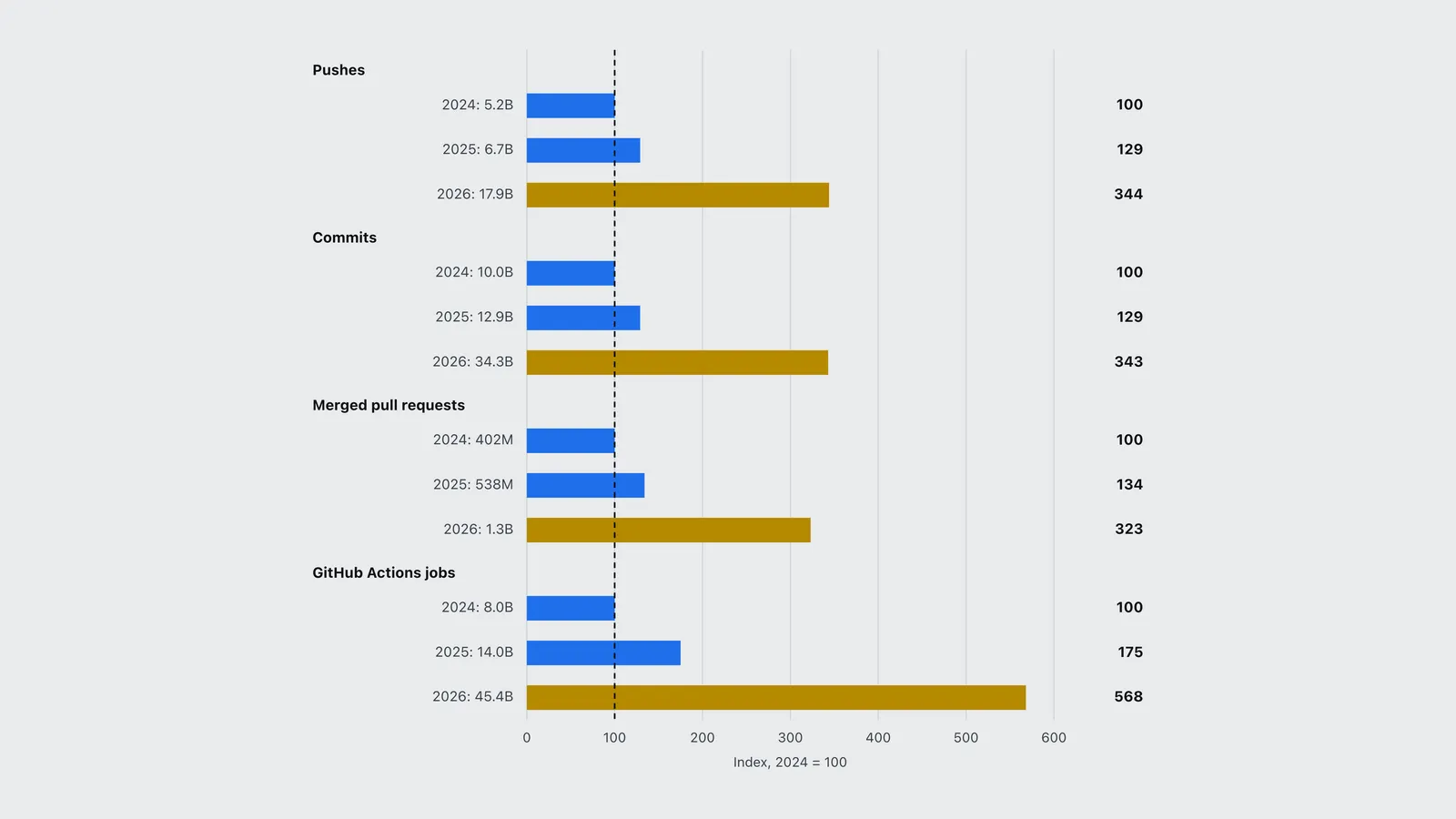
Octoverse covers October 1, 2025 to September 30, 2026. Every core activity metric roughly tripled in two years, and the agent figures show where that growth came from.
| Group | Row | Index, 2024 = 100 |
|---|---|---|
| Pushes | 2024: 5.2B | 100 |
| Pushes | 2025: 6.7B | 129 |
| Pushes | 2026: 17.9B | 344 |
| Commits | 2024: 10.0B | 100 |
| Commits | 2025: 12.9B | 129 |
| Commits | 2026: 34.3B | 343 |
| Merged pull requests | 2024: 402M | 100 |
| Merged pull requests | 2025: 538M | 134 |
| Merged pull requests | 2026: 1.3B | 323 |
| GitHub Actions jobs | 2024: 8.0B | 100 |
| GitHub Actions jobs | 2025: 14.0B | 175 |
| GitHub Actions jobs | 2026: 45.4B | 568 |
The key findings, all from Octoverse 2026:
- Agents changed the curve in mid-2026. Activity rose steadily from January and sped up sharply after June. From June on, about 55% of all commits went to brand-new repositories.
- Agent PRs now merge faster than human ones. In February, 83% of agent-started PRs merged within two weeks, against about 86% for the comparison group. By September the agent figure was 90%. 87% of agent PRs touch multiple files.
- Agent config files mean more output. Among repositories created this year, the average one with an agent configuration file logged eight times as many commits as the average one without.
- Developers use more models. Developer-selected requests split 38 general-purpose, 37 deep reasoning and 25 fast and lightweight. 63% of paying Copilot developers used auto model selection at least once in September.
- TypeScript stays first. TypeScript, Python and JavaScript lead on contributors. Rust grew fastest, roughly doubling. AI was involved in 44.1% of merged TypeScript PRs and 21.2% of Java PRs.
- 225 million developers. The United States has 38.3 million and India 32.0 million, and each added more than 10 million in the year.
- Security load went up with it. More than 30 million Dependabot PRs were merged, and AI-assisted code review and GitHub Advanced Security both grew more than 90% year over year.
What is GitHub doing to its infrastructure?
The keynote post says GitHub has added 4 million CPU cores, 160 PB of high-speed storage and 50 Tb/s of network capacity in 2026. It is moving to a multi-region Azure deployment, due to finish in early 2027, and is building a new Git architecture designed to separate storage from compute. Octoverse’s 45.4 billion Actions jobs (1,440 every second) explain why.
What should you do first?
If you run GitHub Enterprise Cloud with npm, turn on the package firewall in a test enterprise or on one CI pipeline now, while it is free. If you already pay for Secret Protection or Advanced Security, enable AI push protection on the repositories where agents commit, and watch credit usage for a week before rolling it out to the whole organization. Fusion and the Enterprise bundling are pricing decisions: compare them against the alternatives in the AI coding plan pricing comparison before you change contracts.
Frequently asked questions
- When was GitHub Universe 2026?
- October 28 to 29, 2026, in San Francisco. The main announcements, including Copilot Fusion general availability, came in the October 28 keynote.
- Is GitHub AI push protection free?
- No. It is in public preview, needs GitHub Secret Protection or GitHub Advanced Security, and blocking at push uses AI credits. AI-detected secret alerts from post-push scanning remain included in those licenses at no extra charge.
- Does GitHub package firewall support pip or Maven?
- Not yet. As of November 2026 the public preview supports npm only and is available to GitHub Enterprise Cloud customers. It is free during the preview and will be billed by metered usage, similar to Actions, at general availability.
- What is Copilot Fusion?
- A generally available Copilot feature that routes each task to one model or a mix of models based on the effort level you choose (Standard, High or Max). GitHub says Fusion Max came within two points of Opus 5.5 Max on the Artificial Analysis Coding Agent Index at half the cost.
- What share of GitHub pull requests are opened by AI agents?
- More than 40% by September 2026, up from 17% in March, according to GitHub Octoverse 2026. September alone had about 110 million agent-started pull requests.
Sources
- GitHub (2026). GitHub Universe 2026 recap. GitHub. https://github.com/events/universe/recap
- GitHub (2026). GitHub Universe 2026: evolving every layer of the stack. GitHub blog. https://github.blog/news-insights/company-news/github-universe-2026-evolving-every-layer-of-the-stack/
- GitHub (2026). Octoverse: commits and pushes reach new highs in 2026 as developers build with agents. GitHub blog. https://github.blog/news-insights/octoverse/octoverse-commits-pushes-reach-new-highs-in-2026-as-developers-build-with-agents/
- GitHub (2026). Push protection beyond predefined secret patterns. GitHub changelog. https://github.blog/changelog/2026-10-28-push-protection-beyond-predefined-secret-patterns
- GitHub (2026). GitHub package firewall in public preview. GitHub changelog. https://github.blog/changelog/2026-10-20-github-package-firewall-in-public-preview
- GitHub (2026). Enabling push protection for AI-detected secrets. GitHub Docs. https://docs.github.com/en/code-security/how-tos/secure-your-secrets/prevent-future-leaks/enable-ai-push-protection
- GitHub (2026). Protecting endpoints with package firewall. GitHub Docs. https://docs.github.com/en/code-security/how-tos/secure-your-supply-chain/secure-your-dependencies/protecting-endpoints-with-package-firewall