Should You Allow Verified Bots on Cloudflare?
Yes, by category. Allow Search, link previews and monitoring, but set Training to Disallow, not Block: Block now stops Googlebot and Bingbot too.
Yes, for most sites, but decide by category, not with one switch. A Cloudflare verified bot has proved who it is and that it follows robots.txt. That says nothing about whether you want what it does: a training crawler can be fully verified.
The settings that matter for an ad-supported site are the three AI behaviors Cloudflare lets every plan control: Search, Agent and Training. Keep Search on Allow. Set Training to Disallow, not Block, because since 15 September 2026 Block and “Block on pages with ads” also stop Googlebot, Bingbot and Applebot. Leave monitoring, link-preview, feed and ad-verification bots alone, since blocking them costs you uptime alerts, social cards, subscribers and ad revenue for no gain.
What is a Cloudflare verified bot?
A verified bot is an automated client Cloudflare has confirmed is “transparent about who it is and what it does.” Cloudflare’s Verified bots documentation (last updated 12 November 2026) sets two requirements:
- Honest self-identification. The bot declares its identity deterministically, through a Web Bot Auth cryptographic signature, a published IP list with a stable user agent, or reverse DNS.
- Non-abusive behavior. It obeys robots.txt and crawl directives, keeps reasonable request rates, and has not been seen evading site owner preferences or attacking sites.
Operators apply through the BotBase form in the Cloudflare dashboard. Accepted bots appear in BotBase and in the Cloudflare Radar bots directory, which was rebuilt on BotBase on 9 November 2026. Each Radar bot page now shows an access level and a content-use label (full for content kept and reused, such as training or an index; reference for cited or linked back; immediate for used once to answer a request).
Every verified bot gets one or more of 11 behaviors: Search, Agent, Training, Transact, Data Collection, Security Testing, SEO, Ads Verification, Social / Link Preview, Feed Fetching, and Monitoring & Operations. Those behaviors are what you make decisions on.
Does verified mean Cloudflare lets it through?
No, and this is the most common misreading. Cloudflare’s AI Crawler and Agent access policies documentation (updated 2 November 2026) says it plainly: “Each policy applies to Verified bots with that behavior and matching unverified bots.” If you block Training, a verified training crawler is blocked along with an unverified one.
Verification answers “is this really GPTBot?” Your policy answers “do I want GPTBot?” The value of verification to a site owner is that the second question becomes enforceable: a scraper pretending to be Googlebot cannot borrow Googlebot’s pass, so an Allow rule on a category does not open the door to impostors.
What changed for verified bots in 2026?
Four changes landed this year, and the second one is the one that bites.
- 1 July 2026: per-behavior controls for every plan. Free customers got separate Search, Agent and Training policies. The same date folded “AI Search” into Search and merged signed agents into the verified program, with the old split kept as a Direct vs Intermediary field (see below).
- 15 September 2026: Block now reaches mixed-use crawlers. Cloudflare’s post Have it both ways: stay discoverable in search while disallowing AI training says “Block and Block on pages with ads now apply to mixed-use crawlers, including Applebot, Bingbot, and Googlebot.” The fix it introduced is a new Training action, Disallow AI Training, which publishes the preference in robots.txt so crawlers Cloudflare designates “Accountable” keep indexing for search.
- 16 October 2026: trust scores. Continuous accountability for Verified bots describes a system that checks whether verified bots follow robots.txt over time and back off after HTTP 429 responses, turning the pattern into a “trust band.” Cloudflare is running it internally and says customers will later choose a trust threshold for verified traffic. No launch date was given.
- 4 November 2026: per-agent controls. The access policies page now lets you set the top Personal Agents individually. They inherit your Agent policy by default, and Cloudflare recommends Allow for them.
The same September post reports that fewer than 1% of Cloudflare sites block Search bots and 17% block training in some way. Most sites already sit where this guide ends up: search open, training a choice.
What are the pros of allowing verified bots?
- You keep the traffic sources that pay. Search is how Google and Bing send readers, Social / Link Preview is how a shared link gets a card instead of a bare URL, and Feed Fetching is how RSS and newsletter tools pick up new posts. Blocking any of them costs visits directly.
- Impostors stay out. Because identity is checked at Cloudflare’s edge, allowing “verified Search” does not allow anything that merely sets a Googlebot user agent. Cloudflare’s message-signature announcement explains why: IP ranges can be shared or change, and a user-agent header is “easily spoofable,” while a signed request needs the operator’s private key.
- Your own tools keep working. Uptime monitors, payment webhooks and accessibility scanners live in Monitoring & Operations and SEO. A blanket bot block silently breaks alerts you rely on.
- Ad verification keeps your CPM. Ad buyers pay for impressions that a verification vendor has confirmed. The ad-revenue optimizer OnSiteWP reports that Cloudflare’s free Bot Fight Mode can catch ad-verification bots such as IAS, DoubleVerify and MOAT. That is a third-party claim, not Cloudflare documentation, but it is the failure mode to check for on any Mediavine, Raptive or Ezoic site.
- Bad actors lose the pass. Verified status is revocable. Cloudflare de-listed Perplexity in August 2025 after finding it switched to an undeclared crawler, posing as Chrome on macOS, when blocked; the declared agent made 20–25 million requests a day and the stealth one 3–6 million.
What are the cons and risks?
- Verified includes things you may not want. Training crawlers and Data Collection bots (price scraping, competitive intelligence) can be verified. An “allow all verified bots” rule lets them all in, including SEO crawlers from tools that resell data about your site.
- The Googlebot trap. If you set Training to Block or “Block on pages with ads” to keep AI training off your content, Googlebot goes too. On an ad-supported site, “Block on pages with ads” means every page that earns money is the one Google cannot crawl. The crawler economics breakdown covers why mixed-use crawlers behave this way.
- Disallow is a request, not a wall. The docs note that “robots.txt directives are voluntary.” With Bot Preference Sync on, Disallow also blocks training crawlers at the edge, but mixed-use crawlers are excluded from that block by design. And per Cloudflare’s September post, Bingbot does not yet honor the no-training preference; Microsoft is targeting early 2027.
- Intermediaries carry transitive trust. An agent service that many people drive can be verified as a service while you know nothing about the person behind a given request.
- Free-plan Bot Fight Mode cannot be overridden. The Bot Fight Mode documentation says “Skip, Bypass, and Allow actions have no effect” on it, and it does not say whether verified bots are exempt. If a bot you need is being challenged, the documented options are an IP Access rule or moving to Super Bot Fight Mode on Pro and above.
Which verified bot categories should you allow?
The table below is for an ad-supported content site. A site with no ads can be more open on Agent and Training; a site selling data or prices should be stricter on Data Collection.
| Behavior | What it does | Setting for an ad-supported site | What blocking costs you |
|---|---|---|---|
| Search | Builds search indexes and RAG databases | Allow | Google, Bing and AI search referrals |
| Training | Trains or fine-tunes models | Disallow AI Training (never Block) | With Block: Googlebot, Bingbot and Applebot as well |
| Agent | Fetches a page in real time for a person | Allow, or Block on pages with ads | Readers who arrive through an assistant |
| Social / Link Preview | Builds link cards in social and messaging apps | Allow | Click-through on every shared link |
| Feed Fetching | RSS readers, podcast and news aggregators | Allow | Subscribers and newsletter pickups |
| Monitoring & Operations | Uptime checks, webhooks, health checks | Allow | Your own alerts and payment callbacks |
| Ads Verification | Confirms ad placement, detects ad fraud | Allow | Verified impressions, so CPM |
| SEO | Site audits, accessibility and speed checks | Allow your own tools, decide the rest | Your audit tools; blocking resellers costs nothing |
| Data Collection | Price scraping, competitive intelligence | Block unless you want it | Usually nothing for a content site |
| Security Testing | Vulnerability scanning | Allow only scanners you hired | Nothing if you have not hired one |
| Transact | Completes checkout for a user | Allow if you sell anything | Agent-driven sales |
Cloudflare’s own preset for newly onboarded ad-monetized domains matches the first three rows: Search Allow, Training Disallow AI Training, Agent Block on pages with ads. The current docs list Allow on all three as the default for other new domains, so an older or non-preset zone may need changing by hand.
Which Training setting keeps you in Google?
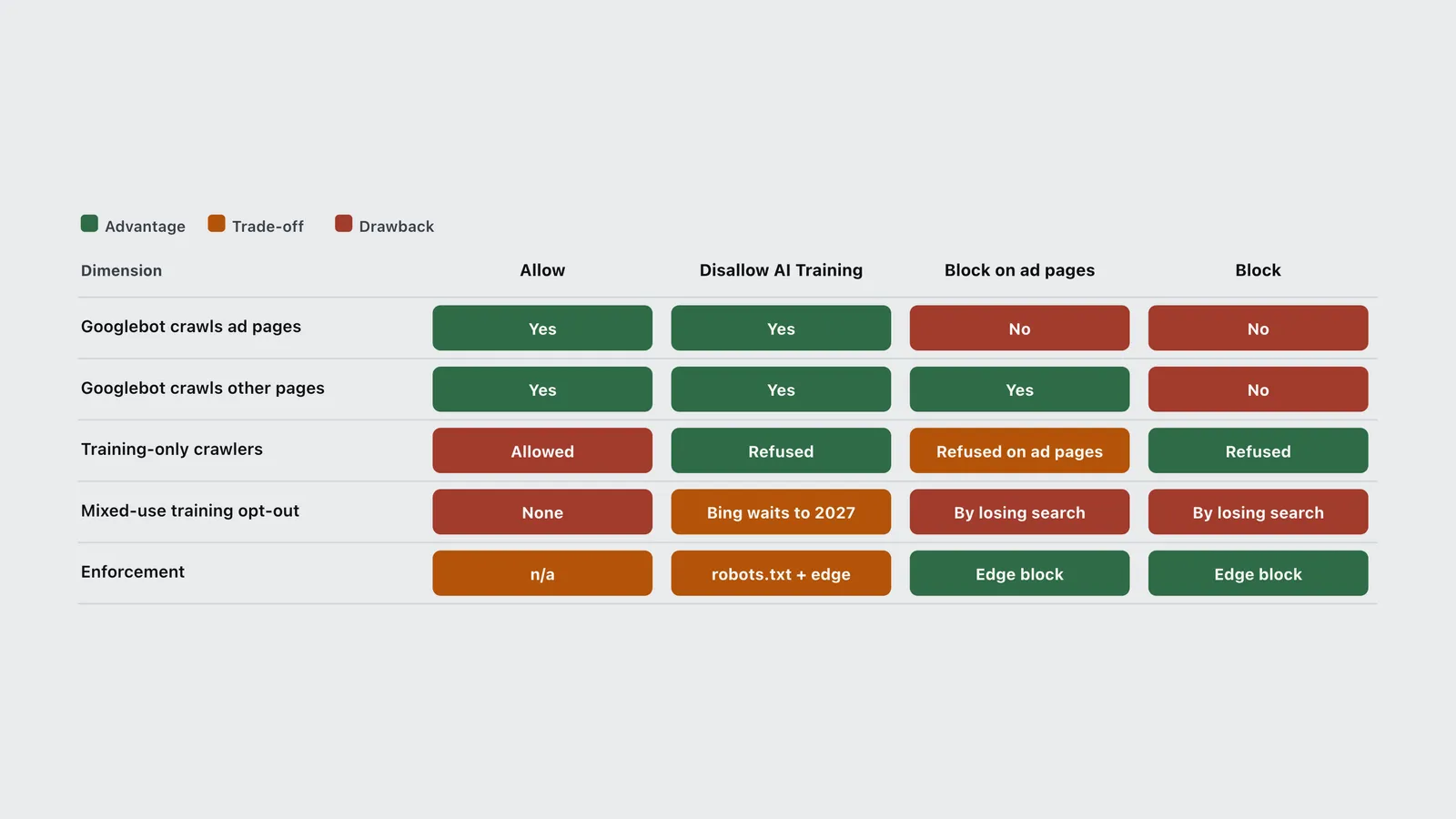
The Training policy is where most sites get it wrong, because the three blocking options sound like degrees of the same thing. They are not.
| Dimension | Allow | Disallow AI Training | Block on ad pages | Block |
|---|---|---|---|---|
| Googlebot crawls ad pages | Yes | Yes | No | No |
| Googlebot crawls other pages | Yes | Yes | Yes | No |
| Training-only crawlers | Allowed | Refused | Refused on ad pages | Refused |
| Mixed-use training opt-out | None | Bing waits to 2027 | By losing search | By losing search |
| Enforcement | n/a | robots.txt + edge | Edge block | Edge block |
Does Direct vs Intermediary change the answer?
Slightly. Cloudflare’s verified bots page defines Direct as a bot “operated by a single, narrow operator,” usually on that operator’s own infrastructure, and Intermediary as “an agentic service that a wide range of end users can operate.” Googlebot is Direct: only Google can send traffic that presents as Googlebot. A browser-agent platform is Intermediary: the platform is known, but each session is someone else’s errand.
For Search and Training the distinction rarely matters, since those crawlers are Direct. It matters for Agent. If you allow agents, you are trusting each platform to police its own users. Cloudflare says it is experimenting with the Forwarded header (RFC 7239) so a site can apply its preferences to the person responsible for a request, but nothing site owners can act on has shipped. Until it does, Intermediary agents are the case for “Block on pages with ads” on Agent rather than a flat Allow: readers using an assistant can still read your free pages, and the pages that earn money are not served to a client that sees no ads.
How to set it up on Cloudflare
- In the dashboard, go to Security → Settings, filter by Bot traffic, and open AI Crawler and Agent access policies.
- Set Search to Allow.
- Set Training to Disallow. If it currently says Block or Block on pages with ads, change it: that setting is blocking Googlebot.
- Set Agent to Allow or Block on pages with ads, then review the Personal Agents list, which inherits that choice.
- Check that Bot Preference Sync is on, so the Disallow choice is written into your robots.txt.
- On the free plan, if Bot Fight Mode is on, confirm in Security Analytics that monitoring and ad-verification bots are not being challenged. If they are, add an IP Access rule or move to Super Bot Fight Mode, which has its own Verified bots group you can set to Allow.
- For custom WAF rules, test on
cf.client.bot(orcf.bot_management.verified_boton Bot Management plans), not on user-agent strings, so impostors cannot match your allow rule.
If you also want to be paid by AI companies, verification is the entry ticket: buyers in Cloudflare’s marketplace identify themselves through this same program. How much Cloudflare Pay Per Use pays works through what an opt-in is worth.
Common questions
- Are Cloudflare verified bots allowed by default?
- Not unconditionally. Cloudflare applies each Search, Agent and Training policy to verified bots with that behavior as well as to unverified ones. The current docs list Allow as the default for all three on new domains, but the preset for ad-monetized domains sets Training to Disallow AI Training and Agent to Block on pages with ads.
- Does blocking AI training on Cloudflare block Googlebot?
- Yes, if you use Block or Block on pages with ads. Since 15 September 2026 both apply to mixed-use crawlers including Googlebot, Bingbot and Applebot. Disallow AI Training opts out of training through robots.txt while keeping those crawlers in search.
- How does a bot become verified on Cloudflare?
- The operator submits it through the BotBase form in the Cloudflare dashboard. It must identify itself with a Web Bot Auth signature, a published IP list with a stable user agent, or reverse DNS, and it must follow robots.txt and keep reasonable request rates.
- Can a verified bot lose its status?
- Yes. Cloudflare removes bots that use undisclosed IPs, behave differently from their stated purpose, or, for AI crawlers, ignore robots.txt crawl-delay. It de-listed Perplexity in 2025 and is building trust scores from robots.txt and HTTP 429 compliance.
- What is the difference between a Direct and an Intermediary verified bot?
- A Direct bot is run by a single operator, so only that operator can send its traffic. An Intermediary is an agent service many end users can drive, so trusting the service does not mean trusting every person behind a request.
Sources
- Cloudflare (2026). Verified bots. Cloudflare bot solutions documentation, updated 12 November 2026. https://developers.cloudflare.com/bots/concepts/bot/verified-bots/
- Cloudflare (2026). AI Crawler and Agent access policies. Cloudflare bot solutions documentation, updated 2 November 2026. https://developers.cloudflare.com/bots/additional-configurations/block-ai-bots/
- Cloudflare (2026). Have it both ways: stay discoverable in search while disallowing AI training. Cloudflare Blog, 15 September 2026. https://blog.cloudflare.com/accountable-mixed-use-ai-crawlers
- Cloudflare (2026). Continuous accountability for Verified bots. Cloudflare Blog, 16 October 2026. https://blog.cloudflare.com/verified-bots-accountability
- Cloudflare (2026). Redesigned Bots Directory on Cloudflare Radar, now powered by BotBase. Cloudflare changelog, 9 November 2026. https://developers.cloudflare.com/changelog/post/2026-11-09-radar-bots-directory-botbase/
- Cloudflare (2025). Message Signatures are now part of our Verified Bots Program, simplifying bot authentication. Cloudflare Blog, 1 July 2025. https://blog.cloudflare.com/verified-bots-with-cryptography/
- Cloudflare (2025). Perplexity is using stealth, undeclared crawlers to evade website no-crawl directives. Cloudflare Blog, 4 August 2025. https://blog.cloudflare.com/perplexity-is-using-stealth-undeclared-crawlers-to-evade-website-no-crawl-directives/
- Cloudflare (2026). Bot Fight Mode. Cloudflare bot solutions documentation, updated 3 August 2026. https://developers.cloudflare.com/bots/get-started/bot-fight-mode/
- OnSiteWP (n.d.). Why Cloudflare Bot Fight Mode Can’t Tell Good Bots from Bad. Third-party publisher blog. https://onsitewp.com/cloudflare-blocks-ad-bots/