Claude Code Self-Hosted Runner vs GitHub Actions
A self-hosted runner puts interactive Claude Code cloud sessions on your servers; GitHub Actions runs Claude on repo events. Architecture, use cases and costs.
A Claude Code self-hosted runner executes interactive cloud sessions on your own servers. GitHub Actions runs Claude on repository events instead. Pick the runner when Claude needs your private network; pick Actions when a comment or a push should start the work.
The two get confused because Anthropic built the runner on the CI pattern. Its self-hosted environments documentation (Anthropic, 2026) describes a runner as “the same idea as a self-hosted CI runner.” But the jobs differ. A runner picks up a session a developer started at claude.ai/code, on the mobile or desktop app, from the terminal or from a scheduled routine, and keeps it open for a conversation. The Claude Code GitHub Action (anthropics/claude-code-action@v1) wakes up on an @claude mention or a workflow trigger, does one job and exits.
Anthropic shipped self-hosted environments as a public beta on 6 August 2026, per its announcement Run Claude Code sessions on your own compute. They need Claude Code v2.1.224 or later and a Team or Enterprise plan.
Self-hosted runner vs GitHub Actions: which do you need?
Choose the self-hosted runner if developers want to talk to Claude while it works and the work needs internal services, private registries or a toolchain you control. Choose GitHub Actions if the trigger is a repository event and the output is a comment, a commit or a pull request. Many teams will run both.
The table leads with what each one costs and who can use it.
| Claude Code self-hosted runner | Claude Code GitHub Action | |
|---|---|---|
| Plans | Team and Enterprise, public beta, off by default | Any API key, or a subscription token on Pro, Max, Team and Enterprise |
| What you pay | Claude Code plan usage (same as hosted sessions) + your compute | API tokens or subscription usage + GitHub Actions minutes on GitHub-hosted runners |
| Started by | A developer (web, mobile, desktop, terminal) or a scheduled routine | A GitHub event: @claude mention, PR, issue, cron |
| Interactive? | Yes, a full session you can steer and resume | No, one run per event; replies land as comments |
| Where code runs | Your hosts (Linux or macOS; no Windows) | GitHub’s runners, or your own via runs-on: self-hosted |
| Network reach | Anything inside your network that you allow | Whatever the Actions runner can reach |
| Repositories | GitHub (github.com or GitHub Enterprise Server) | The repository the workflow lives in |
| Who runs it | Your platform team builds the image and operates the fleet | GitHub, unless you self-host the Actions runner |
Sources: Anthropic’s self-hosted environments and GitHub Actions documentation, checked 17 October 2026.
There is a third reading of “self-hosted runner”: Claude Code GitHub Actions on a self-hosted Actions runner. That gets you the event-driven model with your own network reach. It is plain GitHub plumbing (runs-on: [self-hosted, linux] in the workflow), and the GitHub changelog records that a planned $0.002-per-minute platform charge for self-hosted Actions runners was postponed after it was announced in December 2025. Anthropic’s Action docs only discuss GitHub-hosted runners, so you are on your own if something breaks there.
Two neighbours round out the picture. Remote Control lets one developer drive Claude Code on their own always-on machine from another device, and it works on Pro and Max. And for an unattended agent that isn’t a coding session at all, the choice is between the Agent SDK and Managed Agents, covered in Claude Agent SDK vs Managed Agents.
What is a Claude Code self-hosted runner?
A self-hosted runner is a long-lived claude self-hosted-runner process on a host you own. It registers with an environment, polls Anthropic for queued sessions, and runs each one as a child Claude Code process on that host.
The documentation splits the system into three parts:
- Environment: a named destination created in claude.ai admin settings (the Cloud environments page). It groups runners. Sessions are routed to an environment, never to one runner.
- Runner: the process you deploy. It authenticates with an environment secret, gets a runner token, and polls.
- Session: one Claude Code task a developer started. Each runs as its own child process with its own checkout.
From the developer’s side almost nothing changes. They start a session at claude.ai/code, and the environment picker lists your environment next to Anthropic’s. That’s it. The rest is your platform team’s problem.
How does the architecture work?
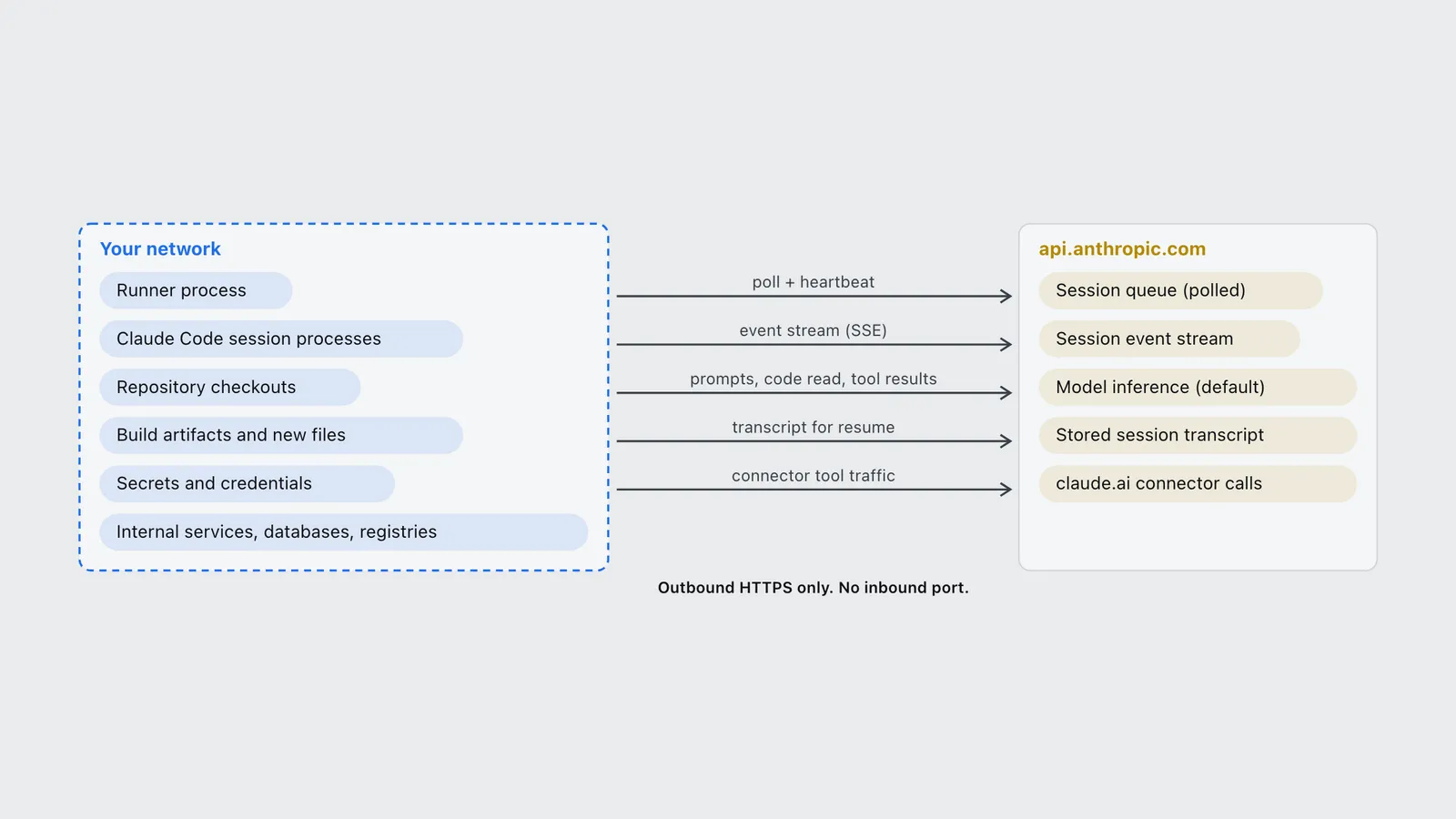
The session lifecycle has four steps, per the docs. Anthropic’s control plane puts the session on your environment’s queue. A runner with free capacity claims it and holds a lease. The runner clones the repository and spawns the child process, which streams events back over HTTPS. Each poll refreshes the lease and doubles as a heartbeat.
| Your network | Connection (outbound) | api.anthropic.com |
|---|---|---|
| Runner process | poll + heartbeat | Session queue (polled) |
| Claude Code session processes | event stream (SSE) | Session event stream |
| Repository checkouts | prompts, code read, tool results | Model inference (default) |
| Build artifacts and new files | transcript for resume | Stored session transcript |
| Secrets and credentials | connector tool traffic | claude.ai connector calls |
| Internal services, databases, registries |
Read the right-hand column carefully, because it is the part most write-ups skip. “Self-hosted” does not mean your code never leaves the building. The documentation says plainly that “the conversation itself, including prompts, responses, and tool results, goes to api.anthropic.com”, and that Anthropic stores the transcript so a session can resume from another device. Any file Claude reads goes into that conversation. Routing a runner’s inference to Amazon Bedrock or Google Cloud’s Agent Platform doesn’t change that either: the docs say session content still reaches Anthropic in the event stream.
What does stay put is the checkout, everything the build produces, every secret on the host, and the network calls sessions make to your internal systems. For a lot of compliance reviews, that’s the line that matters. For a Zero Data Retention organization it isn’t enough, and the feature is switched off: self-hosted environments are unavailable with ZDR or the HIPAA configuration.
A few mechanics shape how you size and run the fleet:
- One owner per runner. The first session a runner claims locks it to that user’s account, and it then runs only that user’s sessions, up to
--capacity. So the minimum fleet size is the number of people active at once, not the number of sessions. - Exit on drain. At the default
--drain-grace-sec 0, a runner exits when its sessions finish, so an orchestrator can restart it on a clean disk for the next owner. This is a feature: no code leaks between users without anyone deleting files. - Lease timeout. If a runner stops polling, its lease lapses after about 60 seconds, and the server can take “a few minutes and sometimes longer” to requeue the session elsewhere.
- Resumed sessions start from a fresh clone. Unpushed work is lost unless you set
--push-outcome-on-release, per the production deployment guide.
Fixed fleet or on-demand runners?
A fixed fleet is a set number of always-on runners, for example a Kubernetes Deployment. It’s simple, but the environment secret sits on every host that runs user code.
On-demand mode is the one to use in production. You run claude self-hosted-runner orchestrator on a separate host that never runs sessions. It polls for sessions queued with no runner free and calls your spawn-runner hook, which submits a Kubernetes Job, an EC2 instance or a Nomad dispatch. Each spawned runner gets a single-use work order instead of the environment secret, per the session customization docs. The orchestrator is stateless, so you can run two replicas for availability.
What are the use cases in late-2026 agentic workflows?
Anthropic’s own pitch names three reasons to self-host: network access, custom tooling and compliance. It also says most teams are “better served by Anthropic-hosted environments.” Believe that second line. If none of the rows below describes you, hosted cloud sessions do the same job with no fleet to run.
| Use case | Why the runner fits | Why GitHub Actions might be enough |
|---|---|---|
| Debugging against an internal staging database or service | Sessions call it from inside your network; nothing is exposed to the internet | Only if the Action runs on a self-hosted Actions runner with the same reach |
| Repos that need a heavy or licensed toolchain (embedded SDKs, internal CLIs, a private package registry) | Bake it into the runner image once; every session starts ready to build | Same, if you maintain a custom Actions runner image |
| Fixing failing CI from a phone | Start a session from the mobile app; it runs on your hardware with your caches | No: Actions has no conversation to steer |
| Scheduled maintenance (dependency bumps, flaky-test triage) | Routines can target a self-hosted environment | Yes: a cron-triggered workflow with a prompt input does this well |
| Turning an issue into a pull request on demand | Works, but a developer has to start the session | Yes: this is what @claude mentions are built for |
| Automatic review on every PR | Not supported yet: Code Review sessions don’t route to self-hosted environments | Yes, with the review workflow, or Anthropic’s managed Code Review |
The one named customer in Anthropic’s announcement is Faire, whose engineering team uses it to generate pull requests, help fix CI issues and respond to developer workflow events, with compute that scales on demand. That is the on-demand pattern from the previous section, used where an event-driven Action would have been the obvious tool a year ago.
The broader shift is that “agentic workflow” in late 2026 means sessions that outlive the laptop. Routines fire on a schedule, sessions start from a phone and get finished at a desk, and Claude Tag sessions start from a Slack channel. The runner is how that work runs next to your private systems instead of in Anthropic’s sandbox. The six workflow patterns behind this are in the best Claude Code agentic workflows.
What does a self-hosted runner cost?
Sessions on a self-hosted environment use your organization’s Claude Code usage “the same way sessions in Anthropic-hosted environments do,” per the docs. There is no runner licence fee. Your costs are compute and people.
For compute, the production guide’s starting point per session is 4 GiB of memory (request and limit equal) and 2 CPUs requested with a 4-CPU limit. At the recommended one session per container, that’s one small VM-sized pod per active developer, plus whatever your builds and test suites need on top. Anthropic says to measure a representative build and raise the numbers from there.
The people cost is the one teams underestimate. Anthropic publishes no runner image, so your platform team builds one (the docs give a minimal Debian Dockerfile around the claude binary), pins versions, rotates the environment secret, runs the orchestrator, and watches the last_poll_age_seconds metric. Anthropic’s announcement says teams choosing this should “plan to staff engineering for setup and maintenance.”
GitHub Actions costs work the other way round. You pay per run in tokens or subscription usage, plus Actions minutes on GitHub-hosted runners. Plan allowances are in GitHub pricing plans and costs. Run the Action on your own Actions runner and that part of the bill disappears: GitHub’s Actions billing documentation says “GitHub Actions usage is free for self-hosted runners.”
How do you set up a self-hosted runner?
You need an Owner on a Team or Enterprise organization, cloud sessions turned on, and a Linux or macOS host with outbound HTTPS. The quickstart takes five steps:
- Turn it on. An Owner enables Allow self-hosted environments on the claude.ai Cloud environments admin page, and the GitHub connector.
- Create the environment there and copy the environment key. It’s shown once and expires after 365 days.
- Install Claude Code v2.1.224+ and git 2.24+ on the host. Check with
claude self-hosted-runner --help. - Start the runner, either with the guided
claude self-hosted-runner setupor manually:
(umask 077 && cat > /etc/claude/environment-secret)
claude self-hosted-runner \
  --environment-secret-file /etc/claude/environment-secret \
--base-dir /srv/claude-runner- Route a session. Start one at claude.ai/code and pick your environment. Send follow-ups from any terminal with
claude -p "your message" --cloud <session-id>.
Three things go wrong on the first try. The runner clones over HTTPS, so an SSH key alone won’t authenticate the clone. Authentication fails if the host clock is more than five minutes off. And the --base-dir must be a directory the runner owns outright, because it resets whatever it finds there.
What should you harden first?
The production guide opens with the sentence to put in front of your security team: a runner “executes arbitrary, model-directed code on your infrastructure on behalf of everyone who can dispatch a session to its environment.” And dispatch has no per-environment access control. Any member of your Anthropic organization can send a session to any of its environments.
The checklist, in the order the guide gives it, condensed:
- One session per container.
--capacity 1, the default drain grace, and a container or VM destroyed when the runner exits. - No broad credentials in the image. Mint push and API tokens per session from a wrapper script. Keep the host’s own
ghtoken orGH_TOKENout of reach, because Claude can use any GitHub credential a session can read. - Keep the environment secret off session hosts, which in practice means on-demand runners.
- Default-deny egress to the documented host list plus the internal services you choose. The default tool set already includes Bash, so shell commands reach the network without a prompt.
- Block the cloud metadata endpoint (
169.254.169.254) inside the session container. Subnet egress rules don’t catch it. - Set
--confine-repo-settings enforceso a repository’s committed settings can’t widen a session’s permissions.
One known gap: claude.ai connectors such as Slack or Linear are called from Anthropic’s side, not your runner, so that traffic never crosses your boundary. If it has to, run the equivalent tool as a local MCP server in the runner image.
Frequently asked questions
- Is a Claude Code self-hosted runner the same as a GitHub Actions self-hosted runner?
- No. A Claude Code self-hosted runner runs interactive Claude Code cloud sessions that developers start from claude.ai, the apps, the terminal or a routine. A GitHub Actions self-hosted runner runs CI jobs, which can include the Claude Code GitHub Action. Anthropic modelled its runner on the CI pattern, but the two register with different systems.
- Does a self-hosted runner keep my code away from Anthropic?
- Partly. Repository checkouts, build artifacts, secrets and files a session creates stay on your hosts. The conversation, including prompts, responses, tool results and any code Claude reads, goes to api.anthropic.com, and Anthropic stores the session transcript. Self-hosted environments are unavailable to Zero Data Retention organizations.
- Which plans can use Claude Code self-hosted environments?
- Team and Enterprise organizations, as a public beta that is off by default. An Owner turns it on in the Cloud environments admin page. Pro and Max users who want Claude Code running on their own machine can use Remote Control instead.
- Does a self-hosted runner cost extra?
- There is no runner fee. Self-hosted sessions draw on your Claude Code plan usage exactly like Anthropic-hosted sessions. You pay for the compute, which Anthropic suggests starting at 4 GiB of memory and 2 to 4 CPUs per session, and for the engineers who run the fleet.
- Can Claude Code Review run on a self-hosted runner?
- Not yet. Anthropic says Code Review and Claude Security sessions do not route to self-hosted environments, with support to follow separately. For automated PR review on your own hardware today, run the Claude Code GitHub Action on a self-hosted Actions runner.
- Can the runner run on Windows?
- No. The runner host must be Linux or macOS. On Windows infrastructure, run the runner inside a Linux container.
Sources
- Anthropic (2026). Run Claude Code sessions on your own compute. Claude blog (vendor announcement). https://claude.com/blog/run-claude-code-sessions-on-your-own-compute
- Anthropic (2026). Self-hosted environments. Claude Code documentation. https://code.claude.com/docs/en/self-hosted-environments
- Anthropic (2026). Self-hosted environments quickstart. Claude Code documentation. https://code.claude.com/docs/en/self-hosted-environments-quickstart
- Anthropic (2026). Deploy self-hosted environments to production. Claude Code documentation. https://code.claude.com/docs/en/self-hosted-environments-deploy
- Anthropic (2026). Customize sessions in self-hosted environments. Claude Code documentation. https://code.claude.com/docs/en/self-hosted-environments-configuration
- Anthropic (2026). Claude Code GitHub Actions. Claude Code documentation. https://code.claude.com/docs/en/github-actions
- Anthropic (2026). Remote Control. Claude Code documentation. https://code.claude.com/docs/en/remote-control
- Anthropic (2026). Routines. Claude Code documentation. https://code.claude.com/docs/en/routines
- GitHub (2026). GitHub Actions billing. GitHub Docs. https://docs.github.com/en/billing/concepts/product-billing/github-actions
- GitHub (2025). Update to GitHub Actions pricing. GitHub Changelog. https://github.blog/changelog/2025-12-16-coming-soon-simpler-pricing-and-a-better-experience-for-github-actions/