Claude Install as App: Ideas and Use Cases
Install as app turns Claude artifacts into Mac and Windows apps. Ideas sorted by the permission each needs, and what sharing and usage limits allow.
Claude’s Install as app, in beta on every plan since 24 November 2026, turns an artifact into a Mac or Windows app with its own icon and window. The best uses are small tools you open every day, and the permission an idea needs decides whether anyone else can run it.
That last point is the one most coverage skips. An installed app can be shared, but full computer access can only be granted to apps you made yourself, or, on Team and Enterprise, apps made inside your organization. A file organizer you build for yourself works. The same file organizer sent to a friend on a Pro plan can never get the access it needs. So the ideas below are grouped by the tier each one requires, starting with the ones that work for anyone.
What is Claude Install as App?
It is a share option on Claude artifacts, the interactive pages Claude builds in a conversation. Anthropic’s announcement, Turn artifacts into Mac and Windows apps (24 November 2026), describes the result: the artifact gets its own icon, opens in its own window instead of inside Claude, and updates automatically when the artifact is edited. You can share it, it can use Claude and your connectors, and it can ask to send notifications or sit in the menu bar or system tray.
The mechanism matters for what you build. The app is still an artifact. It runs on your Claude account, so there is nothing to package, sign or log into separately, and you need to be online and signed in to Claude to open it. Any time the app asks Claude something, that request is billed against your plan. Some artifact types cannot be installed, including Claude Docs, Slides and Sheets.
Availability, from the same announcement: beta on all plans in Claude for Mac and Windows. It is on by default for Team with full access off, off on Enterprise until an owner turns it on, and unavailable to HIPAA-ready organizations and hybrid deployments.
What can an installed Claude app do?
Anthropic defines three levels:
- Default. Installed apps “can only do what they’d be able to do in a browser.” That still covers a lot: forms, calculators, charts, drag-and-drop file reading, calls to Claude and data from your connectors.
- App permissions. The app can ask for features Claude tightly controls: always-on-top windows, global keyboard shortcuts, notifications, and a menu bar or tray item.
- Full computer access. The app can ask to “run programs and read, change, or delete your files without asking each time.”
Two rules sit on top. Permission covers only the current version, so “Claude asks again after every update, even your own edits.” And full access is limited to apps you made or, on Team and Enterprise, apps made by people in your organization. Team and Enterprise admins can switch app permissions and full access off for the whole org.
What should you build with it?
The test for a good idea: something you would open daily, that benefits from a window or menu-bar slot of its own, and that does not need Claude to run constantly in the background. Anthropic’s examples are a good calibration. Its announcement mentions a meeting prep page that pulls from calendar and email, and a tracker for orders that need to ship that day. Its staff built five demos: Linnet, “a full layered image editor”; Phosphor, “a file manager that looks made for a movie set”; Sift, which “sets up folder rules and uses Claude to keep your stuff organized”; Tern, “a terminal with Claude by your side to help and explain”; and Vitals, “a menu bar and tray app for peeking at your computer’s performance.”
The ideas below are this site’s suggestions, sorted by the tier each needs. None has been built or tested here; they are starting prompts.
| Tier | Actions |
|---|---|
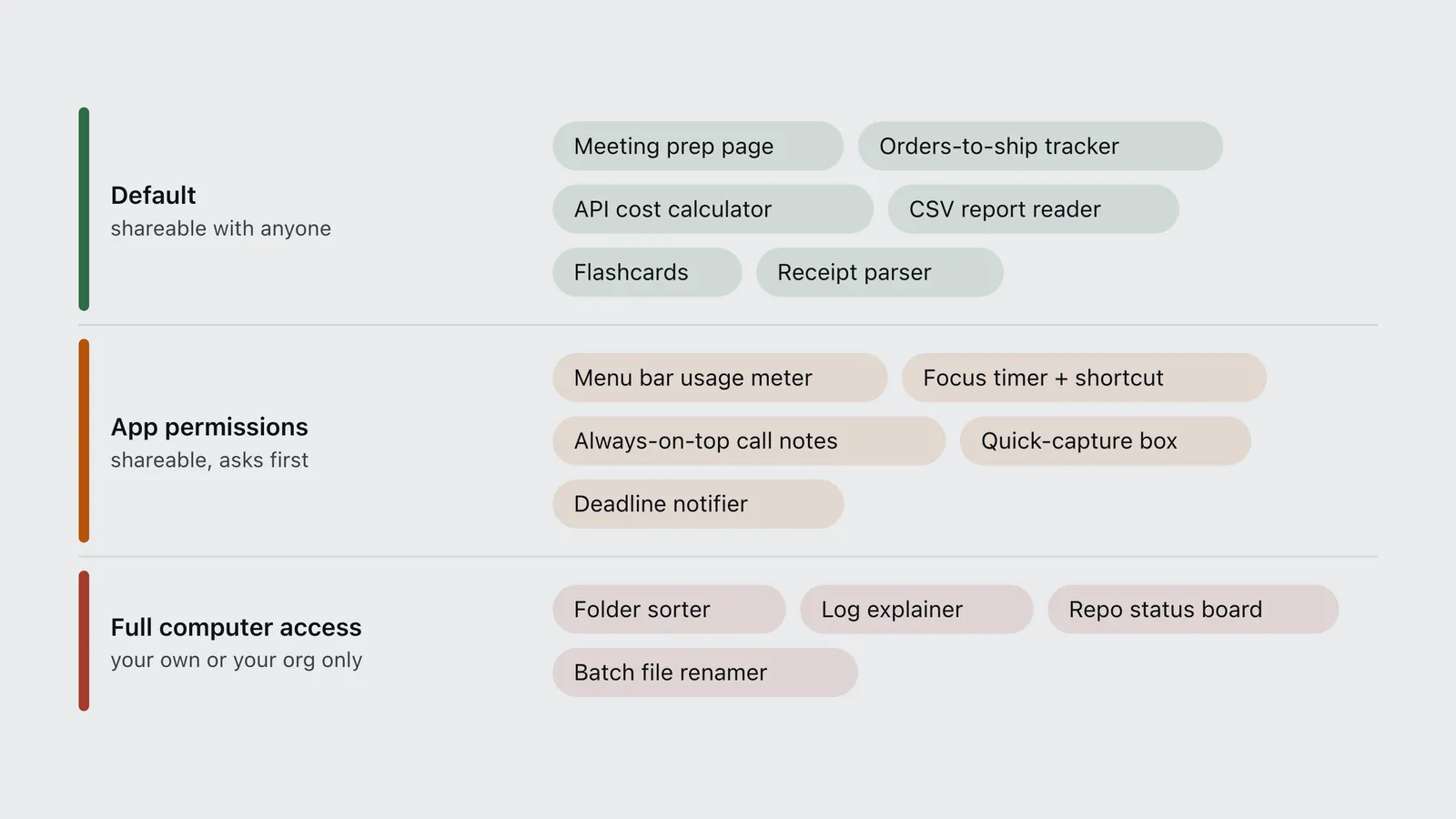
| Default (shareable with anyone) | Meeting prep page; Orders-to-ship tracker; API cost calculator; CSV report reader; Flashcards; Receipt parser |
| App permissions (shareable, asks first) | Menu bar usage meter; Focus timer + shortcut; Always-on-top call notes; Quick-capture box; Deadline notifier |
| Full computer access (your own or your org only) | Folder sorter; Log explainer; Repo status board; Batch file renamer |
Default tier: works for anyone you share it with
- Meeting prep page. Anthropic’s own example. Pull today’s meetings from a calendar connector and the related threads from email, then have Claude write a one-paragraph brief per meeting when you click it.
- Orders-to-ship tracker. Also Anthropic’s. A single window listing what must leave today, built on whatever connector holds your orders.
- API cost calculator. Paste a token count, pick a model, get the cost. Pair it with a fixed price table so it never needs to call Claude at all. The AI coding cost calculator on this site is the same idea as a web page.
- CSV report reader. Drop in a Search Console or analytics export and get the queries that moved, with a Claude summary on demand. Drag-and-drop file reading is something a browser can do, so it needs no extra permission.
- Flashcards or a study drill. Claude generates cards from notes you paste; the app keeps the deck. One of the oldest artifact patterns, now with a dock icon.
- Receipt or invoice parser. Drop a PDF, get a clean line-item table to paste into a spreadsheet.
App permissions: notifications, shortcuts and the menu bar
- Menu bar usage meter. A tray item showing how much of your Claude session window you have used today, based on what you log. Useful because installed apps draw from that same window.
- Focus timer on a global shortcut. Start and stop from anywhere with a key combination; a notification ends the block.
- Always-on-top call notes. A small floating window for notes during video calls, with a button that asks Claude to turn them into action items afterward.
- Quick-capture box. A global shortcut opens a one-line input; Claude files the note into the right list.
- Deadline notifier. Reads due dates from a connected task tool and sends a notification the morning something is due.
Full computer access: only for your own apps
- Folder sorter. The Sift pattern: rules for a Downloads folder, with Claude deciding where ambiguous files go.
- Log explainer. The Tern pattern applied to one job: point it at a log file, ask what went wrong.
- Repo status board. Runs git commands across your projects and shows which have uncommitted work or are behind their remote.
- Batch file renamer. Claude proposes names from file contents, you approve the list, the app renames.
If you build tools for Claude Code itself, the Claude Code dashboard mods and the wider Claude Code mods directory cover the terminal-side equivalents.
Which ideas work when you share the app?
Anything at the first two tiers. A shared app can still ask the person installing it for notifications, shortcuts or a menu bar slot, and they decide. Full computer access is different: on Free, Pro, Max and Ultra, an app made by anyone else cannot be granted it, and on Team and Enterprise only apps made inside the organization can, and only if the admin has not switched full access off.
Two consequences for anyone building to share. First, design the shareable version at the app-permissions tier or below, and keep file-system features in a private copy. Second, every edit you push triggers a new permission prompt for every user, so batch changes rather than shipping small fixes one at a time.
Does an installed Claude app cost extra?
There is no separate fee. The announcement says “requests the app makes to Claude count toward your plan’s usage limits,” and Anthropic’s help article on how usage and length limits work says usage across claude.ai, Claude Code and Claude Desktop draws from the same limit, with a session limit that resets every five hours and a weekly limit on paid plans.
That changes how to design an app that calls Claude. A meeting-prep page that asks Claude once when you open it costs about the same as one chat message. A tray app that asks Claude every 15 minutes makes 96 requests a day against the same five-hour window your Claude Code sessions use. The cheaper pattern is to fetch data on a timer, which costs nothing against your plan, and call Claude only when you click. How plan limits compare to paying per token is covered in the Claude Duet pricing and usage limits breakdown.
Is Claude Install as App safe?
At the default tier, it is as safe as visiting a web page. The risk sits at full computer access, and Anthropic is direct about it: “Anthropic doesn’t review apps before you install them, so only give full access to apps you trust.”
Three things limit the damage. Full access cannot be granted to apps from outside your organization. Permission resets on every update, so an app you approved cannot silently gain new file powers through an edit. And admins on Team and Enterprise can turn full access off entirely.
The gap Anthropic names itself: “If part of an app comes from another website, that part can change without Claude asking you again.” An app that loads a script from an outside host can change behavior without a new prompt. For any app you give full access, prefer one whose code is entirely inside the artifact.
How to install a Claude artifact as an app
- Update Claude for Mac or Windows to the latest version.
- Ask Claude to build the artifact, and use it in the conversation until it does what you want. Editing is cheaper before installing, since every update after install re-prompts for permissions.
- Open the artifact and choose Install as app from the Share menu.
- Grant only the permissions the app needs. Leave full computer access off unless the idea requires it.
- To share it, send it to the people who should use it. They decide their own permissions when they install.
Common questions
- Which Claude plans can use Install as app?
- All plans, in beta, in Claude for Mac and Windows. It is on by default for Team with full access off, off on Enterprise until an owner turns it on, and not available to HIPAA-ready organizations or hybrid deployments.
- Do installed Claude apps use my usage limits?
- Yes. Anthropic says requests the app makes to Claude count toward your plan's usage limits, which are shared with claude.ai, Claude Code and Claude Desktop. Apps that only display data without calling Claude do not draw from them.
- Can I give full computer access to an app someone shared with me?
- Only on Team and Enterprise, and only if someone in your organization made it and your admin allows full access. On other plans, full access is limited to apps you made yourself.
- Do installed Claude apps work offline?
- No. Anthropic says you need to be online and signed in to Claude to open an app.
- Which artifacts cannot be installed as apps?
- Anthropic lists Claude Docs, Slides and Sheets among the artifacts that cannot be installed.
Sources
- Anthropic (2026). Turn artifacts into Mac and Windows apps. Claude resources, 24 November 2026. https://claude.com/resources/articles/install-as-app
- Anthropic (2026). How do usage and length limits work?. Claude Help Center. https://support.claude.com/en/articles/11647753-how-do-usage-and-length-limits-work