Do You Need Inngest With the Vercel AI SDK?
Not for chat. For agents that outlive a 300-second function, yes, or AI SDK 7 WorkflowAgent instead. Where TanStack AI fits, and what durability costs per run.
The three names in this question do different jobs, which is why the answer is “it depends on how long your agent runs” rather than “pick one.” The Vercel AI SDK and TanStack AI run the model loop: call the model, run tools, stream tokens to the browser. Inngest runs the job around that loop: it saves each step, retries the one that failed, and lets a run sleep for an hour without holding a server open.
You only need the second layer once the first one can’t finish inside a single request.
What does each tool actually do?
| Tool | Cost to start | Status (October 8, 2026) | Layer | Durable on its own? |
|---|---|---|---|---|
| Vercel AI SDK 7 | Free, open source | Stable; ai 7.0.133 |
Model calls, tool loop, UI streaming | Only through WorkflowAgent |
| TanStack AI | Free, open source | Release candidate since August 21, 2026; @tanstack/ai 0.65.1 |
Model calls, tool loop, AG-UI streaming | Streams resume; jobs do not |
| Inngest | Free up to 50,000 executions a month; Pro $99/mo | Managed service; self-hostable since 1.0 | Durable steps, retries, waits, scheduling | Yes |
| Vercel Workflows | 50,000 events a month on Hobby, then $0.02 per 1,000 | Generally available since April 16, 2026 | Durable steps (backs WorkflowAgent) | Yes |
| Trigger.dev | $5 of free credits a month; Hobby $10/mo | v4.7.3, October 6, 2026 | Long-running durable tasks | Yes |
Adoption is lopsided. npm counted 34.5 million downloads of the ai package in the week to October 4, 2026, against about 630,000 for @tanstack/ai. Both are real projects; one is the default.
When do you need Inngest with the Vercel AI SDK?
Picture an agent that researches 40 companies. Each one is a model call, two tool calls and a write to your database. Halfway through, the function hits its time limit and dies.
On Vercel that limit is concrete. Vercel’s function limits are 300 seconds on Hobby, and 300 seconds by default with an 800-second maximum on Pro and Enterprise (1,800 seconds in beta). The same page says plainly: “For workloads that require unlimited execution time, use Vercel Workflows.”
Without a durable layer, a restart begins at company one and pays for every model call again. With one, each finished step is saved, and the retry starts at the step that failed. Inngest’s execution docs describe it as replaying your handler with saved step results “so completed work does not run again.”
You need that layer when any of these is true:
- The agent outlives one function call. Long tool loops, big fan-outs, crawls.
- It has to wait. A human approval, a webhook, a scheduled retry tomorrow.
- A repeat is expensive or unsafe. Re-sending an email or re-charging a card is worse than re-paying for tokens.
- You run many of them. Concurrency limits and retries per step matter once agents run in the background for many users.
If none of those apply (a chatbot, a one-shot summary, a form that calls a model once), the AI SDK on its own is the right amount of machinery.
Does AI SDK 7’s WorkflowAgent replace Inngest?
For a lot of teams, yes. Vercel’s AI SDK 7 announcement (June 25, 2026) added WorkflowAgent “for durable, resumable agent execution that survives process restarts, deploys, interruptions, and delayed approvals.” That is the job Inngest was doing for AI SDK users, now inside the SDK.
Three details decide whether it replaces Inngest for you:
- It needs the Workflow runtime. The WorkflowAgent docs state that
@ai-sdk/workflow“requires Workflow 5.” That is Vercel’s Workflow DevKit, the same engine as Vercel Workflows. - It is not locked to Vercel. The Workflow deployment docs say the same code runs locally, on Vercel, or “on any infrastructure using Worlds.” Vercel’s general-availability post says it maintains a Postgres World that customers run in production.
- Its step limit is different. The AI SDK loop-control docs say
ToolLoopAgent“stops after 20 steps” by default, whileWorkflowAgent“does not apply a default step limit” on streams. A durable agent that never stops is a bill that never stops, so setstopWhenyourself.
Inngest still earns its place in a few cases. It is event-driven, so an agent can start from a webhook, a cron or another function and wait on an event with step.waitForEvent. Its AI step helpers wrap AI SDK calls directly: step.ai.wrap “wraps other AI SDKs (OpenAI, Anthropic, and Vercel AI SDK) as a step,” and step.ai.infer offloads the model request so “you don’t pay for function execution while waiting.” And it runs anywhere your code does, not only where a Workflow World exists.
One licensing note for teams that plan to self-host. Inngest’s repository puts the server under the Server Side Public License with delayed publication under Apache 2.0. Self-hosting is supported, but the server is source-available rather than open source in the OSI sense. The SDKs are Apache 2.0.
Where does TanStack AI fit?
TanStack AI sits in the same layer as the AI SDK, not the Inngest layer. It calls models, runs tools and streams results to the browser, with stricter per-model types and a smaller bundle. If you’re comparing the two SDKs, the TanStack and Vercel teams have each published a comparison of their own projects. They’re useful, but both are vendor pages.
Here is what matters for durability, as of October 8, 2026:
- It is a release candidate, not 1.0. TanStack’s RC announcement (August 21, 2026) says the project “officially enters the release candidate phase,” and that a stable v1 is “now very close.” npm still shows 0.x.
- Orchestration is future work. The same post lists “agent workflows and orchestration, which will unlock capabilities such as running agents in parallel, scheduling recurring agent jobs” as what comes next. An experimental orchestration build from May 2026 was a pull-request build, not an npm release.
- Streams are durable; jobs are not. TanStack AI’s durability adapters persist stream chunks, so a reader who reloads the tab can pick the answer back up. That is resumable streaming. It doesn’t retry a failed tool call or wait two hours for an approval.
- It speaks AG-UI. TanStack adopted the AG-UI event protocol for its streams, so a TanStack frontend can sit in front of other AG-UI agent backends. Generative UI frameworks ride the same stream: OpenUI sends its components over AG-UI from LangChain and Mastra agents.
So the practical pattern today is TanStack AI in the app, and a durable runner behind it for anything long. There was no official TanStack AI example for Inngest or Trigger.dev in the TanStack AI repository on October 8, 2026, so expect to wire that yourself. If you want to try TanStack AI against free models first, the guide to testing LLM apps without paying for tokens uses it with local and free-tier models.
What does durability cost per agent run?
Less than one wasted run. That is the whole argument, and the numbers make it hard to dispute.
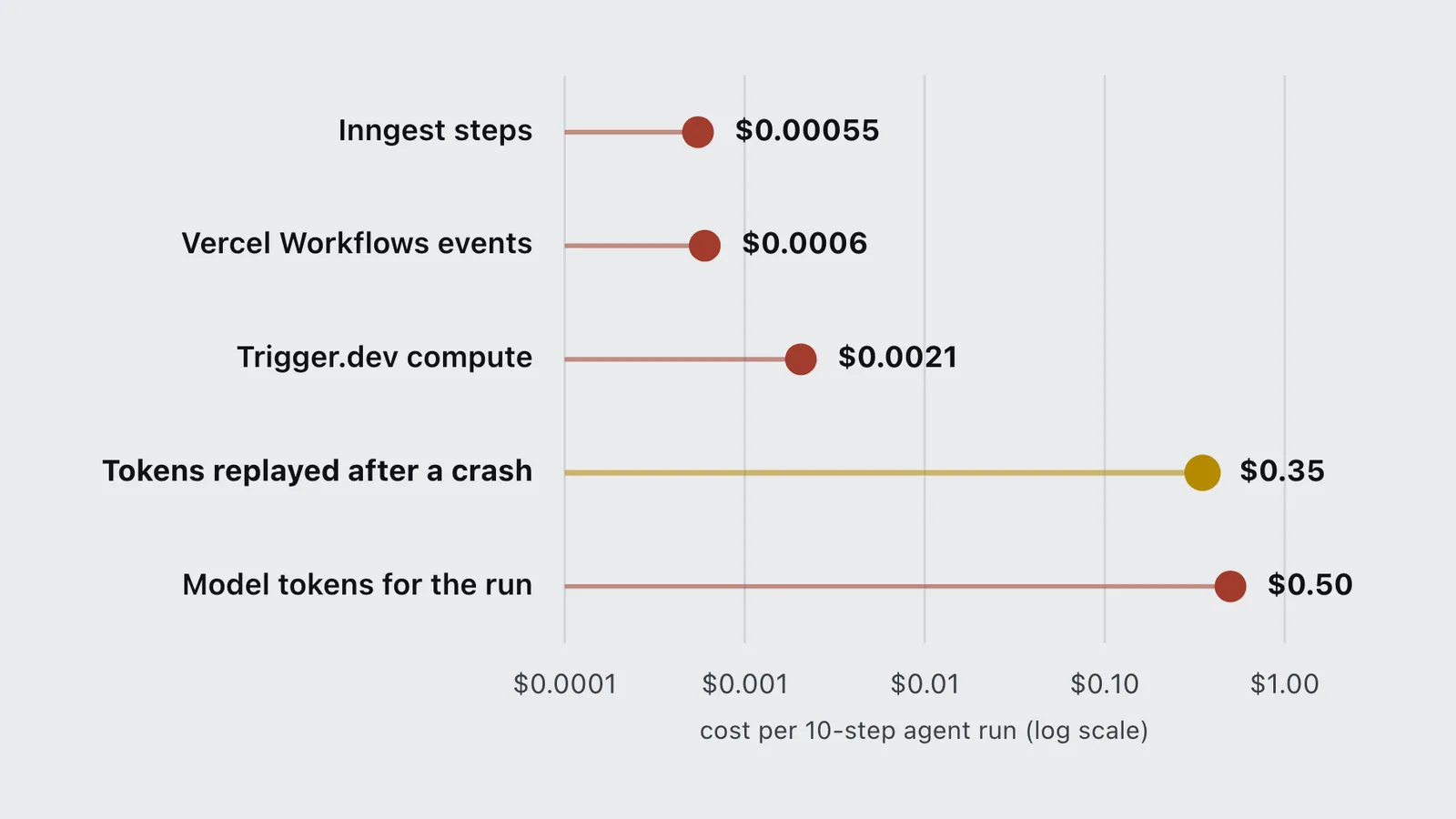
Take a 10-step agent on Claude Sonnet 5.5, at the $2 input and $10 output per million tokens recorded in the AI model price tracker. Assume each step sends 20,000 input tokens and gets 1,000 back: $0.05 a step, $0.50 a run. Now price the durable layer for the same run from each vendor’s pricing page:
- Inngest: Inngest’s pricing counts “1 for the run” plus one per step, so 11 executions. At the Pro overage rate of $0.00005, that is $0.00055.
- Vercel Workflows: Vercel’s Workflow pricing says a normal step “produces three events,” billed at $0.02 per 1,000. Ten steps is at least 30 events, or $0.0006, plus normal function compute.
- Trigger.dev: Trigger.dev’s pricing charges $0.000025 per run plus $0.0000338 a second on the default small machine. At 60 seconds of active run time, that is about $0.0021.
| Tool | Cost per task | Multiple of baseline |
|---|---|---|
| Inngest steps | $0.00055 | - |
| Vercel Workflows events | $0.0006 | - |
| Trigger.dev compute | $0.0021 | - |
| Tokens replayed after a crash | $0.35 | - |
| Model tokens for the run | $0.50 | - |
One crash at step 8 re-bills seven model calls, $0.35, which pays for about 636 runs of Inngest steps at the overage rate. The durable layer is cheap insurance on any agent that does real work.
Free tiers stretch further than you might guess for this workload. Inngest’s 50,000 free executions cover about 4,500 of these 10-step runs a month. Vercel’s Hobby allowance of 50,000 events covers at most about 1,600, because each step costs three events. Trigger.dev’s $5 of free credit covers roughly 2,400 at 60 seconds each. Those are the numbers to run on your own step count before you choose.
How does Trigger.dev compare for AI agents?
Trigger.dev takes the opposite shape to Inngest. Instead of splitting work into steps that each fit a serverless call, it runs your task as one long process on its own machines, and checkpoints it during waits. Its AI chat docs say chat.agent “runs every conversation as a single long-lived Trigger.dev task,” and it plugs into the AI SDK’s useChat.
That suits agents that are one long loop rather than a chain of events. The repository is Apache 2.0 and self-hostable, though Trigger.dev’s self-hosting guide notes that some features, checkpoints among them, are Cloud-only. For the general idea of durable execution and how a database-backed library compares with a dedicated service, see the DBOS durable execution explainer.
How to get started
- Ship the agent on the AI SDK alone first. Use
ToolLoopAgentand keep its 20-step default until you know your real step count. - Watch for the three signals: function timeouts, runs that need to wait on a person or event, and side effects you can’t safely repeat.
- On Vercel, try WorkflowAgent next. Install Workflow 5 and
@ai-sdk/workflow, move your tools across, and setstopWhenexplicitly, since streams have no default limit. - Off Vercel, or event-driven, use Inngest. Wrap each model call in
step.ai.wrap(orstep.ai.inferto stop paying for idle compute) and each tool call instep.run. - Price it on your own step count. Count steps, not runs: every runner here bills by the step, the event or the second. The AI agent production cost guide has the token side of that model.
Frequently asked questions
- Do you need Inngest with the Vercel AI SDK?
- Not for chat or single requests. You need a durable layer such as Inngest when an agent runs longer than a Vercel function allows (300 seconds on Hobby, 800 on Pro), waits for a person or event, or must not repeat a side effect after a crash. AI SDK 7 WorkflowAgent is the built-in alternative.
- Is WorkflowAgent the same as Inngest?
- Both make agent steps durable and resumable. WorkflowAgent runs on the Vercel Workflow runtime, on Vercel or self-hosted through Worlds such as Postgres. Inngest is a separate event-driven service that also wraps AI SDK calls with step.ai.wrap and step.ai.infer.
- Is TanStack AI production ready?
- TanStack AI entered release candidate on August 21, 2026, and 1.0 had not shipped as of October 8, 2026. Its agent workflows and orchestration are planned as later work, so production agents that need durability should pair it with a runner such as Inngest, Vercel Workflows or Trigger.dev.
- How much does Inngest cost for an AI agent?
- Inngest bills one execution per run plus one per step. A 10-step agent uses 11 executions. The free tier includes 50,000 executions a month, Pro is $99 a month with 1 million, and Pro overage runs from $0.00005 down to $0.000015 per execution.
- Can TanStack AI and the Vercel AI SDK be used with Trigger.dev?
- Trigger.dev documents chat.agent with the AI SDK useChat hook. There was no official TanStack AI example for Trigger.dev or Inngest as of October 8, 2026, so TanStack AI users wire the runner themselves.
Sources
- Vercel (2026). AI SDK 7. Vercel blog. https://vercel.com/blog/ai-sdk-7
- Vercel (2026). Loop control. AI SDK documentation. https://ai-sdk.dev/docs/agents/loop-control
- Vercel (2026). WorkflowAgent. AI SDK documentation. https://ai-sdk.dev/v7/docs/agents/workflow-agent
- Vercel (2026). A new programming model for durable execution. Vercel blog. https://vercel.com/blog/a-new-programming-model-for-durable-execution
- Vercel (2026). Deploying. Workflow DevKit documentation. https://workflow-sdk.dev/docs/deploying
- Vercel (2026). Workflows pricing. Vercel documentation. https://vercel.com/docs/workflows/pricing
- Vercel (2026). Functions limitations. Vercel documentation. https://vercel.com/docs/functions/limitations
- Inngest (2026). Pricing. https://www.inngest.com/pricing
- Inngest (2026). AI orchestration with step.ai. Inngest documentation. https://www.inngest.com/docs/features/inngest-functions/steps-workflows/step-ai-orchestration
- Inngest (2026). How functions are executed. Inngest documentation. https://www.inngest.com/docs/learn/how-functions-are-executed
- Inngest (2026). inngest/inngest repository and license. GitHub. https://github.com/inngest/inngest
- Trigger.dev (2026). Pricing. https://trigger.dev/pricing
- Trigger.dev (2026). AI chat overview. Trigger.dev documentation. https://trigger.dev/docs/ai-chat/overview
- Trigger.dev (2026). Self-hosting overview. Trigger.dev documentation. https://trigger.dev/docs/self-hosting/overview
- TanStack (2026). TanStack AI release candidate. TanStack blog. https://tanstack.com/blog/tanstack-ai-rc
- npm (2026). Download counts for
aiand@tanstack/ai, week ending October 4, 2026. https://api.npmjs.org/downloads/point/last-week/ai