What Is REA? Reverse Engineer Apps With AI Agents
REA is a free MIT MCP server that lets Claude Code and Codex reverse engineer binaries, Electron apps and APKs. The real package, setup, rivals and limits.
REA is an open-source tool that connects an AI coding agent to reverse-engineering software over the Model Context Protocol (MCP). You ask your agent how a feature in some app works. REA opens the binary or bundle, decompiles and traces the relevant code, and hands back pseudocode, call references and the evidence behind each finding.
It is also one of the fastest-growing repos of the year, which is why so much of what is written about it is already out of date.
What is REA?
REA is a TypeScript MCP server and command-line tool, published on npm as rea-agents, that gives coding agents reverse-engineering abilities. The morluto/rea README calls it “one MCP for reverse engineering across binaries, applications, and runtime behavior.” It is MIT-licensed and free; you pay only for the agent’s model.
The pitch on rea.tools is blunt: see a feature you like in someone else’s app, then understand how it works “down to the binary level” and build your own version. That is the use case driving the hype. A developer who once needed weeks in a disassembler can now point Claude Code at an Electron app and ask where the clipboard handling lives.
Some numbers, read from the GitHub API on October 10, 2026: 61,899 stars, 12,470 forks, a repo created April 14, 2026, and a push the same morning. The README already celebrates passing 50,000 stars.
How does REA work?
Think of REA as a translator between two worlds that never had a shared language.
On one side is your agent. It is good at reading code and reasoning about it, but it can’t open a Mach-O file or a minified Electron bundle on its own. On the other side are disassemblers such as Hopper, Ghidra and IDA. They are excellent at turning machine code into readable pseudocode, but they were built for a human clicking through a GUI.
REA sits between them as an MCP server. When the agent calls a tool such as open_binary, REA starts the right engine (it launches Hopper itself when an operation needs it), runs the analysis, and returns structured results. Those results are function lists, pseudocode, strings, cross-references, IPC routes, and an explicit list of what it could not determine. The agent reads that output, decides what to look at next, and repeats. When it understands the feature, it writes and tests an implementation in your project.
Three design choices matter in practice:
- Local by default. The README states that “REA analyzes targets locally.” The caveat is in the next sentence: your agent still receives the tool results, and “its model provider has its own data policy.” Decompiled code from a proprietary app does go to Anthropic or OpenAI if that is the model you use.
- Evidence, not guesses. Each result carries the evidence and the unknowns behind a conclusion, which keeps an agent from inventing a plausible-sounding answer.
- A skill ships with it. Setup installs an agent skill (for Claude Code, into
~/.claude/skills) that tells the agent when to reach for REA and how to sequence an investigation. If you have read how Claude skills, agent skills and MCP servers differ, REA is the rare tool that ships both halves together.
What can REA analyze?
More than the headlines suggest. Most coverage says “binaries and APKs,” but the target table in the README runs to twelve rows. The ones most readers care about:
| Target | What you need besides REA | What comes back |
|---|---|---|
| Native binaries (Mac, Linux, Windows apps) | Hopper, Ghidra or IDA | Pseudocode, assembly, strings, symbols, calls |
| JavaScript and Electron apps | Nothing (Node.js and npm only) | Modules, imports, source maps, routes, IPC |
| .NET assemblies | Nothing (static only) | Metadata, CIL instructions, native dependencies |
| Websites | A Chrome-family browser | Page structure, scripts, network observations |
| Android APKs | Headless JADX and a full JDK 17+ | Manifest, classes, decompiled methods |
| Firmware | Binwalk or Unblob, on Linux | Regions, extracted files, native handoffs |
| EVM smart-contract bytecode | A local hex file | Function selectors, inferred arguments |
REA itself needs Node.js 22.19+, 24.11+ or 26+. The installation guide lists the supported native hosts as macOS 12+ and recent Ubuntu, Fedora, Nobara, Arch and CachyOS. Windows works for JavaScript and .NET targets, but native Ghidra analysis on Windows is labelled an “experimental P0 boundary.”
The EVM row is the sleeper for anyone in crypto. Point REA at a deployed contract’s bytecode and an agent can recover its function selectors without verified source on Etherscan.
Which REA package is the real one?
rea-agents. Search results still surface three different answers, and two of them are wrong.
The npm registry shows rea-agents at version 6.3.0, with 19,743 downloads from September 9 to October 8, 2026. A second package, @morluto/rea, stopped at 0.2.1 and drew 114 downloads in the same window. Several directory listings still give the scoped name. A 2026 news write-up on byteiota cites version 4.1.0 and “41 native binary inspection tools,” which was a fair snapshot for about a day.
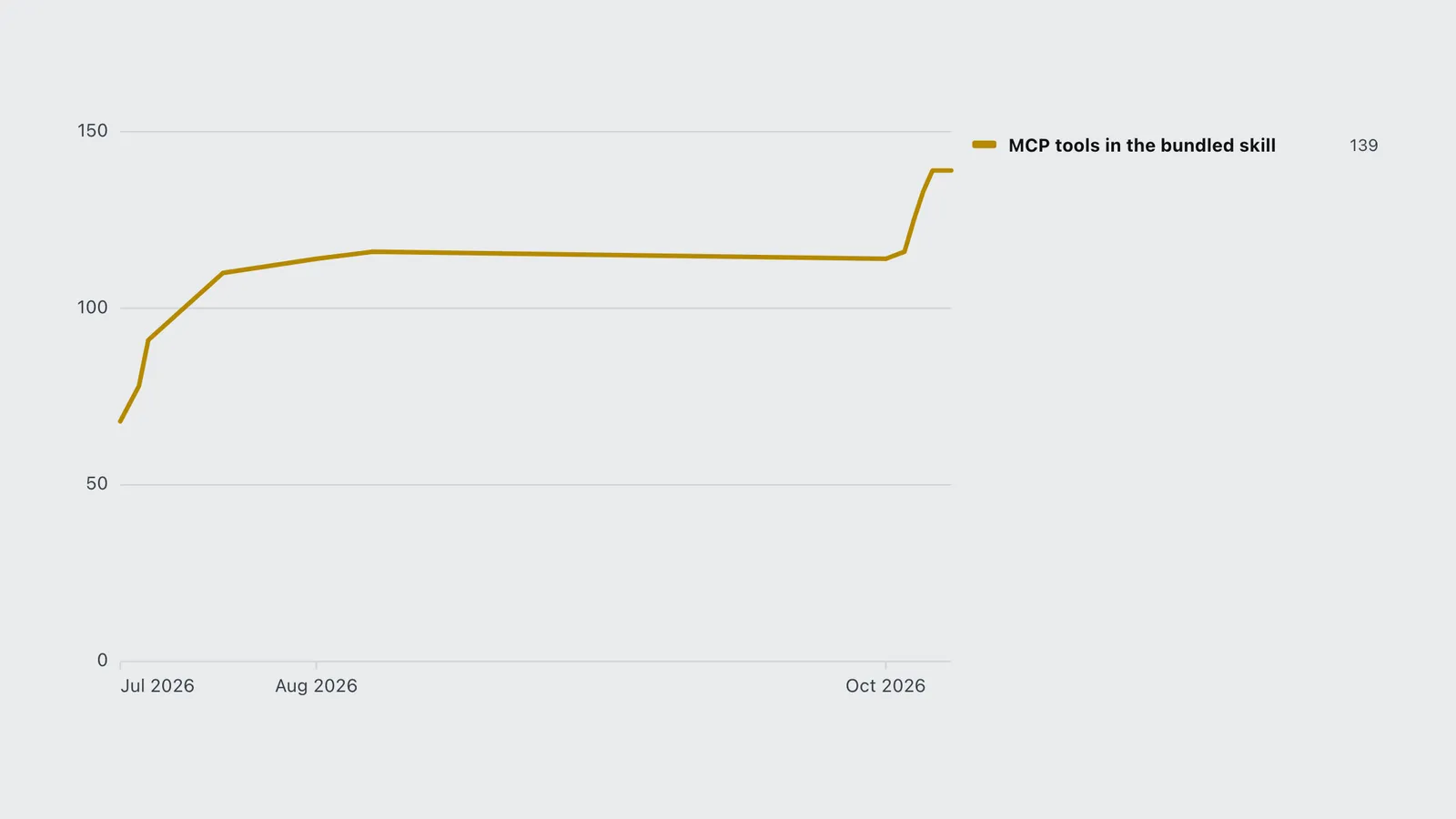
The tool count is where listings disagree most (41, 42 and 70 all circulate). REA doesn’t publish a static number; its docs say the catalog is generated per build. But every npm release bundles the agent skill, and that file’s header records a tool_count. Extracting it from each published tarball gives the real curve:
| Date | MCP tools in the bundled skill |
|---|---|
| 2026-07-13 | 68 |
| 2026-07-15 | 78 |
| 2026-07-16 | 91 |
| 2026-07-24 | 110 |
| 2026-08-03 | 114 |
| 2026-08-09 | 116 |
| 2026-10-03 | 114 |
| 2026-10-05 | 116 |
| 2026-10-06 | 125 |
| 2026-10-07 | 133 |
| 2026-10-08 | 139 |
| 2026-10-09 | 139 |
| 2026-10-10 | 139 |
So any article quoting a tool count is quoting a date. As of October 10, 2026 it is 139.
The download curve explains why the confusion exists. Per the npm downloads API, rea-agents averaged about 16 downloads a day at the start of October. It hit 418 on October 3, 4,048 on October 5 and 9,000 on October 8. Most of what has been written about REA was written during that week, about versions that no longer exist.
Why do REA updates keep breaking things?
Because the project chose to. Its release-please config sets "versioning": "always-bump-minor". Breaking changes therefore land in minor releases, not only in major ones. The CHANGELOG lists a “BREAKING CHANGES” section under 6.1.0, 6.2.0 and 6.3.0, all published within about 24 hours on October 9 (UTC). Version 6.3.0 alone lists eight, from capture formats to how JavaScript graph results store evidence.
For someone chatting with an agent, this barely matters. The skill and server update together, and the README’s advice is simply “Keep your installation up to date.”
It matters a lot if you script REA. Version 6.0.0, for example, made every MCP filesystem input require an absolute path, so open_binary({"path":"./app"}) stopped working overnight. A ^6.0.0 range in a CI job would pull in 6.1, 6.2 and 6.3 and every break with them. Pin an exact version (npx [email protected] ...) and upgrade on purpose.
Does the DX-Ball showcase hold up?
The headline case study is honest about its limits, which is more than most launch demos manage.
The DX-Ball showcase targets one function, 0x00406400 in DXBALL.EXE 1.07, which converts a brick’s horizontal position into a left-right sound pan. The reconstructed C passes 3,205 behavior cases against the original x86 function. Recompiling it with the period’s Visual C++ 4.0 matches 63 bytes of the original machine code “after applying the reviewed relocations and checking the referenced constants.”
Read the fine print, though:
- The first decompiler output was wrong. It showed
FUN_00406400(void), a function with no input. The agent had to read the raw instructions and the caller to discover the integer argument. That is the realistic workflow: the decompiler gets you close, and the agent’s reasoning closes the gap. - It is one helper function. The wider reconstruction repo reports 55 maintained C functions, 33 of them byte-matching. The page also says the playable game is not finished. For the wider picture, see which games AI has decompiled, from Melee to Snowboard Kids.
- It was recorded on REA 4.1.0. Five releases since then have each listed breaking changes.
The verdict: the showcase proves REA can produce byte-exact reconstructions of small, well-bounded functions with a capable agent driving. It doesn’t show a whole app being cloned, and it doesn’t claim to.
How does REA compare with GhidraMCP and IDA MCP?
REA is not the first reverse-engineering MCP. Ghidra and IDA have had MCP bridges since March 2025, and Hex-Rays now ships its own. Prices first, because the engine is usually the real cost:
| Tool | Cost to start | Runs on | Engines | Targets beyond native code |
|---|---|---|---|---|
| REA | Free (MIT); Ghidra free, Hopper from $99 | macOS, Linux; Windows partial | Hopper, Ghidra, IDA | JS/Electron, .NET, APK, web, firmware, EVM |
| GhidraMCP | Free (Apache-2.0) | Wherever Ghidra runs | Ghidra only | None |
| ida-pro-mcp | Free (MIT) plus IDA Pro | Wherever IDA runs | IDA Pro 8.3+ only | None |
| Hex-Rays IDA MCP | Free (MIT) plus IDA 9.4+ | Wherever IDA runs | IDA only | None |
The engine prices: Hopper costs $99 for a personal license with a year of updates. IDA runs from $365 a year for IDA Home to €8,599 a year for Pro Ultimate, billed annually, and IDA Free is limited to x86. Ghidra, from the NSA, is free.
A few things the comparison table can’t show:
- GhidraMCP has 10,855 stars but hasn’t shipped a release since version 1.4 in June 2025, per its GitHub releases. REA’s own Ghidra provider was verified against the current Ghidra 12.1.4.
- ida-pro-mcp now tells its own users, at the top of its README, to use “the Official Hex-Rays IDA MCP Server instead.” That server appeared in August 2026 and needs IDA 9.4 or newer.
- REA and ida-pro-mcp are not strict rivals. REA’s IDA provider talks to ida-pro-mcp’s headless supervisor under the hood. Headless IDA on Linux and macOS is not yet verified there.
Which should you pick? If your target is an Electron, JavaScript, .NET or Android app, REA is the only option in this table, and it needs no paid engine. If you are a security researcher who already lives in IDA Pro and only touches native code, the official Hex-Rays server is the tighter fit. If you want free native decompilation today, REA plus Ghidra beats a GhidraMCP build that hasn’t been updated in 16 months. For the wider field of servers worth installing, see the best MCP servers guide.
Is it legal to reverse engineer an app with REA?
Sometimes. REA doesn’t change the law, and its README puts the burden on you: “You are responsible for obtaining any required authorization and complying with applicable laws.”
In the United States, 17 U.S.C. §1201 makes it illegal to “circumvent a technological measure that effectively controls access” to a copyrighted work. Subsection (f) carves out an exception for someone who “has lawfully obtained the right to use a copy” and circumvents only “for the sole purpose of identifying and analyzing those elements of the program that are necessary to achieve interoperability.” Studying how a competitor’s feature works so you can copy it is not obviously interoperability.
Two more layers sit on top. Most commercial licenses ban reverse engineering outright, and that is a contract claim even where copyright law is silent. And rebuilding what you found can reproduce protected expression if the agent copies decompiled code too literally. The DX-Ball project is a reconstruction of a 1990s game for study, which is a very different risk profile from cloning a live SaaS app.
This is not legal advice. Analyzing your own software, open-source binaries, CTF challenges and malware samples is the uncontroversial ground. Anything commercial deserves a lawyer.
How do you get started with REA?
Setup takes a few minutes if Node.js is already installed.
- Run the setup wizard.
npx rea-agents setupasks which agents to configure (17 are supported, including Claude Code, Codex, Cursor, Gemini CLI, Windsurf and GitHub Copilot CLI). It shows the config changes, backs up existing files, and waits for approval. - Choose a native engine, or skip it. Setup can install Hopper with a separate approval, or save the path to an existing Ghidra or IDA install. For JavaScript, Electron or .NET targets, skip this step.
- Restart your agent. The MCP server and skill load on the next start.
- Ask a question about a real feature. The README’s example: “Understand how search works in the Notes app, show me the evidence, and build a similar feature for my project.” Use absolute paths to target files.
- Pin the version for scripts. For CLI use in automation, call
npx [email protected]rather than@latest, for the reasons above.
One cost note: REA is free, but a deep investigation is a long agent session full of pseudocode, and pseudocode is token-heavy. Expect it to eat into your plan’s limits the way any long Claude Code session does. If you collect agent add-ons, REA also belongs in the best Claude Code mods category of tools that change what the agent can do.
Frequently asked questions
Frequently asked questions
- What is REA reverse engineering?
- REA (Reverse Engineer Anything) is a free, MIT-licensed MCP server and CLI from the morluto project. It lets AI coding agents such as Claude Code, Codex and Cursor inspect native binaries, Electron and JavaScript apps, .NET assemblies, APKs and websites without source code, and returns pseudocode and evidence.
- Is REA free?
- Yes. REA is open source under the MIT license. Static JavaScript and .NET analysis need nothing else. Native analysis needs an engine: Ghidra is free, Hopper costs $99 for a personal license, and IDA starts at $365 a year. You also pay for your agent model.
- What is the npm package for REA?
- The current package is rea-agents (version 6.3.0 on October 10, 2026). Set it up with npx rea-agents setup. The older @morluto/rea package stopped at 0.2.1 and should not be used.
- How many MCP tools does REA have?
- As of version 6.3.0 (October 10, 2026), the bundled REA skill records 139 tools. The count grew from 68 at version 1.0.0 in July 2026, so the 41, 42 or 70 figures in older listings are out of date.
- Does REA upload my app to the cloud?
- No. REA analyzes targets locally. But the tool results, including decompiled code, go to your agent, and the agent model provider has its own data policy.
- Which is better, REA or GhidraMCP?
- REA, for most people. It supports Ghidra plus Hopper and IDA, and also covers Electron, JavaScript, .NET and Android apps. GhidraMCP is Ghidra-only and has not shipped a release since June 2025.
- Does REA work on Windows?
- Partly. JavaScript, Electron and .NET analysis work on Windows. Native Ghidra analysis on Windows is experimental, and the officially supported native hosts are macOS 12+ and recent Linux distributions.
Sources
- morluto (2026). morluto/rea. GitHub repository, README, CHANGELOG and release-please config. https://github.com/morluto/rea
- morluto (2026). Installation and setup. REA documentation. https://github.com/morluto/rea/blob/main/docs/installation.md
- morluto (2026). IDA provider. REA documentation. https://github.com/morluto/rea/blob/main/docs/ida-provider.md
- morluto (2026). DX-Ball: reconstruct a sound-pan calculation. REA showcase. https://rea.tools/showcase/dx-ball/
- N0zoM1z0 (2026). dx-ball. GitHub repository. https://github.com/N0zoM1z0/dx-ball
- npm (2026). rea-agents and @morluto/rea registry entries and downloads API. https://www.npmjs.com/package/rea-agents
- GitHub (2026). Repository API: morluto/rea. https://api.github.com/repos/morluto/rea
- LaurieWired (2025). GhidraMCP. GitHub repository. https://github.com/LaurieWired/GhidraMCP
- mrexodia (2026). ida-pro-mcp. GitHub repository. https://github.com/mrexodia/ida-pro-mcp
- Hex-Rays (2026). Hex-Rays IDA MCP. GitHub repository. https://github.com/HexRaysSA/ida-mcp
- Hex-Rays (2026). IDA pricing. https://hex-rays.com/pricing
- Cryptic Apps (2026). Hopper Disassembler v4 licenses. FastSpring store. https://sites.fastspring.com/hopperapp/product/hopperdisassemblerv4
- National Security Agency (2026). Ghidra. GitHub repository. https://github.com/NationalSecurityAgency/ghidra
- U.S. Congress. 17 U.S.C. §1201, Circumvention of copyright protection systems. Legal Information Institute, Cornell Law School. https://www.law.cornell.edu/uscode/text/17/1201
- byteiota (2026). REA Launches: Give Your AI Agent Reverse Engineering Power. News article (secondary). https://byteiota.com/?p=24506