WebMCP Token Savings: Which Numbers Are Real
The 89 percent saving claim has no source. The 67.6 percent is about a different thing with the same name. Here is what the real test data shows.
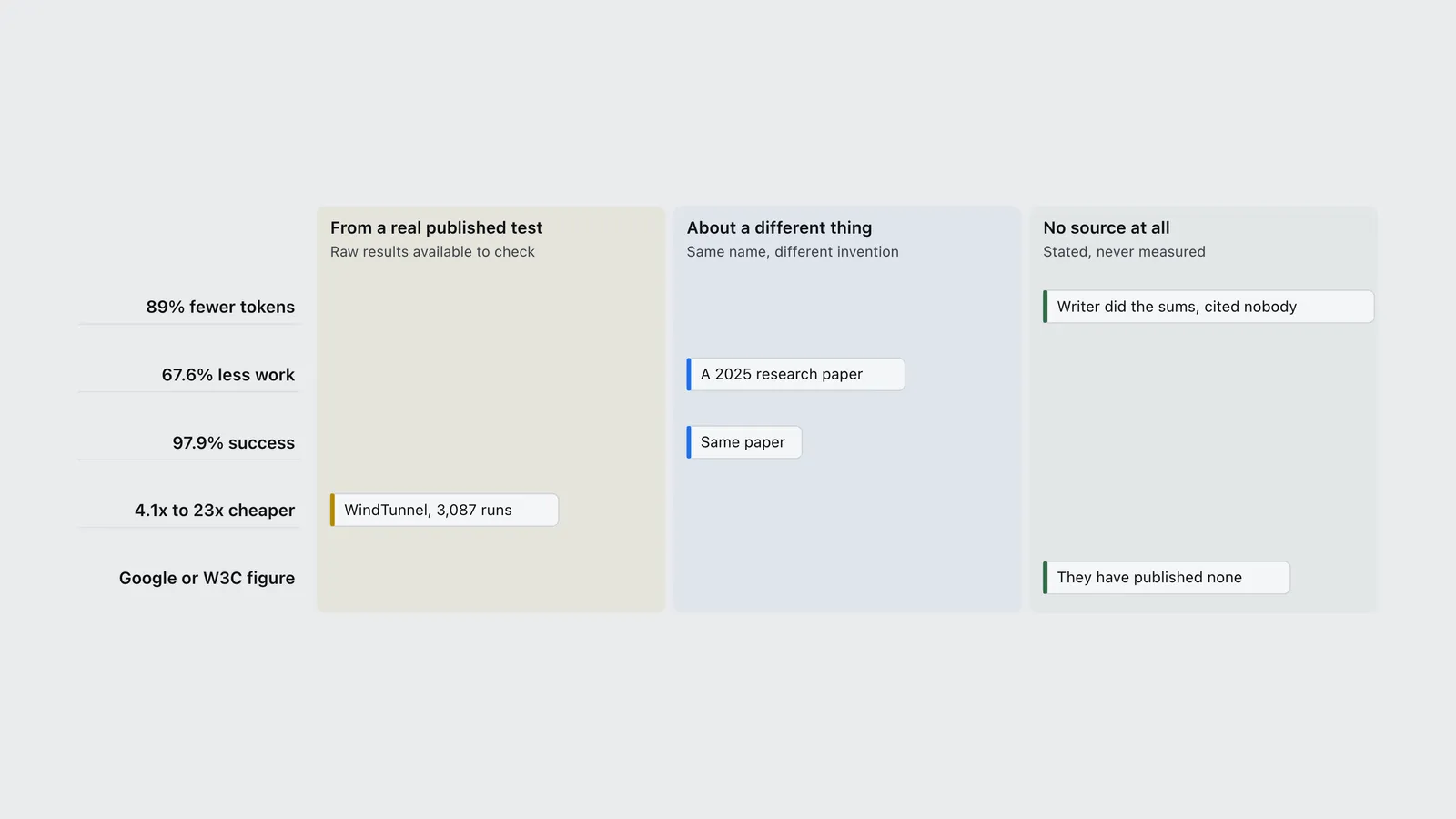
Search for how much money WebMCP saves and you get four numbers back. An 89 percent cut in tokens. A 67.6 percent cut in processing. A 97.9 percent success rate. And somewhere between 3 and 47 times cheaper per task.
Only one of those four was ever actually measured on the thing people think it measures.
Two of them come from a completely different piece of technology that happens to share the name. One is a guess the writer did in their head and credited to nobody. Google and the group writing the standard have published no speed or cost figure at all.
There is one real test, and it puts its raw results online for anyone to check. Redoing the sums from those 3,087 test runs gives an answer that is smaller than the headline, more useful, and a lot harder to argue with.
What WebMCP actually does
Today an AI agent uses a website roughly the way a person would. It takes a screenshot, works out what it is looking at, guesses which button to press, presses it, then takes another screenshot to check what happened. Every one of those steps means sending a picture or a pile of page code back to the AI and paying for it.
WebMCP flips that around. The website itself publishes a menu of things it can do, each with a name, a description and a list of what information it needs. The agent reads the menu and calls the one it wants. No screenshots, no guessing.
It is a proposal from the W3C Web Machine Learning Community Group, a group that writes web standards. In code it looks like document.modelContext.registerTool(). If you find an older tutorial using navigator.modelContext.provideContext(), it will not work any more. The name changed, and the group’s own repository has a commit from 4 September 2026 called “Update stale examples and references to the current modelContext API”.
A website can also tag each menu item with a warning label for the AI. There are four: readOnlyHint (this only looks things up, it changes nothing), untrustedContentHint (do not trust what comes back), consequentialHint (this does something that matters, like spending money) and debugging. A site can also limit which other websites are allowed to see a tool.
If this sounds familiar, it is the other half of something you may have met already. The MCP servers worth installing covers the version that runs on a server, away from the browser, and Claude Skills vs agent skills vs MCP vs prompts untangles the layers people keep mixing up. WebMCP is the bit that lives inside the page.
One thing worth being clear about, because a lot of the coverage makes it sound finished: it is not finished. The document is a draft dated 17 September 2026. It is not a web standard yet. Chrome’s own status page files it as “Proposed”, still being worked out in a community group, with its safety, security and privacy reviews all listed as pending. Per the group’s implementation status page, Chrome is running a trial, Edge is running one too, Brave has an early version in its assistant, and ChatGPT Desktop supports it. Firefox and Safari have said nothing at all. Chrome’s status page records both as “No signal”.
Where the 89 percent number came from
The most-shared cost figure comes from an April 2026 article headlined “Chrome’s WebMCP Promises 89% Token Savings”.
To its credit, the article says where the number came from. It explains that the “89% token efficiency improvement over screenshot-based methods comes from a straightforward arithmetic: replacing ‘send a 1MB screenshot to GPT-4o and ask what to click’ with ‘call a structured API endpoint and get JSON back’ eliminates the vast majority of token consumption in a typical browser automation workflow.”
Read that again. It is a sensible hunch, worked out on paper. It is not a test. Nobody ran anything. There is no benchmark, no data, no link. The same article also says a tool is “11x faster” and credits that to “teams reported”, and gives market predictions with no source whatsoever.
| Primitive | From a real published test | About a different thing | No source at all |
|---|---|---|---|
| 89% fewer tokens | nothing loads | nothing loads | Writer did the sums, cited nobody |
| 67.6% less work | nothing loads | A 2025 research paper | nothing loads |
| 97.9% success | nothing loads | Same paper | nothing loads |
| 4.1x to 23x cheaper | WindTunnel, 3,087 runs | nothing loads | nothing loads |
| Google or W3C figure | nothing loads | nothing loads | They have published none |
The 67.6 percent is about something else
This one is the strangest. The 67.6 percent figure is real, it is published, and it has nothing to do with Chrome.
It comes from a 2025 paper posted on arXiv, written by one person, D. Perera, with no university or company listed and no sign it was ever checked by other researchers. Papers posted this way are called preprints. Anyone can upload one. The review that normally catches mistakes has not happened yet.
The paper says its approach “reduces processing requirements by 67.6% while maintaining 97.9% task success rates compared to 98.8% for traditional approaches”, tested across 1,890 requests.
Here is the catch. In that paper, webMCP stands for Web Machine Context and Procedure. In Chrome, WebMCP stands for Web Model Context Protocol. The paper’s version works by hiding extra notes inside the page’s code, and it proudly points out that it “requires no server-side modifications”. There is no browser feature. There is no document.modelContext. There is no Google, no Chrome trial, no standards group.
So when you see “WebMCP cuts processing by 67.6 percent”, you are reading a number about one invention being used to sell a different one. It has spread far enough that even a sharp, well-argued article attacking WebMCP repeats it as though it were Chrome’s.
The one test that holds up
WindTunnel is the only WebMCP test found that shows its working.
It runs 49 tasks across 8 real applications, each one installed and frozen at a fixed version so the test is repeatable. Every task is attempted three times, by 21 different setups, across four ways of driving a website: WebMCP, screenshots, dumping the page code, and letting the AI write its own code. Whether a task counts as done is decided by looking at the application afterwards, not by asking an AI to mark its own homework. The code is free to use and the full results sit in the repository.
Two warnings belong next to it. WindTunnel is run by Nekuda, a company that stands to gain if WebMCP catches on. That is not a reason to bin it, but it is a very good reason to redo the sums yourself rather than repeat the headline. And its overall ranking is a blended score, part success rate and part cost and speed, and how you blend those is a judgement call that changes who comes top.
So the figures below are worked out from the 3,087 individual runs, not copied from the leaderboard. Doing that turned up two rules that the published table never states. First, a task counts as solved if it worked on at least two of its three tries, so a setup can show a perfect 49 out of 49 while still failing some runs. Second, the token counts include text the AI had already seen and stored cheaply, but leave out a separate kind of token that you still get billed for.
| Model | Accuracy | Cost per solved task | On the cost-efficiency frontier |
|---|---|---|---|
| Jev · A11y tree | 25/49 | $0.00 | Yes |
| Jev · WebMCP | 49/49 | $0.00 | Yes |
| Luna · WebMCP | 49/49 | $0.00 | No |
| Sonnet 5 · WebMCP | 49/49 | $0.01 | No |
| Astra · WebMCP | 49/49 | $0.02 | No |
| Sonnet 5 · Computer use | 39/49 | $0.07 | No |
| Astra · Code exec | 49/49 | $0.12 | No |
| Sonnet 5 · DOM dump | 48/49 | $0.21 | No |
| Astra · Computer use | 45/49 | $0.26 | No |
What the real numbers show
The only comparison worth anything keeps the AI model the same and changes only the way it drives the website. Otherwise you are really just comparing the prices of two AI models. There are twelve of those fair comparisons in the data.
| AI model | Cost with WebMCP | Compared with | Cost that way | How much cheaper |
|---|---|---|---|---|
| Sonnet 5 | $0.00913 (49/49) | Dumping the page code | $0.21021 (48/49) | 23.0x |
| GPT-6 Astra | $0.01710 (49/49) | Screenshots | $0.26078 (45/49) | 15.3x |
| GPT-5.6 Luna | $0.00244 (49/49) | Dumping the page code | $0.03283 (43/49) | 13.5x |
| Opus 5 | $0.01401 (49/49) | Screenshots | $0.13886 (45/49) | 9.9x |
| GPT-5.6 Luna | $0.00244 (49/49) | Reading the page structure | $0.01954 (40/49) | 8.0x |
| Sonnet 5 | $0.00913 (49/49) | Screenshots | $0.06970 (39/49) | 7.6x |
| GPT-5.6 Luna | $0.00244 (49/49) | Screenshots | $0.01737 (45/49) | 7.1x |
| GPT-6 Astra | $0.01710 (49/49) | Writing its own code | $0.11868 (49/49) | 6.9x |
| GPT-5.6 Sol | $0.01210 (49/49) | Screenshots | $0.06269 (46/49) | 5.2x |
| Gemini 3.6 Flash | $0.00440 (49/49) | Screenshots | $0.02016 (43/49) | 4.6x |
| Sonnet 5 | $0.00913 (49/49) | Reading the page structure | $0.03778 (42/49) | 4.1x |
| Jev + Mercury 2.5 | $0.00106 (49/49) | Reading the page structure | $0.00078 (25/49) | 0.7x |
The middle result is 7.4 times cheaper. That is the number to use.
And here is a fun detail. The original guess of “89 percent cheaper” was not far off, because 7.4 times cheaper is the same as 86 percent cheaper. The hunch was fine. The problem was dressing a hunch up as a measurement.
Now look at the bottom row, because it is the most useful one in the table. The cheapest setup in the entire test is not WebMCP at all. It is a rival that costs about a quarter less per task. It also finished 25 tasks out of 49 instead of all of them. Cheap and wrong is not cheap. A price per task means nothing until you put the score next to it.
That bottom row also shows how a claim like “3 to 47 times cheaper” gets built. Take the cheapest WebMCP setup and the most expensive rival, and the gap is 245 times. Take the most expensive WebMCP setup and the cheapest rival, and WebMCP now looks 22 times worse. Both comparisons are garbage, because each one is really comparing two different AI models with different prices. When someone quotes you a range that wide, they have not found a result. They have chosen two dots on a chart.
Fewer tokens does not mean a smaller bill
The whole “token savings” framing is the weakest part of the case, because tokens and money drift apart badly once you change AI model.
GPT-6 Astra driving by screenshots used a middle figure of 1,149 tokens per task, the lowest count of anything in the test. The same model on WebMCP used 2,226, roughly double. The screenshot version cost 15 times more. Tokens from different models simply are not worth the same amount, and the published token count leaves out a kind of token that screenshot-heavy runs generate in bulk and that you still pay for.
There is another wrinkle. The two biggest token counts in the whole test, 64,424 and 29,561, both come from a setup that cannot reuse text it has already sent. Modern AI services give you a discount when you send the same thing twice. That setup does not get the discount. So part of the enormous token gap people credit to WebMCP is really a gap between tools that get the repeat discount and tools that do not. If you have read where AI coding agent tokens actually go, this is the same accounting trap wearing a new hat.
What does survive every way of slicing the data is the number of trips. WebMCP setups finished a task in 2 to 4 trips back to the AI. Screenshot setups needed 5 to 11. Each trip is a fresh question with everything said so far attached, so trips drive up cost and waiting time together. That is the real mechanism, and it is the one thing here nobody is arguing about.
| Machine | Middle seconds per task |
|---|---|
| Jev + Mercury 2.5 · WebMCP (49/49 solved, 4 model turns) | 3.2s |
| Jev + Mercury 2.5 · A11y tree (25/49 solved, 5 model turns) | 5.4s |
| GPT-5.6 Luna · WebMCP (49/49 solved, 3 model turns) | 5.7s |
| GPT-6 Astra · WebMCP (49/49 solved, 3 model turns) | 6.3s |
| Sonnet 5 · WebMCP (49/49 solved, 2 model turns) | 6.8s |
| Gemini 3.6 Flash · WebMCP (49/49 solved, 3 model turns) | 7.2s |
| GPT-5.6 Sol · WebMCP (49/49 solved, 3 model turns) | 9.3s |
| Opus 5 · WebMCP (49/49 solved, 3 model turns) | 9.8s |
| GPT-5.6 Luna · A11y tree (40/49 solved, 6 model turns) | 16.0s |
| GPT-6 Astra · Code exec (49/49 solved, 5 model turns) | 16.4s |
| GPT-5.6 Luna · Computer use (45/49 solved, 6 model turns) | 18.3s |
| GPT-5.6 Luna · DOM dump (43/49 solved, 3 model turns) | 19.8s |
| GPT-6 Astra · Computer use (45/49 solved, 6 model turns) | 20.8s |
| GPT-5.6 Sol · Computer use (46/49 solved, 5 model turns) | 27.3s |
| Sonnet 5 · DOM dump (48/49 solved, 4 model turns) | 29.3s |
| Sonnet 5 · Computer use (39/49 solved, 10 model turns) | 31.7s |
| Gemini 3.6 Flash · Computer use (43/49 solved, 7 model turns) | 33.7s |
| Sonnet 5 · A11y tree (42/49 solved, 8 model turns) | 37.5s |
| Opus 5 · Computer use (45/49 solved, 11 model turns) | 50.4s |
One result in that chart gets less attention than it deserves. Letting GPT-6 Astra write and run its own code finished all 49 tasks without using WebMCP at all. It cost about seven times more, but it was just as reliable. WebMCP is not the only way to get an agent off screenshots. The test’s own data says so.
The case against WebMCP
The sharpest criticism is The WebMCP False Economy by Manveer Chawla, from February 2026. It does not argue with the measurements. It argues about who does the work.
A website that adopts WebMCP now has two versions of itself to keep in step: the one people look at, and the menu it hands to robots. Change a button and forget the menu, and nothing warns you. The menu just quietly starts lying.
Chawla’s point about history is the one that stings. Web features that ask site owners for extra effort only catch on when the owner sees something back. The tags that generate those neat preview cards when you paste a link into a chat spread everywhere, because you can watch them working. Similar ideas that offered no visible payoff went nowhere at all. WebMCP gives a site owner nothing they can see.
Worse, the savings do not even land on the site that did the work. They land on whoever is running the agent. You pay to build the menu, somebody else’s AI bill gets smaller. That mismatch is exactly the problem behind AI crawler economics, where the people carrying the cost and the people collecting the benefit are never the same people.
Trying it yourself
You can switch WebMCP on in Chrome today for local tinkering with the flag chrome://flags/#enable-webmcp-testing. Putting it in front of real visitors is harder: you have to register your website for the trial and serve a key from your pages. Chrome does not publish an end date, and its status page lists no dates either, so treat the November 2026 deadline doing the rounds as unconfirmed.
This site has had WebMCP switched on for a while. It started with exactly one tool, list_articles, which hands back the machine-readable list of articles. Since 26 September 2026 it registers twelve, listed on the WebMCP tools page: memory, SSD, GPU and hosting prices, the model leaderboard, releases, benchmarks, inference providers, free models and Claude Skills, each answering with the page URL and the date its figures were checked. All of them are tagged as look-only, and they sit behind a check so ordinary readers never download them.
They also do absolutely nothing yet, and that is the interesting bit. No trial key is being served, so the feature is never switched on. Loading a page in Chrome 153, inside the trial window, with the code sitting right there and no key on the page, the browser reports the feature as missing by both of its names. The code is correct and completely idle.
Which is Chawla’s argument, live and in public. The hard part is not the code. It took one short script. The hard part is that a site owner has to find the trial, register a domain, install a key, remember to renew it, and get nothing visible in return while someone else’s costs go down.
Bottom line
WebMCP really does make AI agents cheaper to run. On the same AI model and the same tasks, about 7.4 times cheaper, somewhere between 4.1 and 23 times depending on what you compare it with. That is a big, real effect, and it comes from cutting the number of trips back to the AI, not from anything magic about tokens.
What you should not repeat is any single headline figure you find in the coverage. Three of the four in circulation are not measurements of this technology, and the fourth is two dots picked off a chart. The feature itself is an unfinished draft with three safety reviews outstanding and two major browsers saying nothing. That is a perfectly sensible thing to build a toy with. It is not a settled part of the web, whatever the headlines suggest.
Frequently asked questions
- Does WebMCP actually save tokens?
- Yes, but cost and speed are the better things to measure. Working the sums again from WindTunnel’s 3,087 published runs, WebMCP setups cost 4.1 to 23 times less than screenshot or page-code alternatives using the same AI model on the same 49 tasks, with 7.4 times as the middle result. Token counts are misleading on their own: GPT-6 Astra driving by screenshots used about half the tokens of the same model on WebMCP and still cost 15 times more.
- Where does the 89 percent WebMCP token saving figure come from?
- From an April 2026 article on AgentMarketCap. The article states that the figure comes from a straightforward arithmetic comparing sending a screenshot against calling a structured endpoint. It links to no test, no study and no data. It is a reasonable guess presented as a result.
- Is the 67.6 percent reduction figure about Chrome WebMCP?
- No. It comes from a 2025 paper on arXiv by a single author, describing something called Web Machine Context and Procedure, which hides extra information inside page code. Chrome’s WebMCP stands for Web Model Context Protocol and is a browser feature. The two share a name and nothing else.
- What is the difference between WebMCP and MCP?
- MCP servers run outside the browser and offer tools to an AI over a connection to a server. WebMCP runs inside the web page, letting the site offer tools to whichever AI agent happens to be visiting. MCP is the server-side half and WebMCP is the in-the-page half.
- Is WebMCP a W3C standard?
- Not yet. It is a draft from the W3C Web Machine Learning Community Group, dated 17 September 2026. Chrome files it as Proposed, with its safety, security and privacy reviews all pending. Chrome and Edge are running trials, Brave and ChatGPT Desktop support it, and Firefox and Safari have given no opinion at all.
- How do I enable WebMCP in Chrome?
- For tinkering on your own machine, turn on chrome://flags/#enable-webmcp-testing and the feature becomes available with no key needed. To serve it to real visitors you have to register your website for the Chrome origin trial, which has been running since Chrome 149, and serve the key it gives you from your pages.
Sources
W3C Web Machine Learning Community Group (2026). Web Model Context Protocol. Draft Community Group Report, 17 September 2026. Primary, specification text. Source of the API surface, the four annotation hints, the origin allowlist, and the security considerations. https://webmachinelearning.github.io/webmcp/ Verified 21 September 2026.
W3C Web Machine Learning Community Group (2026). WebMCP explainer and implementation status. GitHub repository. Primary, working-group published. Source of the browser and agent implementation status and the September 2026 API-rename commit. https://github.com/webmachinelearning/webmcp Verified 21 September 2026.
Google (2026). WebMCP. Chrome for Developers documentation. Primary, vendor documentation. Source of the origin-trial milestone and the local testing flag, and the basis for the statement that Chrome publishes no efficiency claim. https://developer.chrome.com/docs/ai/webmcp Verified 21 September 2026.
Google (2026). WebMCP. Chrome Platform Status entry. Primary, vendor tracker. Source of the Proposed status, the incubation maturity, the pending safety, security and privacy reviews, and the Firefox and Safari “No signal” positions. https://chromestatus.com/feature/5117755740913664 Verified 21 September 2026.
Nekuda (2026). WindTunnel: the WebMCP benchmark, canonical results v1.2. Apache-2.0. Primary run data, published by a party with a commercial interest in WebMCP adoption. Source of every cost, token, trip and solve figure in this post, recomputed from the 3,087-row per-attempt CSV. https://github.com/nekuda-ai/WindTunnel Verified 21 September 2026.
Perera, D. (2025). webMCP: Efficient AI-Native Client-Side Interaction for Agent-Ready Web Design. arXiv preprint 2508.09171, submitted 6 August 2025. Preprint, not peer reviewed, single author, no stated affiliation. Source of the 67.6 percent and 97.9 percent figures, and of the demonstration that they describe a different specification. https://arxiv.org/abs/2508.09171 Verified 21 September 2026.
AgentMarketCap (2026). Chrome’s WebMCP Promises 89% Token Savings, 7 April 2026. Secondary, cited only as the origin of the unsourced 89 percent claim. https://agentmarketcap.ai/blog/2026/04/07/chrome-firefox-native-agent-apis-2026-browser-agentic-primitives Verified 21 September 2026.
Chawla, M. (2026). The WebMCP False Economy: Why Server-Side MCP and Browser APIs Beat a Browser-Side Protocol, 13 February 2026. Secondary, an argued position, attributed as such. Source of the maintenance-drift and adoption-incentive objections. https://manveerc.substack.com/p/webmcp-false-economy-server-side-mcp-browser-apis Verified 21 September 2026.