Claude Code Autonomous Workflow: Guardrails Over Approvals
Run Claude Code like a team you manage: deny rules restrict it, sandboxes contain it, hooks and CI verify it, cloud sessions take risky work, a person merges.
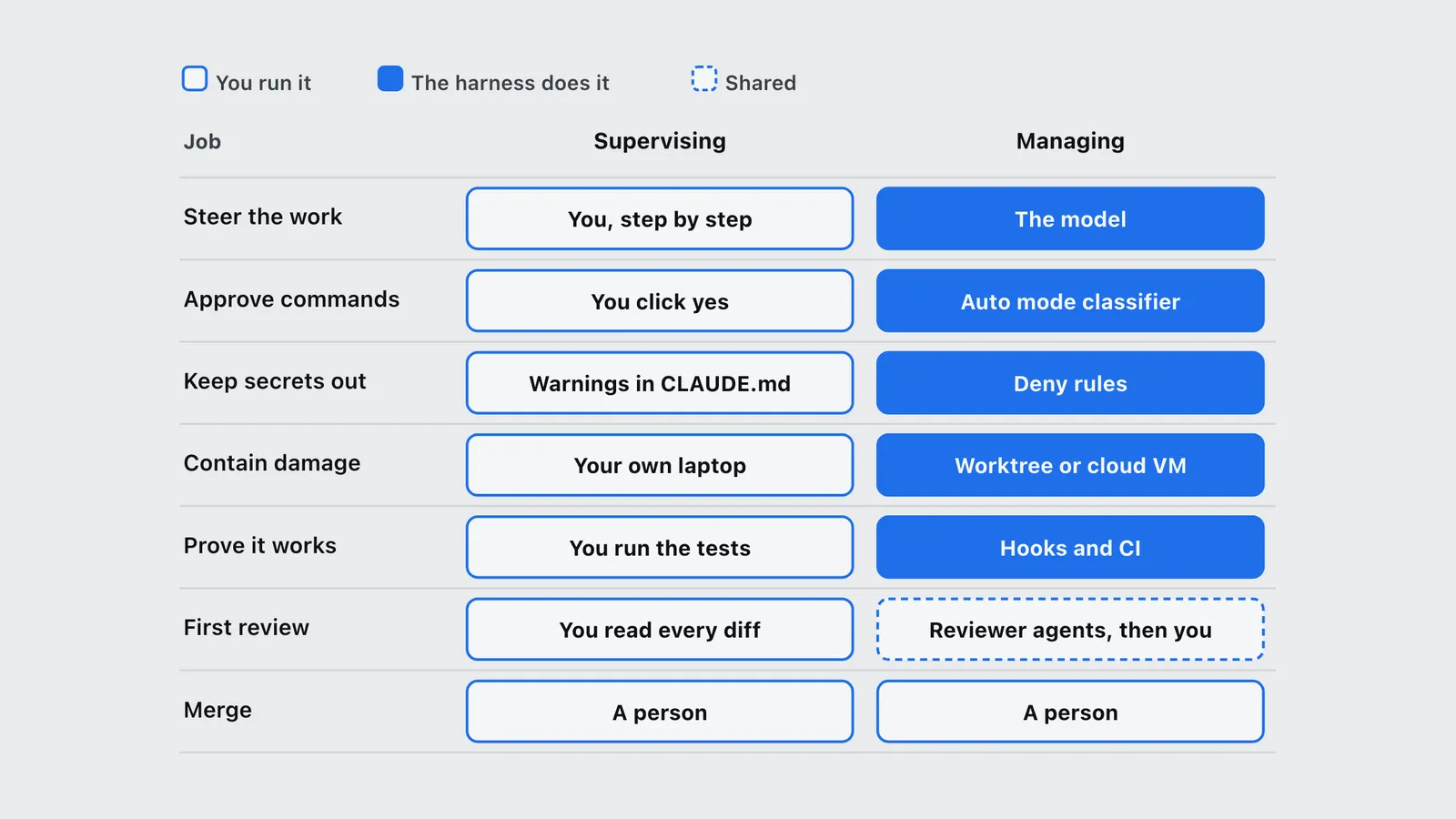
A Claude Code autonomous workflow swaps per-command approval for guardrails. Deny rules restrict what the agent can touch, sandboxes contain what it breaks, hooks and CI make it prove its work, and a person reviews the finished pull request.
Anthropic made that argument from four directions this autumn. In October it published a field guide to cloud sessions, a set of rules for scheduled agents that run with nobody watching, and the Claude Code team’s account of how it reviews code at the volume agents now write it. In November, Lydia Hallie of Anthropic told the AI Engineer Code Summit that most of what developers bolted onto their Claude Code setups over the past year now holds the models back. This post sets all four next to a real setup: a TypeScript monorepo at a small company, a browser-driven data collector, local worktrees for fast work and cloud sessions for the risky work. It also covers the parts that setup has not built yet.
What changes when you manage Claude Code instead of supervising it?
The jobs stay the same. Who does them changes. Under supervision, you start the session, approve each command, correct mistakes as they happen and run the tests yourself. Under management, you hand over a task with a definition of done, and the environment does the policing.
Hallie’s talk, Rethinking Claude Code Best Practices (AI Engineer, 12 November 2026), makes the case in six moves:
- Trust the model to do more. Current models read codebases and instructions well enough that constant steering costs more than it saves.
- Shrink CLAUDE.md. Keep only what Claude cannot discover from the code. Emphatic warnings and copied documentation now get in the way.
- Use deny rules and sandboxes for safety. An instruction is a request. A deny rule is a wall.
- Make Claude prove its work. Tests, builds and hooks run at checkpoints during the task, not only at the end.
- Move work into CI and cloud sessions. Each session runs in isolation and ends in a pull request that CI tests and an independent reviewer reads.
- Run several sessions together. One orchestrator plans and delegates, workers do the tasks, and the orchestrator checks and combines the results.
| Job | Supervising | Managing |
|---|---|---|
| Steer the work | You: You, step by step | The harness does it: The model |
| Approve commands | You: You click yes | The harness does it: Auto mode classifier |
| Keep secrets out | You: Warnings in CLAUDE.md | The harness does it: Deny rules |
| Contain damage | You: Your own laptop | The harness does it: Worktree or cloud VM |
| Prove it works | You: You run the tests | The harness does it: Hooks and CI |
| First review | You: You read every diff | Shared: Reviewer agents, then you |
| Merge | You: A person | You: A person |
Why stop approving every command?
Because people are bad at it. When Anthropic made auto mode the default for Pro, Max and Team users in August 2026, its @ClaudeDevs announcement gave the testing result: auto mode, which reviews shell commands with a separate classifier, “caught 89% of dangerous commands. Manual approval caught 14%.” (TechCrunch covered the change on 9 August.) After the fortieth harmless prompt, a person clicks yes without reading.
This does not mean “let it do anything”. It means the review a person gives each command is worth less than a rule that never gets tired. So the next question is which rules.
What belongs in CLAUDE.md, and what belongs in a deny rule?
The monorepo’s harness documentation states the split in one line: rules that must hold every time are enforced, not written down, and knowledge that only sometimes matters loads only when it matters. In practice that gives three homes for an instruction:
| Kind of instruction | Where it lives | Why |
|---|---|---|
| Never touch secrets, generated files, held documents | permissions.deny in settings |
Checked before the tool runs; the model cannot argue |
| Ask before commit, push, opening or merging a PR | PreToolUse hook that returns ask |
Outward-facing actions keep a person on the trigger |
| Branch names carry an issue number | PreToolUse hook that denies |
Mechanical, so a script checks it |
| Lint and format after every edit | PostToolUse hook, exit code 2 |
Failures go straight back to Claude to fix |
| How one package’s data layer works | Path-scoped rule file | Loads only when Claude touches that package |
| Facts the code cannot show (why a legacy path exists) | CLAUDE.md | The only thing CLAUDE.md is for |
The root CLAUDE.md in that repo also has a byte budget, enforced by a script in the pre-commit hook, so it cannot quietly grow back. Hallie pointed people at a command that prunes the rest: on X she noted that /checkup prompt-audit checks CLAUDE.md, skills and agents for instructions the model no longer needs.
A minimal version of the deny layer looks like this (placeholder paths):
{
  "permissions": {
    "deny": [
      "Read(./.env)",
      "Read(./.env.*)",
      "Edit(./src/generated/**)",
      "Edit(./pnpm-lock.yaml)",
      "Bash(git push --force *)"
    ]
  }
}
The exit code matters on the hooks. Claude Code’s hooks documentation treats exit code 2 as a blocking error and feeds stderr back to Claude. Other non-zero codes show the error to you and let the agent carry on. A lint hook that exits 1 tells you about the problem; one that exits 2 makes Claude fix it.
How does Anthropic’s own team review agent-written code?
In layers, and mostly before a person looks. How the Claude Code team does code review (Addy Osmani, Morgan Westlee Lunt and Qing Wang, claude.dev, 15 October 2026) describes the path: verification on the author’s machine, required CI, a multi-agent Claude review whose findings other agents vote on, a separate security review that can block, human approval scaled by a risk classifier, a merge queue, flags, staged release and fast rollback.
The numbers are the reason to copy it. Changes landing per day in Anthropic’s monorepo went from about 2,500 in May 2026 to more than 30,000 in September. Over June to September, merged pull requests to Claude Code more than doubled while the share that had to be reverted fell by more than 40%.
The part most teams skip is convergence. An agent author and an agent reviewer can keep each other busy forever; the post describes one pull request that went through more than fifty rounds overnight. When the team ran git blame on repeat findings, about 59% pointed at code that had been there since the first pass. The fixes were a cap of three rounds, diff-only re-review after the first few, flagging the class of bug instead of one line, and no repeated findings.
| Item | Before | After |
|---|---|---|
| Pass after one round | 65% | 78% |
| Need five or more rounds | 8.9% | 1.5% |
What does a code review workflow for agent-written code look like on a small team?
Smaller, and with honest gaps. Here is how the monorepo’s layers line up against Anthropic’s, including the ones it does not have.
| Anthropic’s layer | The small-team version | Status |
|---|---|---|
| Verify before the PR | Lint and format hook after every edit; read-only reviewer subagent with the house checklist | In place |
| Required CI | Secret scan, typecheck, sharded tests and build on every PR; the full verify suite runs only in CI | In place |
| Every finding must be answered | After each push, a hook asks GitHub for unanswered review threads and points Claude at an answer-review skill | In place |
| One review per round, inline | Review skill posts one submission per round, each finding on its own line, with Conventional Comments labels | In place |
| REVIEW.md | None yet; review rules live in the reviewer subagent’s prompt | Gap |
| Automated security review | Gitleaks in pre-commit and CI plus a manual security checklist in the PR template; no blocking security bot | Gap |
| Risk-tiered approval | None; every pull request gets a human merge | Deliberate |
| Explainer instead of reading diffs | An explain-change skill writes a walkthrough of a change for whoever has to own it | In place |
Two lessons came from getting it wrong. The review skill exists because one early review ran to about 20,000 characters with not one comment attached to a line, and another pull request collected eight separate review submissions. Neither could be answered thread by thread. And the full verify suite used to run in a pre-push hook. It was moved out because it cost minutes on every push and only repeated what CI already checks. Pre-commit stays fast (lint, format, secret scan, regenerated files); CI does the slow proof.
Where do git, the CLI and the diff fit in?
Every task gets its own branch and its own worktree, and the diff is the unit of review. A repo script creates worktrees in a sibling folder rather than inside the repo, so linters and the dev server never crawl them. It symlinks the .env files from the main checkout so secrets exist in exactly one place on disk, then installs and builds.
Branches start with the issue number, enforced by a hook. Commits follow Conventional Commits. The gh CLI does the GitHub side, and a guard adds the repository flag to every gh call so nothing depends on which folder the agent is in. When a review comes back, the reviewer reads the diff before the transcript: the transcript says what the agent meant to do, the diff says what it did.
When do you use a local Orca worktree, and when a cloud session?
Route by what the task can reach, not by how big it is.
| Work | Where it runs | Why |
|---|---|---|
| Parallel feature work, refactors, fixes on trusted code | Local worktrees, managed in Orca | Fast loops, your own browser and dev server, several agents at once |
| Tight UI iteration you watch in a browser | Local worktree | Seconds per loop matter more than isolation |
| Reading untrusted web pages, downloading files from them | Cloud session | The page might carry an injection; the VM holds nothing to steal |
| Long scheduled collection runs | Cloud session on a schedule | Survives a closed laptop; ends in a pull request |
| Infrastructure changes | Local, applied by a person | CI only validates them and holds no credentials |
Orca sits on top of the worktrees. A lead session plans the work and splits it into tasks, workers run each task in their own worktree, and the lead reads each worker’s diff before anything is combined. That is Hallie’s sixth point done on one laptop. Worktrees isolate the checkout, though, not the machine: every worker still runs next to your SSH keys, your signed-in browser and your password manager. That is fine for code you trust. It is the wrong place for an agent that reads the open web.
Why does sensitive work belong in a cloud session?
Because the laptop holds the keys to everything, and attacks now go after developer tools directly. Two incidents set the tone. In August 2025, tainted releases of the nx build package ran a postinstall script that looked for installed AI coding CLIs, Claude Code among them, and invoked them with permission checks off to hunt for secrets (GitHub advisory GHSA-cxm3-wv7p-598c). In September 2025, the Shai-Hulud worm spread through more than 500 npm packages, stealing GitHub tokens and cloud keys from every machine that installed one (CISA alert, 23 September 2025). And prompt injection tops the OWASP Top 10 for LLM applications: text in a page can redirect an agent that reads it.
A data collector does all three risky things at once: it reads pages nobody controls, installs packages and runs for hours without a person approving each step. The team’s internal rationale for moving it off laptops listed what a cloud session changes:
- Nothing to steal. Addy Osmani’s field guide, Claude Code in the cloud (claude.dev, 6 October 2026), puts it plainly: the GitHub token never enters the VM. A proxy holds it, and the session gets a short-lived credential that can push only to its own working branch.
- Keys the session cannot read. The remote-browser API key is stored as a network secret on the cloud environment. The session sends a placeholder; the proxy swaps in the real key for the listed host. Keys never go in the environment’s variables, which every member’s sessions can read.
- Small reach. The Claude GitHub App is installed on one repository only,
mainis protected, and “quick setup” (which would hand the session a personal token that reaches every repo) stays off. - Thrown away after use. Each session gets its own VM. Whatever got in does not carry over.
- On the record. Every session keeps its transcript, and every change arrives as a pull request.
The worst case moves from a stolen token to a branch you delete.
Three details from the field guide shaped how the cloud setup is built:
- Your personal config stays home. CLAUDE.md, rules, skills, agents and commands travel with the repository;
~/.claudedoes not. Every hook the collector depends on therefore lives in the repo. The cloud setup itself is a committedSessionStarthook that runs only whenCLAUDE_CODE_REMOTEis set: it installs the pinned toolchain, pulls large files, installs packages only when the lockfile changed, and points Node at the proxy’s CA bundle, because the proxy re-signs TLS. - Pick the network level on purpose. The guide recommends the narrowest level that works: None, Trusted (package registries, GitHub, major cloud SDK hosts), Custom or Full. The collector runs on Full, because its sources sit on more domains than any allowlist could hold. That is acceptable only because the VM holds no keys and the browser is never signed in. Even at None, the guide notes, data can still leave through the Anthropic API.
- Idle VMs get reclaimed. A long run commits as it goes, so a reclaimed machine costs minutes, not the run.
If the cloud VM cannot handle the repo’s large-file storage, the fallback is a self-hosted runner on a dedicated machine with no personal keys on it.
How does a browser-based collector run safely?
It climbs a ladder, and the top rung runs on someone else’s machine. Each refusal moves a fetch up one rung:
// Placeholder sketch of the fetch ladder. Each rung runs only if the one below was refused.
const rungs = [
  plainHttp, // ordinary request
  browserLikeHttp, // browser-shaped TLS and headers, no browser
  localChrome, // real Chrome via Playwright; local runs only
  hostedBrowser, // remote browser over CDP: empty profile, never signed in
];

for (const rung of rungs) {
  const page = await rung(url);
  if (page.ok && !looksLikeBlockPage(page)) return save(page);
}
return recordBlocked(url); // a block is logged, never treated as "not published"
The hosted rung is Browserbase: a browser on its machines, driven over CDP with the same Playwright client. Its rules are strict. It is never signed in to any account, so a hostile page has no cookies to take. A geo-matched proxy is used only when a person asks for it. A hook stops the paid browser being called from anywhere outside the collector. Block pages are checked before saving, so a challenge page never lands as a document. Writes are sorted and deterministic, so a diff after a run means the source changed, not the code.
The full routine version of this pipeline, with the network allowlist and the review routine, is in Claude Code routines for data collection.
How do you stop a scheduled agent from failing silently?
Give it memory, make it re-check before it acts, and fence it in. Lance Martin and CJ Avilla’s Building effective agent automations (claude.dev, 8 October 2026) builds a scheduled agent that reads Slack and GitHub and posts a brief, then reduces the lessons to six rules. They carry over to a collector almost word for word. One stands out: if an MCP server is down or a token has expired, the run still starts, sees nothing from that source and reports “nothing new”. A broken source looks exactly like a quiet day.
| Rule from Anthropic’s post | What the collector does | Status |
|---|---|---|
| Read each source from a bookmark, not a fixed time window | Each held source is stored with when it was fetched; a weekly re-check from there is planned | Planned |
| Report a failed read as unreadable, never as a quiet day | A blocked fetch is recorded as blocked, with the rung that failed; the task stays open | In place |
| Re-check every item right before acting | Block-page check before saving; a person reviews the PR before anything lands | In place |
| Count an action as done only when the destination confirms it | The run’s output is a pushed branch and an opened PR; if neither exists, nothing happened | In place |
| Preferences read-only to the agent, state read-write | Collection rules live in committed rule files the agent can edit, but only through a reviewed PR | Partial |
| Read-only credentials and a spending cap per run | The GitHub App can push branches, so not read-only; a monthly cap is proposed, no per-run cap | Gap |
The spending-cap advice is worth copying exactly. Martin and Avilla suggest starting at three to five times the cost of a normal run, then tightening it once you see real numbers. They also warn that a run that hits its cap pauses rather than fails, so a cap set too low looks like a brief that went quiet. That is the same silent failure the bookmark rule exists to prevent.
What still needs a person?
Deciding whether to build the thing at all, reviewing changes that set a pattern others will copy, and merging. Anthropic’s post keeps people on direction, risky paths (billing, auto-updaters, CI workflows), architecture and owning the outcome, and it never lets an agent’s approval fill a slot that needs a human. The small-team version keeps a human merge on every pull request. Until it has a risk classifier and an incident-based eval set, that gate is cheap insurance.
What is this setup changing next?
Three things, none of them done yet, all taken from Hallie’s talk:
- A CLAUDE.md audit. Run the prompt audit and delete what the code already says.
- Harder walls. Deny rules on the large-file document store, every
.envpath and destructive git commands, instead of hooks that ask. - Verification mid-task. A hook that runs the tests for the area Claude touched when it marks a task complete, with failures sent back through exit code 2, instead of waiting for CI to find them.
After those: a REVIEW.md for the reviewer, an automated security review that blocks, and a round cap on agent-to-agent review.
How do you start?
- Turn on auto mode and stop approving commands by hand.
- Move every “never do X” line from CLAUDE.md into a deny rule or a hook. Delete what the code already shows.
- Add a
PostToolUselint hook that exits 2, and run tests at task completion. - Give each task its own branch and worktree; read the diff before the transcript.
- Send anything that reads untrusted pages or needs a key to a cloud session. Keys go in network secrets.
- For scheduled runs, keep a bookmark per source, record failed reads as failed, and set a per-run spending cap at three to five times a normal run.
- End every autonomous run in a pull request. Require CI, require every review thread answered, and keep a person on the merge.
For the hooks and skills behind steps 2 and 3, see the Claude Code harness example and the agent harness checklist. This post is part of the Claude Code harness series, which documents each setup in full.
Frequently asked questions
- What is a Claude Code autonomous workflow?
- A setup where Claude Code works through a task without a person approving each command. Auto mode approves routine actions, deny rules block what must never happen, worktrees or cloud sessions contain damage, hooks and CI verify the work, and the run ends in a pull request a person reviews and merges.
- Is auto mode safer than approving every command?
- In Anthropic's testing, announced in August 2026, the auto mode classifier caught 89% of dangerous commands while manual approval caught 14%. It is not a complete defence, so deny rules and sandboxing still sit underneath it.
- What should go in CLAUDE.md?
- Only what Claude cannot discover from the code, such as why a legacy path still exists. Rules that must always hold go in deny rules or hooks, and knowledge for one part of the codebase goes in a path-scoped rule file.
- How do you stop a scheduled agent from failing silently?
- Give each source a bookmark instead of a fixed time window, record a failed read as unreadable rather than as a quiet day, re-check items right before acting, and update bookmarks only after the destination confirms the action. Anthropic's October 2026 post on agent automations also suggests a per-run spending cap of three to five times a normal run.
- When should I use a cloud session instead of a local worktree?
- Use a cloud session when the agent reads untrusted web content, needs a credential, or runs long enough that a laptop might sleep. Use a local worktree for fast, trusted coding where you want your own browser and dev server.
Sources
- Osmani, A. (2026). Claude Code in the cloud: a field guide to cloud sessions. claude.dev (Anthropic). https://claude.dev/blog/claude-code-in-the-cloud/
- Martin, L. and Avilla, C. (2026). Building effective agent automations. claude.dev (Anthropic). https://claude.dev/blog/building-effective-agent-automations/
- Hallie, L. (2026). Rethinking Claude Code Best Practices. AI Engineer Code Summit talk (video). https://www.youtube.com/watch?v=vlfCjWuv4es
- Osmani, A., Lunt, M. W. and Wang, Q. (2026). How the Claude Code team does code review. claude.dev (Anthropic engineering blog). https://claude.dev/blog/solving-code-review-at-anthropic/
- Anthropic, @ClaudeDevs (2026). Auto mode will be the default permission mode in Claude Code. X post. https://x.com/ClaudeDevs/status/2085794862608318627
- TechCrunch (2026). Anthropic is turning Claude Code’s auto mode on by default. Secondary coverage. https://techcrunch.com/2026/08/09/anthropic-is-turning-claude-codes-auto-mode-on-by-default/
- Hallie, L. (2026). Post on
/checkup prompt-audit. X. https://x.com/lydiahallie/status/2103617988918485226 - Anthropic (2026). Hooks reference. Claude Code documentation. https://code.claude.com/docs/en/hooks
- Anthropic (2026). Configure cloud environments. Claude Code documentation. https://code.claude.com/docs/en/cloud-environments
- Nrwl (2025). Malicious versions of Nx were published (GHSA-cxm3-wv7p-598c). GitHub Advisory Database. https://github.com/advisories/GHSA-cxm3-wv7p-598c
- CISA (2025). Widespread Supply Chain Compromise Impacting npm Ecosystem. Alert. https://www.cisa.gov/news-events/alerts/2025/09/23/widespread-supply-chain-compromise-impacting-npm-ecosystem
- OWASP (2025). LLM01:2025 Prompt Injection. OWASP Top 10 for LLM Applications. https://genai.owasp.org/llmrisk/llm01-prompt-injection/