What Is Orca? The Free App for Parallel Coding Agents
Orca is a free, MIT-licensed app that runs Claude Code, Codex and 30+ agents in parallel worktrees. The app costs $0; your plan limits pay for the parallelism.
Orca is a free, MIT-licensed desktop app from Stably AI that runs Claude Code, Codex and 30-plus other coding agents side by side, each in its own git worktree. The app costs nothing. The agents bill the subscriptions you already pay for, and running five at once spends that plan five times as fast.
That last sentence is the part most Orca write-ups skip. Orca removes the friction of parallel agents, which is real. It does not add capacity. If you run a fleet on a $20 plan, you hit the plan’s usage window sooner, and only a bigger plan or a second account fixes that.
What is Orca?
Orca is a desktop app for running a fleet of coding agents. Its GitHub README describes it as a way to “run Claude Code, Codex, and any other coding agent in parallel, each in its own worktree,” with chat or terminal views, diffs, a built-in browser and a CLI in one window. The Orca website calls the category an “agent development environment” (ADE) and names the maker as Stably AI, a Y Combinator-backed San Francisco company.
The core idea is isolation. A git worktree is a second checkout of the same repository on its own branch. Give every agent its own worktree and three agents can edit the same codebase at once without overwriting each other’s files. Orca automates the bookkeeping: it creates the worktree, starts the agent in it, shows the diff when the agent finishes, and deletes the worktree and branch when you discard the result.
The feature list in the README goes well past worktrees:
- Orchestration. A coordinator agent splits a large task, starts worker agents in their own workspaces and collects their results. The orchestration docs describe it as Runs, Tasks with dependencies, and Dispatches that each worker must close with a
worker_donemessage, plus decision gates that block a task until you answer. It is still marked experimental. - Review. You leave notes on specific diff lines and send them back to the agent, then draft the commit and pull request from the diff. Orca’s attribution feature marks which diff lines an agent wrote and which a human wrote. That record stays inside Orca and is not committed to git.
- Scheduled automations. The automations docs show prompts that run hourly, daily, on weekdays or on any cron expression, such as a 9 a.m. issue triage run by Codex.
- Handoff. An agent’s terminal menu has “Hand Off to Another Agent”, which starts a fresh session, in the same CLI or a different one, with a short summary of the previous transcript, per the Codex in Orca docs.
- Design Mode. You click an element in Orca’s browser to copy its HTML, styles and selector into the agent’s chat.
- Run anywhere. Worktrees can run on your laptop, on an SSH host, on a paired always-on Orca server, or on a per-workspace cloud VM.
- Mobile. The iOS app and an Android APK notify you when an agent needs input and let you reply.
- Usage and accounts. A status bar shows how much of each agent plan you have used and when it resets, and switches accounts without logging out.
It ships fast. The releases page showed v1.4.250, v1.4.251 and v1.4.252 published on three consecutive days ending 7 November 2026. The repository was created on 17 March 2026 and had 117,978 stars and 7,485 forks when checked on 7 November.
Is Orca free? What does it actually cost?
Orca itself is free. The site footer says “Free and open source for macOS, Windows, and Linux,” the license is MIT, and the Orca docs put the model question plainly: “Not a model. Orca runs agents you already use.” The only priced offer is an enterprise page with a contact form and no published rates.
The real bill is the agents. Orca drives each agent’s own CLI, signed in with your own account, so every token goes on the plan behind that agent. Cloud worktrees work the same way: the Ways to run Orca page says “You bring the provider (and pay that provider),” with Vercel Sandbox, Fly, Modal, SSH hosts and local Docker as the examples. Orca does not sell hosting.
| What you pay for | Monthly price (USD) | What it buys for parallel agents |
|---|---|---|
| Orca app | $0 | Worktrees, diffs, browser, CLI, mobile app |
| Claude Pro | $20 ($17 billed yearly) | Claude Code, with a 5-hour and a weekly limit shared across Claude and Claude Code |
| Claude Max (5x) | $100 | 5x Pro usage per 5-hour and weekly window |
| Claude Ultra | $200 | 10x Pro usage per week, no 5-hour limit on verified accounts |
| ChatGPT Plus (Codex) | $20 | Codex, with an estimated 15 to 160 GPT-6.1 Sol local messages per 5 hours |
| ChatGPT Pro (Codex) | From $100 | No five-hour limit; weekly limits may apply |
| Cloud VM per worktree | Your provider’s rate | Agents keep running while your laptop sleeps |
Claude prices are from Claude’s pricing page and the limit wording from the Claude Help Center article Using Claude Code with your Pro or Max plan. Codex figures are from OpenAI’s Codex pricing documentation. All were checked on 7 November 2026. For the full plan-by-plan comparison across vendors, see the AI coding plan pricing tracker.
How fast do parallel agents burn your plan limits?
Linearly. Every agent in an Orca fleet signed in to the same account draws from the same usage window. Anthropic’s help article states that “these limits are shared across Claude and Claude Code,” and OpenAI’s Codex page says local messages and cloud chats “share the same plan allowance.” Neither vendor gives each worktree its own budget.
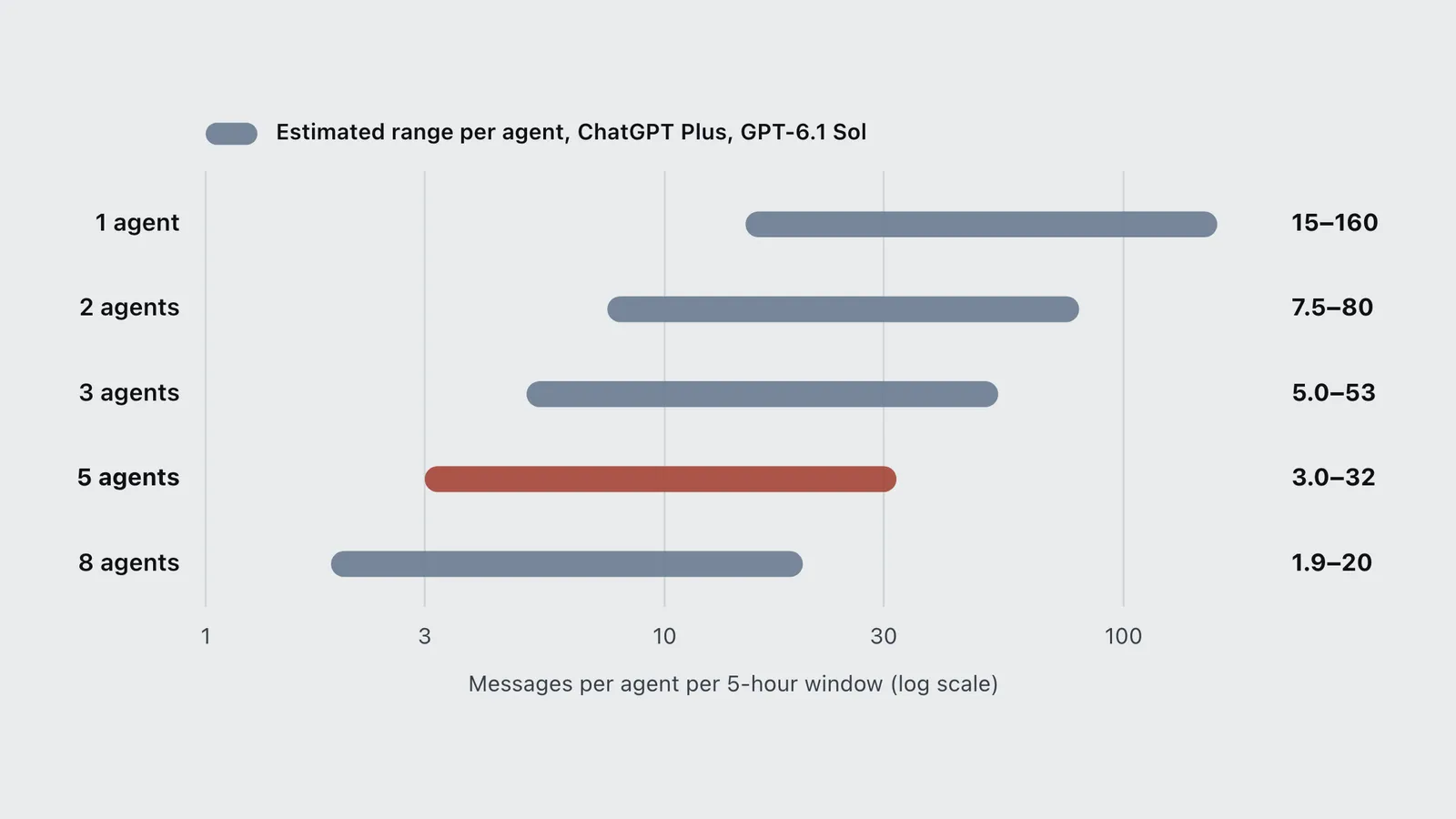
OpenAI is the only one of the two that publishes a number. Its estimate for ChatGPT Plus is 15 to 160 local messages per 5 hours on GPT-6.1 Sol, with the spread set by task size. Divide that pool across agents running at the same time and each one’s share shrinks fast:
| Agents running at once | Low | High |
|---|---|---|
| 1 agent | 15 | 160 |
| 2 agents | 7.5 | 80 |
| 3 agents | 5.0 | 53 |
| 5 agents | 3.0 | 32 |
| 8 agents | 1.9 | 20 |
At the low end, a five-agent fleet on Plus has about three heavy messages per agent before the window closes. That is enough to try an idea, not enough to finish a feature. Anthropic does not publish message counts for Pro, so the same division cannot be done in numbers for Claude, but the mechanism is identical: Max (5x) gives five agents roughly what Pro gives one.
Three ways out exist, and Orca helps with only one of them. You can buy a bigger plan (Claude Ultra and ChatGPT Pro both remove the 5-hour limit, per the vendors’ own pages). You can spread agents across different vendors, so Claude Code, Codex and Cursor each burn a separate plan. Or you can use several accounts, which is the case Orca’s usage tracking is built for: it sorts providers so the tightest limit shows first, warns at 80% of a limit, and lets you switch the active account.
Orca is open about this. Its hot-swap docs begin: “Running multiple Codex accounts to maximize tokens is common.” You log in to each account once, label them (“personal”, “work”), and pick one from a status-bar chip. The swap changes which credentials Orca points to and does not log you in again. Two details matter for a fleet. Only agents launched after the swap use the new account; running sessions keep their old one until restarted. The usage bar shows only the active account. The Claude Code switcher works the same way. Read each vendor’s terms before stacking personal accounts. A switcher that is easy to use does not mean the vendor allows the practice. To compare a plan against paying per token for heavy parallel use, run your numbers through the subscription vs API calculator.
Is running agents in parallel cheaper than retrying one agent?
Orca’s own parallel agents recipe says “running the same task in parallel is cheaper than sequential retries.” That holds for your time, not for your tokens.
The recipe has you send one prompt to three agents and keep the best diff. That always costs three full runs. A sequential approach runs one agent and retries only if the result is unusable. If each attempt succeeds half the time, the expected cost of trying up to three times in a row is 1 + 0.5 + 0.25 = 1.75 runs. At a 30% success rate it is 2.19 runs. Sequential retries cost fewer tokens at any success rate, and they reach three runs only when the first two attempts fail.
What the parallel version buys is wall-clock time and choice. You wait for one round instead of three, and you pick between three different approaches instead of taking the first one that compiles. That is worth paying for on a plan with headroom. On a plan already near its 5-hour limit, it is the fastest way to lock yourself out for the afternoon.
The same pattern shows up in research on multi-agent systems: more agents reliably cost more tokens and only sometimes produce better work. The breakdown of graph versus agent-loop costs covers those numbers, including Google Research’s finding that multi-agent setups help on parallel tasks and hurt on sequential ones.
How do you stop an Orca fleet from draining your plan?
Use Orca’s own settings. Several features in the docs decide how many model turns a fleet spends, though the docs never present them as cost controls:
- Set the model and effort per worker. In orchestration,
worker-starttakes--modeland--effortfor Claude, Codex, Muse, Cursor, Antigravity and OpenCode workers. The setting applies to that launch only. A coordinator can stay on a frontier model while routine workers run on a cheaper one. - Lower the nesting limit. Workers can start their own helper workers up to a “Nested worker depth” that defaults to 4. Every helper is another agent on the same plan, so a setting of 1 or 2 caps the spread.
- Gate scheduled runs with a precheck. An automation can run a shell command before it starts, such as
gh pr list, and skip the run if the command fails. An hourly “review PRs” job then spends nothing on hours with no PRs. The automations docs also suggest creating every automation with--disabledand triggering it by hand before you enable the schedule. - Give automations a cheaper model.
--extra-agent-args="--model ..."sets the model for each run of one automation without changing your defaults for interactive work.
Agent hibernation is the feature that sounds like a saving but is not one for your plan. Per the hibernation docs, it stops finished, untouched background agents after 30 minutes by default and resumes them with claude --resume or codex resume when you reopen the worktree. That frees memory on your machine, since each idle agent is “a live PTY holding a model session in memory.” It does not save tokens, because an agent waiting at a prompt is not calling the model anyway. It is experimental and off by default. The troubleshooting page names the bigger memory cost: split layouts with many browser tabs.
Which agents does Orca support?
Any agent that runs in a terminal. The README states that “if it runs in a terminal, it runs in Orca.” Orca’s supported agents page lists 40 agents set up for one-click launch, from Claude Code, Codex and Cursor CLI to DeepSeek Harness, Qoder CLI, Kiro, Goose, Aider, Mistral Vibe and Trae. Claude Agent Teams, off by default, is a 41st entry. The README names 34 and the homepage cites 27, so the count depends on which page you read. The docs list is the longest.
Support comes in tiers. Only Claude Code, Codex, Muse Code and Cursor CLI are marked “deep integration”, which adds usage tracking and, for Claude and Codex, account hot-swap. Most of the rest are “auto-setup”: Orca installs and launches them but shows less of their state.
Usage tracking covers fewer agents than launching does. The usage tracking docs list Claude Code, Codex, Muse Code, Gemini, Antigravity, OpenCode, Kimi Code, MiniMax, Cursor, ZCode and GLM Coding Plans. For any other agent you can run it but you are on your own for watching its limits.
If you are still choosing the agents themselves, the AI coding agents hub compares them by price and capability, and new agentic code editors in 2026 covers ZCode, Antigravity 2.0 and Grok Build, all of which Orca can drive.
Does Orca turn off agent permission prompts?
Yes, by default. The supported agents docs say Orca “pre-fills each supported CLI’s permission-bypass flag for new launches”: --dangerously-skip-permissions for Claude Code, --dangerously-bypass-approvals-and-sandbox for Codex, and --yolo for Gemini, Cursor, Kimi, GitHub Copilot and others. Orca’s reasoning is that “worktrees are disposable.” An agent in its own checkout can experiment, and you can still discard the diff.
That is true for your files and not for everything else. A worktree separates one branch’s files from another’s. It does not stop a shell command from reaching your home directory, your network, your cloud credentials or a production database that a .env file points at. Codex’s flag name says it outright: it bypasses the sandbox as well as the approvals. Anthropic’s Claude Code security documentation says the same about Claude’s working-folder boundary: it “is a permission prompt, so a Bash command you approve can still write anywhere your user account can.” Skip the prompt and nothing is left to ask. Claude Code also has an auto mode, in which a separate classifier model reviews actions and blocks the ones it judges unsafe. That sits between prompting for everything and bypassing everything.
To turn the prompts back on, open Settings, Agents, Agent Permissions and switch from Yolo to Manual. That applies to new terminal launches and new Claude and Codex chat sessions. Existing chats keep their mode, and agents whose launch arguments you have already customized are left alone. A sensible split is Manual for any repo with production credentials and Yolo only for throwaway work.
How does Orca compare with Conductor and Claude Code’s built-in worktrees?
Short version: Orca is the cross-platform, open-source option with the widest agent support. Conductor was the polished Mac-only option and is now winding down under Meta. Claude Code’s own --worktree flag is enough if you only run Claude.
| Orca | Conductor | Claude Code --worktree |
|
|---|---|---|---|
| Price | Free | App winding down; Cloud ends 20 Nov 2026 | Included in Claude Code |
| Platforms | macOS, Windows, Linux, iOS, Android | Mac | Anywhere Claude Code runs |
| License | MIT, open source | Proprietary | Proprietary CLI |
| Agents | 40 preconfigured, plus any CLI | Claude Code, Codex, Cursor | Claude only |
| Status | Daily releases | Joining Meta | Maintained by Anthropic |
Conductor. Conductor’s 0.93.0 changelog entry, dated 4 November 2026, announced that “Conductor is joining Meta.” The same post says “Conductor Cloud goes read-only on November 13 and shuts down on November 20,” and that the local Mac app “keeps getting new models and critical bug fixes until early 2027.” Axios reported the deal as an acquisition by Meta the same day. Conductor’s homepage lists Claude Code, Codex and Cursor as its agents.
Orca published a migration guide from Conductor that states “Conductor and Orca share the same model”: one worktree and branch per task. Because Conductor workspaces are ordinary git worktrees, Orca opens them in place. The guide maps conductor.json setup scripts to orca.yaml and notes two real differences: Orca does not reserve a port per worktree, and Orca does not host machines, so Conductor Cloud work has to move to a computer you control. Export Conductor Cloud data before 13 November.
Claude Code alone. Anthropic’s common workflows documentation shows the built-in way: claude --worktree feature-auth in one terminal and the same command with a different name in a second. That gives you isolation with no extra app. What it lacks is everything around it: the side-by-side panes, the diff review, other vendors’ agents and the usage view across plans. If you already live in Claude Code, the six agentic workflows guide covers when parallel worktrees beat a single session, and the best Claude Code mods list covers tools that add dashboards without leaving the terminal.
When do parallel agents actually pay off?
Parallel agents pay off when the tasks are independent. Three unrelated bug fixes, a refactor in one package while tests get written in another, or three competing designs for one UI component all split cleanly. Each worktree touches different files, each diff reviews on its own, and nothing waits on anything else.
They do not pay off when tasks depend on each other. If agent B needs agent A’s new interface, B either waits (so you have lost the parallelism) or guesses (so you get merge conflicts). Handing the task to Orca’s coordinator agent does not remove the dependency either: a coordinator can split work, but linked steps still have to land in order, and one agent working through them in sequence spends fewer tokens.
The binding constraint usually turns out to be you. Every parallel agent produces a diff someone has to read. Three agents finishing at once means three reviews at once. Orca’s line-level review notes make that faster, but they do not make it free. A practical starting point is two or three agents on a plan with headroom, not eight on a Plus plan. For where Orca worktrees fit next to cloud sessions and automated review, see the Claude Code autonomous workflow.
How to get started with Orca
- Install it. On macOS run
brew install --cask stablyai/orca/orcaor download the DMG; Windows has an installer and Linux has AppImage, .deb and .rpm builds, per the install docs. On Linux the CLI is namedorca-ideso it does not clash with the GNOME screen reader. - Add a repo. Orca asks for access to your home directory on first launch, and can import your
~/.claude,~/.codexand Ghostty settings. - Sign in to your agents. Log in to Claude Code, Codex or any other CLI with your own account. Orca uses those sessions; there is no Orca key to buy.
- Fix the clean-checkout gap. A new worktree is a fresh checkout, so gitignored files such as
.envandnode_modulesare missing. Per the worktrees docs, list files to copy into each new worktree in a.worktreeincludefile at the repo root. List large rebuildable folders to share underworktree.sharedDirectoriesinorca.yaml. Commands such aspnpm installgo under Settings, Repository, Hooks and run after each worktree is created. - Choose a permission mode. Decide between Yolo and Manual under Settings, Agents, Agent Permissions before the first launch (see the permissions section above).
- Start small. Create two worktrees from the same branch, launch a different agent in each and give each a different, independent task. Orca’s first-session walkthrough races three agents on the same prompt instead. That costs three full runs, so try it after you have checked your plan’s headroom.
- Watch the usage bar. Check the reset times before adding a third agent, and review each diff before you merge. Deleting a worktree in Orca also deletes its branch.
On privacy, the telemetry docs say Orca sends anonymous usage events to PostHog Cloud in the US, and that “no agent prompts, responses, or terminal contents” are sent. Turn it off in Settings, Privacy, or set DO_NOT_TRACK=1.
Frequently asked questions
- Is Orca free?
- Yes. Orca is MIT-licensed and free on macOS, Windows and Linux, with no paid individual tier as of November 2026. You pay for the coding agents it runs (Claude, Codex, Cursor and so on) through your own subscriptions, and for any cloud VMs through your own provider.
- Who makes Orca?
- Orca is made by Stably AI, a Y Combinator-backed company in San Francisco, according to the Orca website. The source code is public at github.com/stablyai/orca.
- Does Orca need an API key?
- No. Orca drives each agent CLI with the account you are already signed in to, such as a Claude Pro or ChatGPT Plus subscription. You can still point an agent at an API key if that agent supports one.
- Is Orca a good Conductor replacement?
- For most Conductor users, yes. Orca uses the same one-worktree-per-task model, opens existing Conductor worktrees in place and has a migration guide for conductor.json scripts. The gap is cloud hosting: Orca does not host machines, so Conductor Cloud work, which shuts down on 20 November 2026, has to move to your own computer, an SSH host or a cloud provider you pay.
- Does Orca skip agent permission prompts?
- By default, yes. Orca launches Claude Code with --dangerously-skip-permissions, Codex with --dangerously-bypass-approvals-and-sandbox and other agents with their own bypass flags, on the grounds that worktrees are disposable. Switch new launches to Manual under Settings, Agents, Agent Permissions for any repo that holds real credentials.
- Can Orca switch between several Claude or Codex accounts?
- Yes. Orca lists every Codex and Claude Code account you have logged in to, and a status-bar chip switches the active one without logging in again. Only agents launched after the switch use the new account. Check the terms of each vendor before using several personal accounts to extend limits.
- Is Orca related to the GNOME Orca screen reader?
- No. GNOME Orca is a Linux screen reader. To avoid the name clash, the Orca coding app installs its Linux command as orca-ide.
Sources
- Stably AI (2026). Orca README. GitHub. https://github.com/stablyai/orca
- Stably AI (2026). stablyai/orca repository metadata and releases. GitHub API, checked 7 November 2026. https://api.github.com/repos/stablyai/orca
- Stably AI (2026). Orca: the agent development environment. Orca website. https://www.onorca.dev/
- Stably AI (2026). What is Orca? Orca documentation. https://www.onorca.dev/docs
- Stably AI (2026). Ways to run Orca. Orca documentation. https://www.onorca.dev/docs/ways-to-run
- Stably AI (2026). Usage and rate-limit tracking. Orca documentation. https://www.onorca.dev/docs/agents/usage-tracking
- Stably AI (2026). Parallel agents recipe. Orca documentation. https://www.onorca.dev/docs/recipes/parallel-agents
- Stably AI (2026). Migrate from Conductor. Orca documentation. https://www.onorca.dev/docs/migrate-from-conductor
- Stably AI (2026). Install. Orca documentation. https://www.onorca.dev/docs/install
- Stably AI (2026). Telemetry. Orca documentation. https://www.onorca.dev/docs/telemetry
- Stably AI (2026). Supported agents. Orca documentation. https://www.onorca.dev/docs/agents/supported
- Stably AI (2026). Hot-swap Codex accounts. Orca documentation. https://www.onorca.dev/docs/agents/codex-hot-swap
- Stably AI (2026). Codex in Orca. Orca documentation. https://www.onorca.dev/docs/agents/codex
- Stably AI (2026). Agent hibernation. Orca documentation. https://www.onorca.dev/docs/agents/hibernation
- Stably AI (2026). Orchestration. Orca documentation. https://www.onorca.dev/docs/cli/orchestration
- Stably AI (2026). Scheduled automations. Orca documentation. https://www.onorca.dev/docs/cli/automations
- Stably AI (2026). Worktrees. Orca documentation. https://www.onorca.dev/docs/model/worktrees
- Stably AI (2026). Your first 3-agent session. Orca documentation. https://www.onorca.dev/docs/first-session
- Stably AI (2026). Attribution. Orca documentation. https://www.onorca.dev/docs/review/attribution
- Stably AI (2026). Troubleshooting & FAQ. Orca documentation. https://www.onorca.dev/docs/troubleshooting
- Anthropic (2026). Security. Claude Code documentation. https://code.claude.com/docs/en/security
- Stably AI (2026). Enterprise. Orca website. https://www.onorca.dev/enterprise
- Anthropic (2026). Pricing. Claude. https://claude.com/pricing
- Anthropic (2026). Using Claude Code with your Pro or Max plan. Claude Help Center. https://support.claude.com/en/articles/11145838-using-claude-code-with-your-pro-or-max-plan
- Anthropic (2026). Common workflows: run parallel sessions with worktrees. Claude Code documentation. https://code.claude.com/docs/en/common-workflows
- OpenAI (2026). Codex pricing. OpenAI documentation. https://learn.chatgpt.com/docs/pricing
- Conductor (2026). 0.93.0: Conductor is joining Meta. Conductor changelog. https://www.conductor.build/changelog/0.93.0-conductor-is-joining-meta
- Axios (2026). Exclusive: Meta acquires AI coding startup Conductor. Axios. https://axios.com/2026/11/04/meta-acquires-ai-coding-startup-conductor
- Git project. git-worktree documentation. git-scm.com. https://git-scm.com/docs/git-worktree