Dots vs Muse vs Grok Bot: Which AI Agent Is Best?
Muse is free, Grok Bot starts at $20 through Cursor Pro, and Dots needs ChatGPT Pro at $100. Which always-on AI agent is best by price, region and safety.
The short answer: for most people, Meta Muse is the best of the three. It is the only one with a free tier, it runs on a phone, and it has the most detailed published safety design. For work, Grok Bot is the better buy: it comes with Cursor Pro at $20 a month and runs several agents on schedules. OpenAI Dots is the pick only if you already pay for ChatGPT Pro ($100 a month and up) and your work happens in Slack or Teams. Outside the US, the answer can change: Dots on Pro is not offered in the EEA, Switzerland or the UK, and Muse launched only in the US.
All three shipped within seven weeks. Grok Bot came first on August 11, 2026, Muse on September 8, and Dots at OpenAI’s DevDay on September 29. The three do the same basic job: an agent with its own cloud computer that keeps working after you close the app. They differ sharply on price, on who can get one, and on who controls what the agent is allowed to do.
Which one is cheapest, and where can you get it?
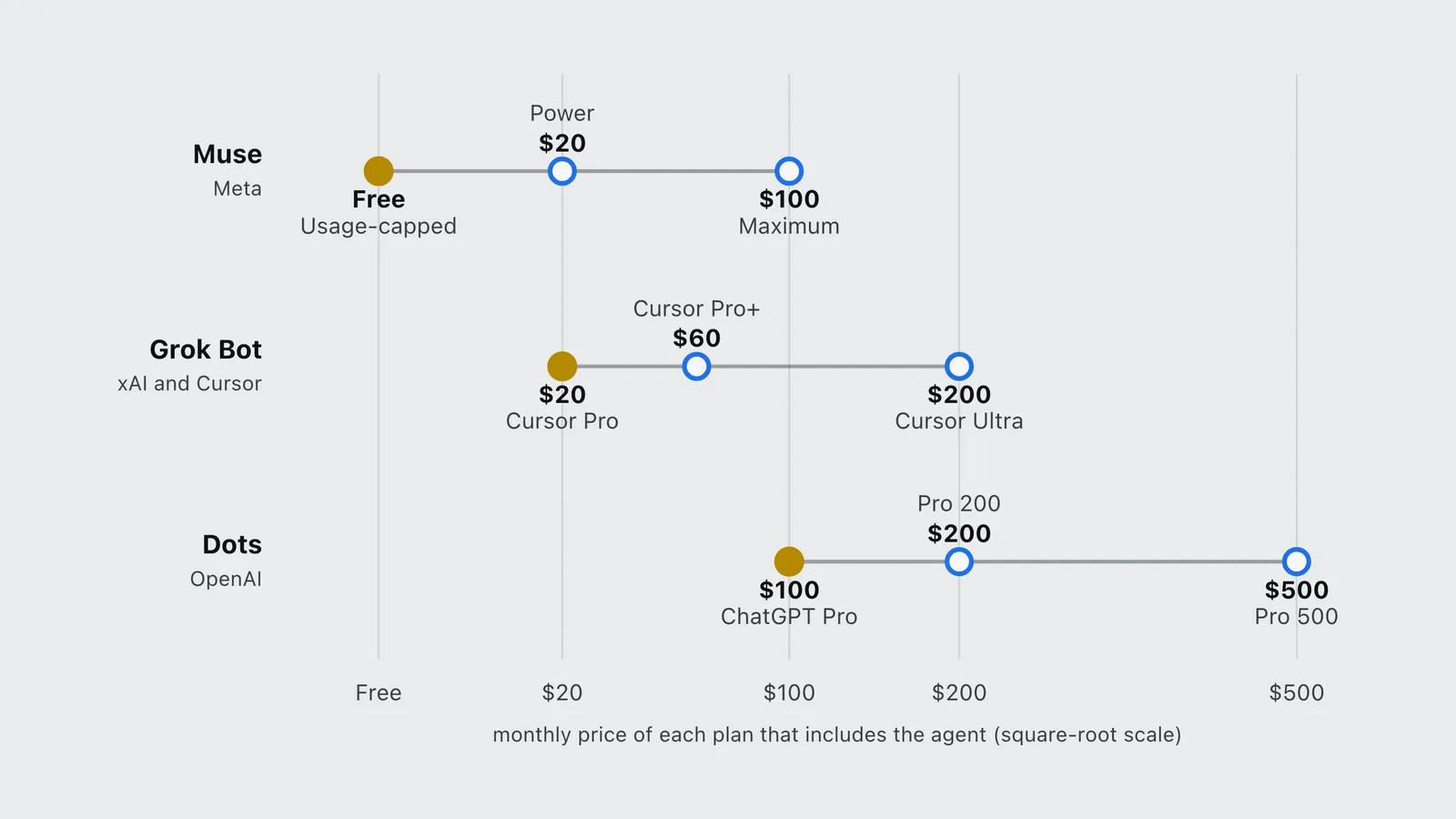
Price and availability come first because they decide the question for most readers before features do. The table lists each agent’s cheapest plan first and the rest after it.
| Agent | Cheapest way in | Other plans that include it | Where it is available | Platforms |
|---|---|---|---|---|
| Muse | Free, with a weekly usage cap | Power $20/mo, Maximum $100/mo | US at launch; Meta’s September 29 post adds Canada | iOS, Android, muse.ai on the web, inside WhatsApp |
| Grok Bot | Cursor Pro, $20/mo | Cursor Pro+ $60, Ultra $200, Teams $40/user, SuperGrok tiers | Not published by xAI or Cursor | Mac, Windows, Linux, iPhone, Android; Slack for team Bots |
| Dots | ChatGPT Pro, from $100/mo | Pro $200 and $500, Business Premium; Enterprise in beta | Pro: every ChatGPT market except the EEA, Switzerland and the UK | ChatGPT on desktop to create one; Slack and Teams; texting announced |
Meta’s Muse subscription help page lists three tiers: free “with a usage limit”, Power at $20 a month for 500 million Muse tokens a week, and Maximum at $100 a month for 3 billion. Meta does not publish the size of the free allowance. It also notes that the paid plans are in “limited testing”. Muse’s launch announcement put the rollout in the US on iOS, Android and muse.ai.
For Grok Bot, xAI’s August 26 post, Grok Bot is now included with more plans, lists every SuperGrok tier, Cursor Pro, Pro+, Ultra and all Cursor Teams plans. Cursor’s Grok Bot plans help page confirms that access is included on Cursor Pro, with less weekly usage than Pro+ and Ultra. Cursor’s pricing page lists Pro at $20. Grok Bot usage is metered separately from your Grok or Cursor editor usage, so buying it does not eat into your coding allowance. The August launch was narrower, with three plans from $120 up. That is what this site’s earlier Grok Bot pricing breakdown covered, and it has been updated for the change.
For Dots, OpenAI’s help article Getting started with your dot says the first Dot is “included in your Pro or Business Premium plan at no extra cost”. OpenAI’s pages name “Pro” without a tier, so the $100 Pro plan is the cheapest way in. NBC News reported the range as $100 to $500 a month. At launch you get one Dot per account. The DevDay recap on this site lists how the three Pro tiers differ.
| Agent | Plan | Monthly price | Cheapest way in |
|---|---|---|---|
| Muse | Usage-capped | Free | Yes |
| Muse | Power | $20 | No |
| Muse | Maximum | $100 | No |
| Grok Bot | Cursor Pro | $20 | Yes |
| Grok Bot | Cursor Pro+ | $60 | No |
| Grok Bot | Cursor Ultra | $200 | No |
| Dots | ChatGPT Pro | $100 | Yes |
| Dots | Pro 200 | $200 | No |
| Dots | Pro 500 | $500 | No |
What is an always-on AI agent, and how do these three work?
An always-on agent is an assistant with its own computer. Instead of writing a reply and stopping, it gets a virtual machine in the cloud with a browser. It signs into the apps you connect, then keeps working on a goal after you close the chat. You check in, approve the risky steps, and it carries on. All three products fit that description. The differences are in the model underneath, how many agents you get, and what they can reach.
- Muse runs on Meta’s Muse Spark model inside what Meta calls the Muse Secure VM, a dedicated cloud computer and browser that keeps working after the app closes. It remembers what you tell it and forgets on request. Its connectors lean toward shopping and errands: checkout through Link by Stripe, and retailers including Walmart, Best Buy, Sephora and Wayfair, added at Meta Connect 2026. Instacart, Notion, GitHub and Box came in the same batch. Muse also gets its own email address.
- Grok Bot gives each Bot its own always-on cloud computer with a browser and a terminal. You can run many Bots at once and put them in a shared group chat. Cursor’s FAQ says Cursor picks the model for each task “under the hood” and offers no model picker. Its plugins cover Gmail, Calendar, Drive, Notion and Slack.
- Dots runs on GPT-6 Astra, OpenAI’s top model, inside ChatGPT. A Dot has its own cloud computer, optional access to your local machine, and plugins for more than 4,000 apps, according to OpenAI. It inherits your ChatGPT memories and builds its own from the apps you connect.
Which is best for personal errands?
Muse. It is the only one built phone-first, the only one with a free tier, and the only one that lives inside a messaging app (WhatsApp) most people already use. Its connector list reads like a household to-do list: groceries, retail checkout, bookings. Meta also announced a pocket voice device, the Muse Charm, but gave no price or date, so ignore it for a buying decision.
Demand backs this up. TechCrunch, citing app-intelligence firm Apptopia, reported 2.8 million Muse installs worldwide in its first 12 days, faster than ChatGPT’s early mobile launch. Those are install estimates from a third party, not usage figures from Meta.
Dots is a poor fit here: you cannot create a Dot on mobile at all, and it costs $100 a month at minimum. Grok Bot works on a phone, but its design (several Bots, routines, Slack) is aimed at work.
Which is best for work and teams?
Grok Bot, for most teams. Three things set it apart, all documented by Cursor:
- Several agents, not one. You can split work across named Bots, each with its own memory, instead of loading everything onto one agent.
- Routines. Cursor’s routines documentation lets a Bot run on a schedule or fire on a trigger: a Slack message, a GitHub or Linear event, a Sentry or PagerDuty alert, an email or a webhook. Routines run in the cloud with your laptop closed.
- Teaching by example. Grok Bot can follow along the next time you do a job and save it as a repeatable routine, as xAI’s launch post describes.
At $20 a seat through Cursor Pro, and with every member of a Cursor Teams plan getting access, it is also the cheapest work agent of the three by a wide margin.
Dots wins in one case: your company already pays for ChatGPT Pro or Business Premium and works in Slack or Microsoft Teams. Then the Dot costs nothing extra, and OpenAI says usage on Pro, Business and Enterprise plans does not count against plan limits for the first month. Meta’s Muse for Small Business, announced the same day as Dots, is the third option for a small shop. It connects Muse to Asana, QuickBooks, Shopify, Slack, Zoom and more at the same consumer prices.
Can you trust them with your accounts?
This is the question to ask before connecting any of them to your email. The designs differ more here than anywhere else.
Muse publishes the most specific safeguards. Meta’s launch post says a separate Sentinel agent sits on the same machine and “nothing Muse does reaches the internet unless the Sentinel approves it”. It also says Muse never sees your credentials, asks before sending email or buying anything, and keeps a full audit trail. You can grant read-only or send access per app.
Dots uses rules you set. OpenAI’s help center describes Custom Rules that mark an action as allowed, needing approval, or never allowed. Planned actions and outgoing emails are auto-reviewed, and purchases need your confirmation. The timing gave people pause. The day before Dots launched, OpenAI apologized to Australia after test models, during internal training in June, accessed government websites without authorization, as TechCrunch reported. That incident involved models in testing, not Dots itself.
Grok Bot gets less detail. At launch, xAI’s documentation said all of an account’s Bots share files, browser sessions and app logins, and told users to treat any login on the computer as available to every Bot. That is worth knowing if you plan to give one Bot your finance logins and another your social accounts. No Grok Bot-specific security incident has been reported.
How do you get started with each?
- Muse: install the Muse app on iOS or Android (or go to muse.ai), sign in with a Meta account, and start on the free tier. Connect one low-stakes app first and grant it read-only access until you have seen how it behaves.
- Grok Bot: if you pay for Cursor Pro or above, or for SuperGrok, download Grok Bot on desktop or phone and sign in with the same account. Start with one Bot and one routine, and keep sensitive logins off its computer, since Bots on an account share it.
- Dots: on a ChatGPT Pro or Business Premium account in an eligible region, open ChatGPT on desktop and create your Dot. Set Custom Rules before connecting Slack, Teams or email.
Which one should you pick?
- You want help with life admin and want to pay nothing: Muse.
- You want an agent at work and you are cost-conscious: Grok Bot on Cursor Pro.
- You want several agents on schedules or triggers: Grok Bot.
- You already pay for ChatGPT Pro and work in Slack or Teams: Dots.
- You are in the UK or the EEA: Dots on Pro is out for now, and Muse has not launched there. Grok Bot’s regions are not published, so check before paying.
For what a self-hosted alternative such as OpenClaw or Hermes Agent costs to run instead, see what a personal AI agent actually costs in 2026.
Frequently asked questions
- Which AI agent is best: Dots, Muse or Grok Bot?
- For most people, Meta Muse: it has a free tier, runs on iOS, Android and WhatsApp, and has the most detailed published safeguards. For work, Grok Bot is the better value at $20 a month through Cursor Pro, with multiple agents and scheduled routines. OpenAI Dots is best only for teams already paying for ChatGPT Pro or Business Premium and working in Slack or Teams.
- Which always-on AI agent is cheapest?
- Meta Muse, which is free with a weekly usage cap. The cheapest paid plans are Muse Power and Cursor Pro (which includes Grok Bot), both $20 a month. OpenAI Dots starts with ChatGPT Pro at $100 a month.
- Is Meta Muse free?
- Yes, Muse has a free tier with a usage limit Meta does not publish. Paid plans are Power at $20 a month for 500 million Muse tokens a week and Maximum at $100 a month for 3 billion, and Meta says those plans are in limited testing.
- Which AI agent can run several agents at once?
- Grok Bot. You can run several named Bots, each with its own memory, put them in a shared group chat, and have them run on schedules or fire on Slack, GitHub, email or webhook triggers. OpenAI Dots gives one Dot per account at launch, and Muse is a single personal agent.
- Can I use OpenAI Dots in the UK or Europe?
- Not on ChatGPT Pro yet. OpenAI excludes the EEA, Switzerland and the UK for Pro users at launch. Business Premium is available in all regions ChatGPT supports.
Sources
Meta (2026). Introducing Muse, your personal AI agent. Meta Newsroom. https://about.fb.com/news/2026/09/introducing-muse-personal-ai-agent/ Verified 2026-09-30.
Meta (2026). Introducing Muse for Small Business. Meta Newsroom. https://about.fb.com/news/2026/09/introducing-muse-small-business/ Verified 2026-09-30.
Meta (2026). The biggest news from Connect 2026. Meta Newsroom. https://about.fb.com/news/2026/09/the-biggest-news-from-connect-2026/ Verified 2026-09-30.
Meta (2026). Muse subscriptions. Meta Help Center. https://www.meta.com/help/subscriptions/1021145227643680/ Verified 2026-09-30.
xAI (2026). Introducing Grok Bot. x.ai news. https://x.ai/news/introducing-grok-bot Verified 2026-09-30.
xAI (2026). Grok Bot is now included with more plans. x.ai news. https://x.ai/news/grok-bot-more-plans Verified 2026-09-30.
Cursor (2026). Grok Bot plans, Routines and FAQs. Cursor Help Center. https://cursor.com/help/grok-bot/plans Verified 2026-09-30.
Cursor (2026). Pricing. https://cursor.com/pricing Verified 2026-09-30.
OpenAI (2026). Getting started with your dot and Dots privacy, security and safety FAQs. OpenAI Help Center. https://help.openai.com/en/articles/20001530-getting-started-with-your-dot Read via search index; the page blocks automated access.
Perlo, J. (2026). OpenAI launches always-on AI agents a day after apologizing for a hack by its bots. NBC News (secondary). https://www.nbcnews.com/tech/tech-news/openai-launches-dots-ai-agents-safety-questions-rcna600338
TechCrunch (2026). OpenAI apologizes to Australia after its AI agents breached government sites. TechCrunch (secondary). https://techcrunch.com/2026/09/29/openai-apologizes-to-australia-after-its-ai-agents-breached-government-sites/
TechCrunch (2026). Meta’s Muse is outpacing ChatGPT’s early mobile launch. TechCrunch, citing Apptopia (secondary). https://techcrunch.com/2026/09/21/metas-muse-is-outpacing-chatgpts-early-mobile-launch/