How Codex Cloud Environments Work: Setup, VMs, Limits
Codex cloud environments, new at DevDay 2026: how setup and publishing work, what each task VM gets, how secrets and network access work, and what is missing.
A Codex cloud environment is a saved, tested setup for your repositories that OpenAI’s coding agent reuses for every cloud task: the checked-out code, installed dependencies and tools, environment variables, secrets and network rules. You build it once, publish it, and each new task starts from a copy of it in its own virtual machine. That is what lets a task keep running after you close the laptop, which was the Codex headline at OpenAI’s DevDay on September 29, 2026.
This guide explains the lifecycle in plain terms, then covers the parts that decide whether it fits your project: the VM you get, how credentials reach the task, what the network allows, and what cloud environments cannot do yet. Everything is taken from OpenAI’s cloud environments documentation, read on September 30, 2026.
The lifecycle: prepare, publish, run
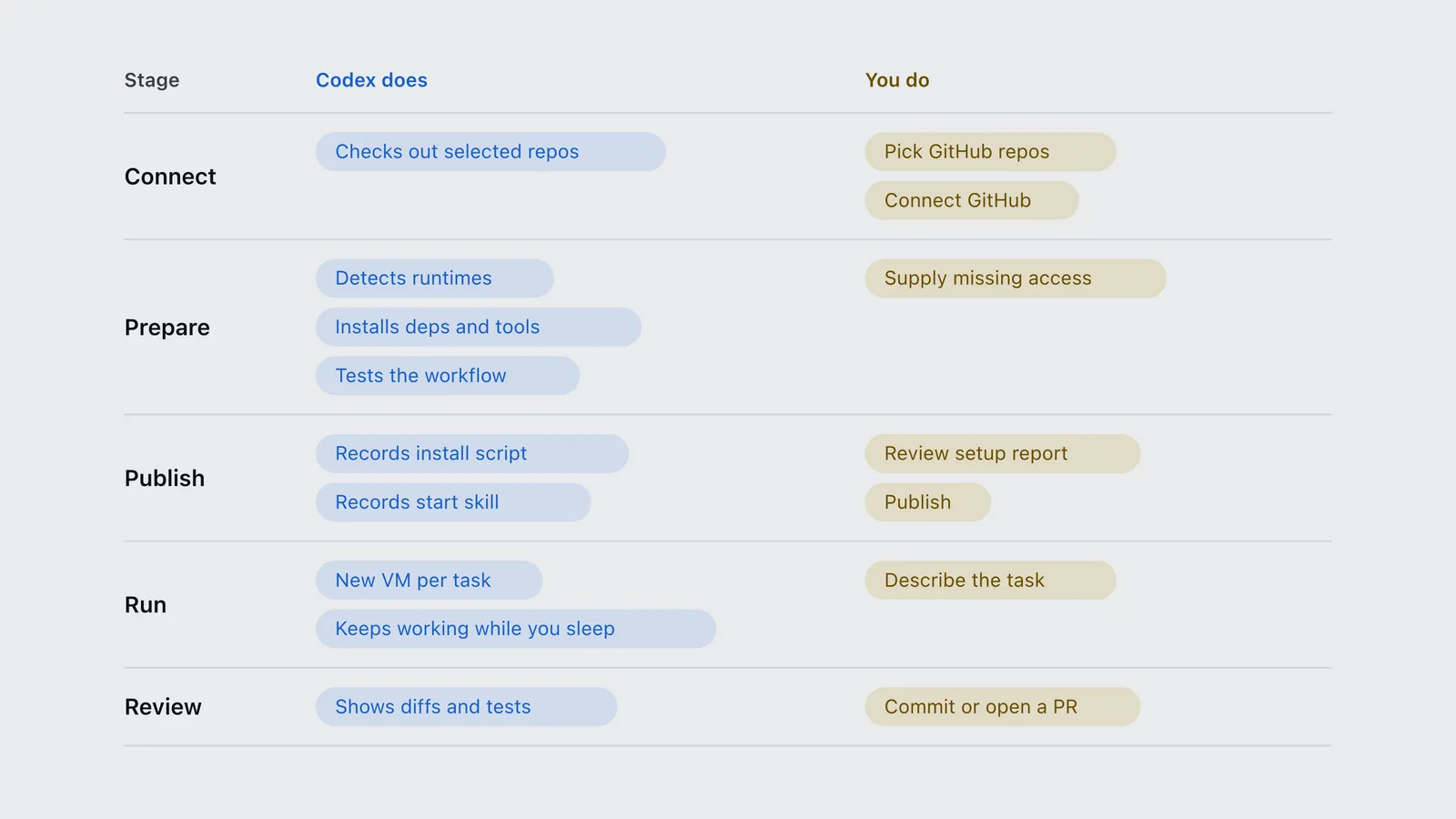
The notable change from the older Codex Cloud is that you no longer write the setup script yourself. OpenAI’s docs describe it as a conversation: “Codex identifies runtimes, package versions, tools, and services from your repositories”, and you refine the result instead of authoring it.
| Stage | Codex does | You do |
|---|---|---|
| Connect | Checks out selected repos | Pick GitHub repos; Connect GitHub |
| Prepare | Detects runtimes; Installs deps and tools; Tests the workflow | Supply missing access |
| Publish | Records install script; Records start skill | Review setup report; Publish |
| Run | New VM per task; Keeps working while you sleep | Describe the task |
| Review | Shows diffs and tests | Commit or open a PR |
Step by step, per the documentation:
- Connect. In a new task, choose Work in, then Cloud, then Create environment, and select the GitHub repositories to check out.
- Prepare. Codex inspects the repositories, installs dependencies and tools, and tests the workflow. It asks for anything it cannot infer, such as a private registry token. You can also request specific versions, commands or services.
- Publish. Codex records what worked in two fields: an install script (dependencies and development assets) and a start skill (instructions to start services and check they are ready). You review the setup report and select Publish. OpenAI draws a clear line here: “Saving stores configuration”, while “publishing captures the prepared filesystem for new tasks”.
- Run. Each new task starts from that published filesystem in its own workspace. A task you reopen continues with its own saved files, including uncommitted changes.
- Review. You inspect changed files and test results, ask for follow-ups, then commit or open a pull request.
To change the setup later, you edit the environment, let Codex prepare and test the change, and republish. Existing tasks keep their own state; only new tasks pick up the update. Repository refreshes run in the background and keep dependency caches, so a routine pull does not reinstall everything.
The VM each task gets
Every cloud task runs in its own VM, and the default size depends on your ChatGPT plan:
| Plan | vCPUs | Memory | Disk |
|---|---|---|---|
| Plus, Edu Plus | 2 | 8 GiB | 8 GiB |
| Pro, Business, Enterprise | 4 | 16 GiB | 32 GiB |
| Edu, Edu Pro | 4 | 16 GiB | 32 GiB |
Larger or custom VMs are an Enterprise option priced through an account team. The Plus disk is the constraint to watch: 8 GiB is tight for a monorepo with a large node_modules or a machine-learning dependency tree. OpenAI’s pricing page also lists “larger virtual machines to run cloud chats faster” as a Business feature.
The VM does not change what the work costs in tokens. Codex bills cloud and local work at the same per-token credit rates, from one shared allowance. The worked numbers are in what a Codex cloud task costs next to a local one.
How secrets and credentials reach a task
Cloud environments separate two kinds of value, and the difference matters for security:
| Type | Use it for | How it is delivered |
|---|---|---|
| Environment variable | A value a program must read directly | Passed straight to programs in the VM |
| Network secret | A credential sent to a specific HTTPS service | Programs see a placeholder; a proxy swaps in the real value for allowed domains only |
A network secret never sits in a process or file inside the VM. It works only over HTTPS on port 443, only for the domains you list, during both setup and tasks. That makes it the safer default for API tokens and registry credentials, since an agent that prints its environment cannot leak them.
Two more layers sit on top:
- Personal vault. Each person can store their own variables and secrets, for all environments or selected ones. A shared environment can request values that every user supplies from their own account, so sharing the environment does not share your credentials.
- OIDC for cloud resources. Enterprise workspaces can, on request, attach an OpenID Connect identity so a task gets short-lived credentials for AWS or Azure resources, with permissions set on the identity rather than inherited from your personal account.
What the network allows
Internet access is off until you turn it on. You then pick a preset: Package managers (a fixed allow-list covering npm, PyPI, crates.io, Go, Maven, Gradle, Ubuntu and Debian repositories, GitHub downloads and a few vendor repositories), custom domains only, or all (unrestricted). Any other host needs its own entry, and allowing a domain does not grant credentials for it.
For private services, the supported VPN is Tailscale, with a reusable, ephemeral auth key so each task VM can join and then drop off your network. The limits are specific: IPv4 only, no private DNS, and no native database protocols or SSH over the connection. For public services that filter by source IP, OpenAI publishes an agent egress IP feed that it says to check daily, and warns the ranges are shared across customers.
What cloud environments cannot do yet
Per the “current limitations” section of the documentation:
- No computer or browser use inside cloud environments.
- No GitLab or self-hosted GitHub Enterprise Server. GitHub.com only, for now.
- Personal skills do not sync. Skills stored in the repository work in cloud tasks; skills on your own machine do not.
- No API-key access. Codex with an API key is local-only; OpenAI’s pricing page lists it with “no cloud-based features”.
There is also a naming trap. The older setup, now labelled Codex Cloud (Legacy), still runs Code Review and the Linear and GitHub integrations, and OpenAI says it plans to deprecate it. If a guide tells you to write a setup script into a universal container image, it is describing the legacy system, not the environments launched at DevDay.
When to use one
A cloud environment earns its setup cost when the same project gets many tasks: each task reuses the tested setup instead of rediscovering it. It also fits work you want to hand off and check later from a phone, and team setups in Enterprise workspaces, where one published environment can be shared so colleagues start their own tasks from it without seeing each other’s work.
It is the wrong tool when the task needs your machine: a browser, a local database over its native protocol, SSH into a server, or a GitLab repository. For those, local Codex, or Codex Remote, which lets you steer a task on your own connected computer from the phone app, is the better fit. The full list of what else changed for Codex at DevDay is in what’s new in Codex after DevDay 2026.
Frequently asked questions
- What is a Codex cloud environment?
- A Codex cloud environment is a reusable, tested setup for Codex Cloud tasks: selected GitHub repositories, installed dependencies and tools, environment variables, network secrets and internet-access rules. Codex prepares and tests it with you, you publish it, and each new cloud task starts from that published filesystem in its own virtual machine.
- How long does Codex Cloud keep a task?
- By default, a Codex Cloud task saved VM state is recoverable for up to seven days after you last start a turn or resume the task, per OpenAI documentation. OpenAI advises committing important work, because saved state does not replace source control.
- How big is a Codex Cloud VM?
- On Plus and Edu Plus, each Codex Cloud task runs in a VM with 2 vCPUs, 8 GiB of memory and 8 GiB of disk. Pro, Business, Enterprise, Edu and Edu Pro get 4 vCPUs, 16 GiB of memory and 32 GiB of disk. Larger VMs are available for Enterprise through an OpenAI account team.
- Does Codex Cloud support GitLab?
- Not yet. OpenAI lists GitLab and self-hosted GitHub Enterprise Server as unsupported in cloud environments and on its roadmap, alongside computer and browser use. The legacy Codex Cloud experience supports some GitLab code review triggers.
Sources
OpenAI (2026). Cloud environments. Product documentation. https://learn.chatgpt.com/docs/environments/cloud-environments Verified 2026-09-30.
OpenAI (2026). Codex Cloud. Product documentation. https://learn.chatgpt.com/docs/cloud Verified 2026-09-30.
OpenAI (2026). Codex Cloud (Legacy). Product documentation. https://learn.chatgpt.com/docs/environments/cloud-environment Verified 2026-09-30.
OpenAI (2026). Pricing (plan features, API-key limitations). Product documentation. https://learn.chatgpt.com/docs/pricing Verified 2026-09-30.
OpenAI (2026). Codex Remote. Product documentation. https://learn.chatgpt.com/docs/remote Verified 2026-09-30.
OpenAI (2026). Code review. Product documentation. https://learn.chatgpt.com/docs/code-review Verified 2026-09-30.