Codex Cloud vs Local: What Each Task Costs in 2026
A Codex cloud task bills the same token rates as a local one, but only local can fall back to an API key. Per-task credit costs for Sol, Astra and Ultrafast.
OpenAI used its DevDay keynote on September 29, 2026 to move Codex “fully into the cloud”: tasks that keep running with the laptop shut, from reusable environments, reviewable on a phone. The obvious follow-up question is what a cloud task costs next to the same task run locally in the CLI or the desktop app.
Short answer: a Codex cloud task bills at the same per-token credit rates as a local one. OpenAI’s rate card has no cloud surcharge. A standard twelve-turn coding loop costs about 9.7 credits (roughly $0.39) on GPT-6.1 Sol and about 52 credits ($2.07) on GPT-6 Astra, in either place. The real differences are three: OpenAI says cloud tasks “may use more of your allowance”, cloud work cannot fall back to an API key when the allowance runs out, and on a subscription the Fast and Ultrafast modes drain your allowance faster than their credit price suggests.
Every rate below is read from OpenAI’s Codex pricing documentation and speed-mode documentation, checked on September 30, 2026.
What a Codex task costs, local or cloud
OpenAI prices Codex usage in credits per million tokens, with one rate table for all surfaces. The current rates for the three GPT-6 models, per OpenAI’s pricing page:
| Model | Input (credits / 1M) | Cached input | Output |
|---|---|---|---|
| GPT-6 Astra | 250 | 25 | 1,250 |
| GPT-6.1 Sol | 50 | 2.5 | 250 |
| GPT-6 Luna | 2.5 | 0.25 | 12.5 |
The same page says Codex credit billing “has no separate cache-write charge”, which matters for agent loops, since they re-send the same growing context on every turn.
To turn rates into a task, this site uses one fixed unit of agent work across its cost posts, first set out in the GPT-5.6 cost-per-task breakdown: a twelve-turn coding loop where each turn sends 25,000 input tokens at a 90 percent cache-hit rate and writes 2,500 output tokens. On GPT-6.1 Sol that is:
12 x (22,500 x 2.5 + 2,500 x 50 + 2,500 x 250) / 1,000,000 = 9.68 credits per loop.
The same loop is 51.75 credits on GPT-6 Astra and about half a credit on GPT-6 Luna.
What is a credit worth in dollars? OpenAI’s page says credit purchase prices “depend on your plan or agreement” and does not print one number. The ratio between the credit table and OpenAI’s API price list is exactly 25 credits per dollar on every GPT-6 row (Astra’s $10 input against 250 credits, Sol’s $2 against 50), and it matches the 2,500-credits-for-$100 terms in ChatGPT Business Premium. So this post values a credit at $0.04. That puts the Sol loop at $0.39 and the Astra loop at $2.07, the same figures the site’s Pro 500 breakeven uses.
Nothing in the rate card changes with location. There is no “cloud” row and no per-task fee. A turn that sends 25,000 tokens costs the same whether it runs on your laptop or on an OpenAI virtual machine.
Why cloud tasks can still use more of your allowance
OpenAI’s own wording is careful: “Cloud tasks may use more of your allowance than local messages. Usage depends on the model and task.” It gives no multiplier.
Third-party Codex pricing guides still circulate a figure of about 5 credits for a local task against 25 for a cloud one, quoted for GPT-5.3-era models. OpenAI’s current page prices Codex by tokens (it tells a small set of Enterprise customers to stay on a “legacy rate card” until they are migrated to “the new token-based pricing”), and the “5x” does not appear anywhere on it. Treat it as out of date.
The likelier reason a cloud task costs more is that it does more work, not that the work is priced higher. OpenAI’s Codex Cloud documentation describes the setup: Codex “inspects your repositories, installs dependencies and tools, and tests the workflow” before an environment is published, and every task then gets “its own workspace”. A local session starts inside a checkout you have already built, with your context already warm. A cloud task starts from the saved environment and has to rediscover some of it. That is an inference from how the product works, not a figure OpenAI publishes. The practical upshot: the setup is paid once per environment, so reusing one published environment across many tasks is the cheap way to use the cloud.
Fast and Ultrafast drain a plan faster than they bill
This is the part the DevDay coverage skipped. OpenAI prices its speed modes with two different multipliers, depending on which meter you are on. From the pricing page:
| Speed mode | Included subscription usage | Purchased credits and Enterprise pay-as-you-go |
|---|---|---|
| Fast | 2.5x | 2x |
| GPT-6 Astra Ultrafast | 8x | 6x |
OpenAI adds that “these billing multipliers don’t describe speed increases”. The speed documentation says Ultrafast generates tokens up to eight times faster than standard Astra in Codex, and that on Pro 500 it “uses your included usage first”.
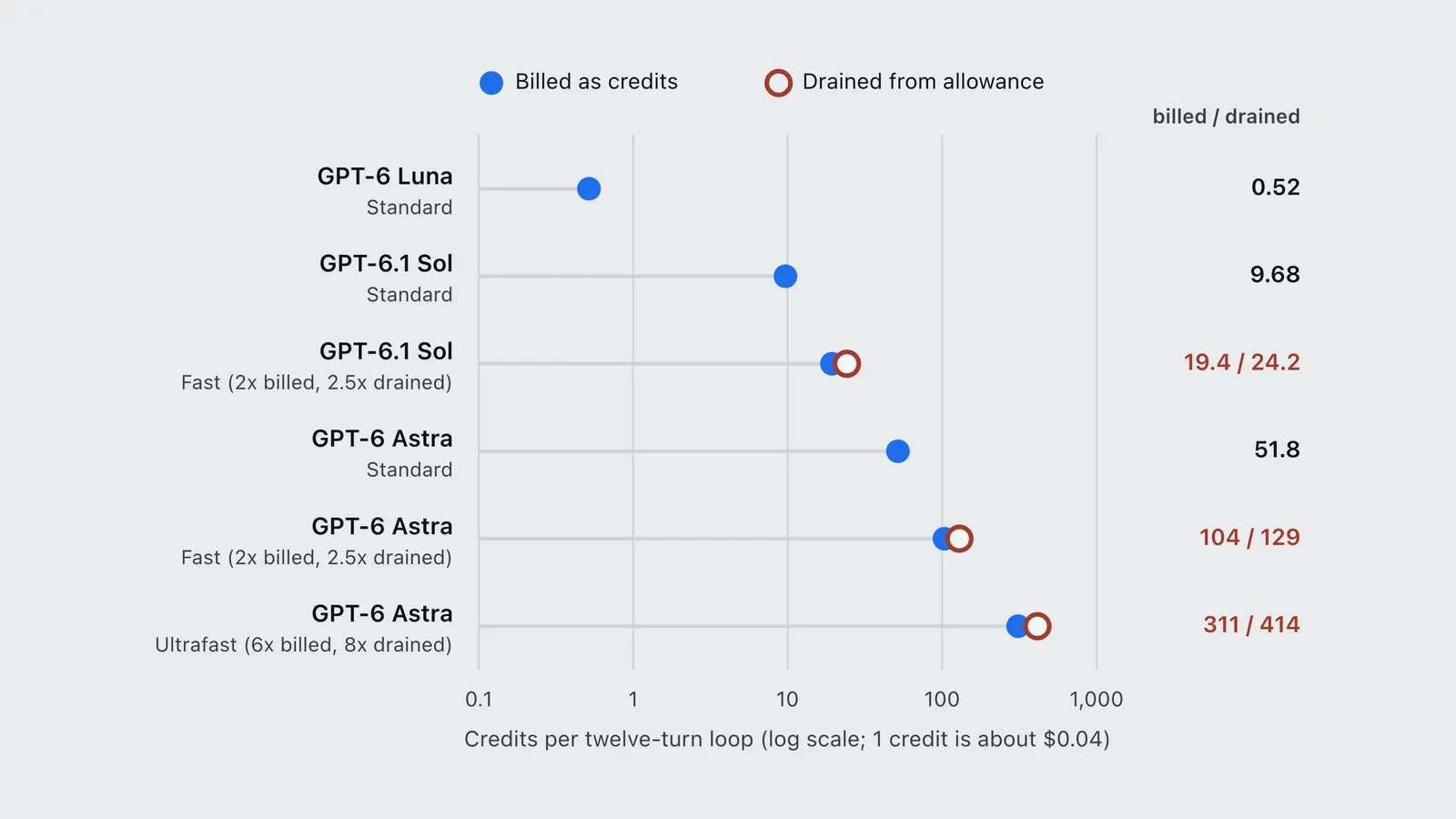
Put the two tables together and the same Ultrafast loop costs 310.5 credits ($12.42) once you are buying credits, but drains 414 credits’ worth of Standard allowance while you are still inside your plan. Your subscription allowance buys about 25 percent fewer Ultrafast loops than its credit-equivalent value implies. Whether the speed is worth that price is worked out in is OpenAI Ultrafast worth it. Fast mode has the same gap at a smaller size: 2.5x against 2x.
| Model and speed | Billed as credits | Drained from allowance |
|---|---|---|
| GPT-6 Luna (Standard) | 0.52 | 0.52 |
| GPT-6.1 Sol (Standard) | 9.68 | 9.68 |
| GPT-6.1 Sol (Fast (2x billed, 2.5x drained)) | 19.4 | 24.2 |
| GPT-6 Astra (Standard) | 51.8 | 51.8 |
| GPT-6 Astra (Fast (2x billed, 2.5x drained)) | 104 | 129 |
| GPT-6 Astra (Ultrafast (6x billed, 8x drained)) | 311 | 414 |
How many cloud tasks each plan buys
OpenAI publishes estimates only for Plus and Standard Business, as local messages per five-hour window. Per its pricing page: 15 to 160 messages on GPT-6.1 Sol, 5 to 45 on GPT-6 Astra, and 350 to 3,000 on GPT-6 Luna. The same page states that “local messages and cloud chats share your plan’s usage allowance” and that weekly limits may also apply. A cloud task, then, is not a separate bucket. It is taken out of the same five-hour window as your terminal sessions.
Pro plans “currently have no five-hour limit”, per the same page, but still draw from a larger allowance that OpenAI sizes in multiples of Plus rather than in tokens. After October 30, 2026 that is 10 times Plus on Pro 200, down from 20, and 25 times on Pro 500, as covered in the Pro 500 breakeven. Because none of these allowances is stated in tokens, no one outside OpenAI can say how many twelve-turn loops a plan holds. Your usage dashboard, or /status in the Codex CLI, is the only exact reading.
The cloud VM you get also depends on the plan. OpenAI’s cloud environment documentation lists the defaults:
| Plan | vCPUs | Memory | Disk |
|---|---|---|---|
| Plus, Edu Plus | 2 | 8 GiB | 8 GiB |
| Pro, Business, Enterprise | 4 | 16 GiB | 32 GiB |
A Plus cloud task runs on a smaller machine than most developer laptops. Usage is billed by tokens, so a slow build does not cost allowance, but it does cost time: a test suite that takes a minute locally can take several on two cores.
When the cloud is worth it, and when local wins
Run it in the cloud when:
- The work should outlive your session. Each cloud task keeps working while your computer sleeps, and its saved VM state is recoverable for up to seven days after the last turn, per OpenAI’s environment documentation.
- You want several tasks at once from one setup. A published environment starts every task from the same prepared filesystem while keeping each task’s state separate. That is where the one-time setup cost pays off.
- You review from a phone. Starting a task on the desktop and approving the diff on mobile is the DevDay feature that has no local equivalent. How setup, secrets and network access work is covered in how Codex cloud environments work.
Keep it local when:
- You might outrun your allowance. Codex with an API key is local-only: OpenAI’s pricing page says the API-key option has “no cloud-based features”. Locally, you can switch to API billing at standard rates when the plan runs dry. Cloud work has only one fallback, which is buying ChatGPT credits.
- The task needs your machine. Cloud environments do not yet support computer and browser use or GitLab and self-hosted GitHub Enterprise Server, per the environment documentation, and personal skills from your computer are not synced to them.
- Your laptop is faster than the VM. On Plus especially, two vCPUs and 8 GiB make build-and-test loops slower in wall-clock time, even though they cost the same tokens.
Two costs apply either way. Voice in the desktop app, one of the DevDay additions, spends Codex usage at $0.05 a minute (1.25 credits a minute on credit billing), per the pricing page, before the tokens of the task it starts. And automatic code reviews triggered in GitHub count as Code Review usage, while reviews run locally count toward general usage.
Frequently asked questions
- Do Codex cloud tasks cost more than local tasks?
- Not per token. OpenAI bills Codex cloud and local work at the same credit rates, for example 50 credits per million input tokens and 250 per million output on GPT-6.1 Sol, with no cloud surcharge. OpenAI does say cloud tasks may use more of your allowance than local messages, because a cloud task does more work, but it publishes no multiplier.
- Do Codex cloud and local share the same usage limit?
- Yes. OpenAI states that local messages and cloud chats share your plan usage allowance. On Plus and Standard Business that is a five-hour window, estimated at 15 to 160 GPT-6.1 Sol messages or 5 to 45 GPT-6 Astra messages. Pro plans have no five-hour limit but draw from the same shared allowance.
- How much does a Codex task cost on GPT-6.1 Sol?
- A twelve-turn coding loop with 25,000 input tokens per turn at a 90 percent cache hit and 2,500 output tokens costs about 9.7 Codex credits on GPT-6.1 Sol, roughly $0.39 at the $0.04 per credit implied by OpenAI API prices. The same loop is about 52 credits, or $2.07, on GPT-6 Astra.
- Can you use Codex cloud with an API key?
- No. OpenAI lists the API-key option as Codex in the CLI, SDK or IDE extension with no cloud-based features. Codex Cloud needs a ChatGPT plan, and once its allowance runs out the only way to continue in the cloud is to buy ChatGPT credits.
Sources
OpenAI (2026). Pricing (Codex and ChatGPT Work usage, token rates and speed-mode multipliers). Product documentation. https://learn.chatgpt.com/docs/pricing Verified 2026-09-30.
OpenAI (2026). Speed (Fast and Ultrafast modes). Product documentation. https://learn.chatgpt.com/docs/agent-configuration/speed Verified 2026-09-30.
OpenAI (2026). Codex Cloud. Product documentation. https://learn.chatgpt.com/docs/cloud Verified 2026-09-30.
OpenAI (2026). Cloud environments (saved state, VM specifications, limitations). Product documentation. https://learn.chatgpt.com/docs/environments/cloud-environments Verified 2026-09-30.
OpenAI (2026). API pricing. Documentation. https://developers.openai.com/api/docs/pricing Verified 2026-09-30.
OpenAI (2026). DevDay 2026 announcements and developer resources. OpenAI Developer Community post. https://community.openai.com/t/devday-2026-announcements-and-developer-resources/1402006 Verified 2026-09-30.