Orca Alternatives: Which Parallel Coding Agent App Is Free?
Every app that runs Claude Code, Codex and other agents in parallel, compared by price and platform. Most are free; Conductor is back and Superset is Paradev.
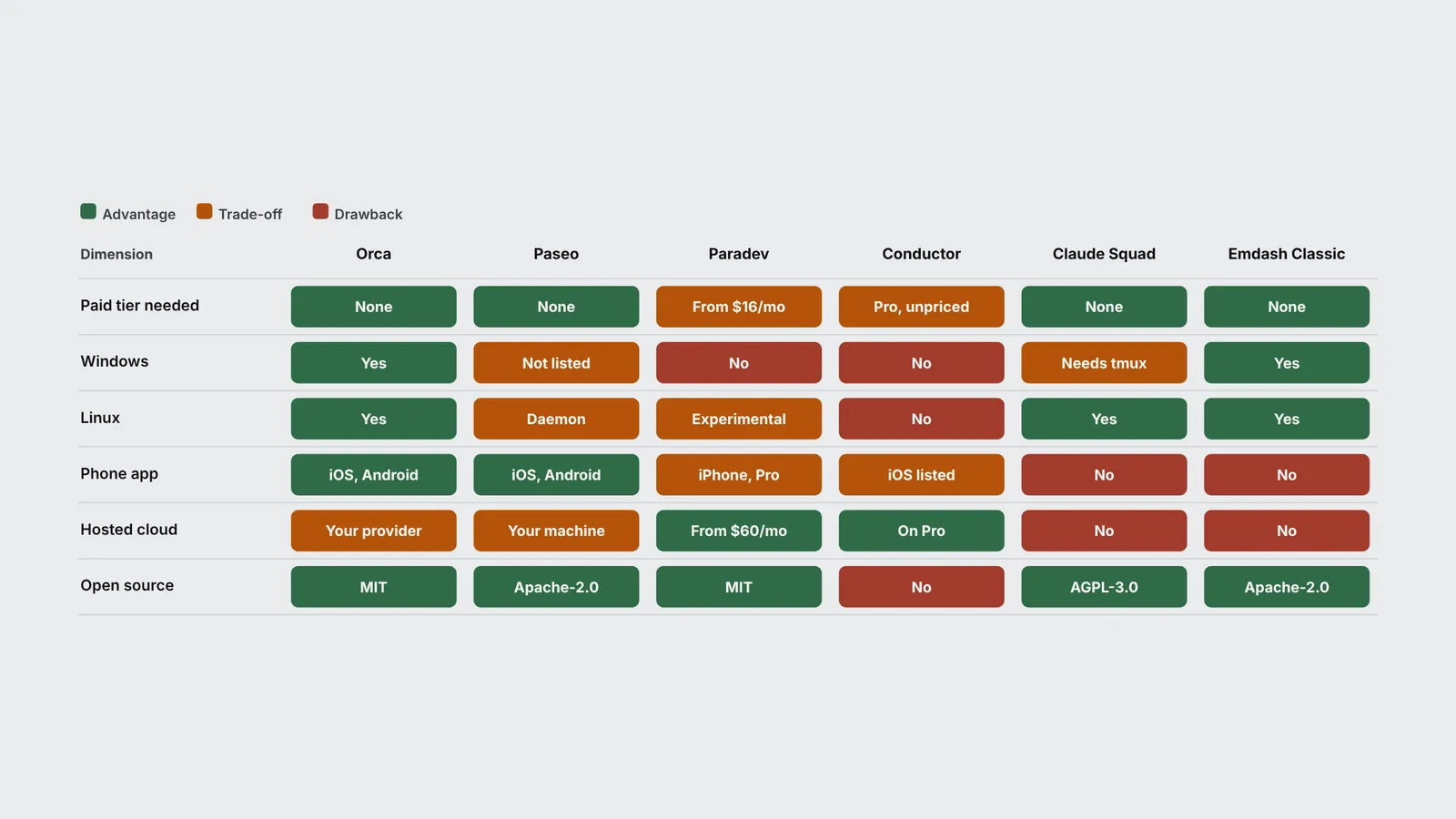
Almost every Orca alternative is free. Paseo, Claude Squad, Emdash Classic and Conductor’s Mac app cost nothing, and Paradev (the app formerly called Superset) has a free tier. Pick Paseo if you want Orca’s open-source, phone-friendly model with a self-hosted daemon. Pick Paradev if you want hosted cloud workspaces, from $60 a seat a month. Pick Conductor if you are on a Mac and want the most polished app; it cancelled its shutdown on 13 November 2026. Pick Claude Squad if you live in the terminal. If you only use one vendor’s agent, the manager built into the Codex, Claude or Antigravity desktop app may be enough.
What none of them changes is the real bill. Every app on this list drives agent CLIs signed in to your own subscriptions, so five agents in parallel spend one plan five times as fast. The app is the cheap part.
Which Orca alternatives are free?
All six desktop apps below have a free way in. The table leads with what you pay and where the app runs, because those two facts decide most shortlists. Prices and platforms were checked against each vendor’s own site, README or documentation on 18 November 2026.
| App | Cheapest way in | Where it runs | License | Agents | Status (18 Nov 2026) |
|---|---|---|---|---|---|
| Orca | Free | macOS, Windows, Linux; iOS and Android companions | MIT | 27 on the homepage, plus any CLI | Active, releases most days |
| Paseo | Free | Desktop app, iOS, Android, web, CLI; daemon anywhere | Apache-2.0 | 7 named | Free; built by one person |
| Paradev | Free tier; Pro $20/user/mo | macOS; Linux experimental; no Windows | MIT | 21 named, plus any CLI | Renamed from Superset, $11.5M seed |
| Conductor | Free; Cloud needs a Pro plan | macOS; iOS listed | Closed | Claude Code, Codex, Cursor, OpenCode | Owned by Meta, shutdown cancelled 13 Nov |
| Claude Squad | Free | Any terminal with tmux | AGPL-3.0 | Claude Code, Codex, Gemini, Aider, others | Open source on GitHub |
| Emdash Classic | Free | macOS, Windows, Linux | Apache-2.0 | 9 named, plus a longer providers list | Fixes only; new work moved to Emdash 2.0 |
Orca stays the reference point because it is the only one with confirmed builds for all three desktop systems and both phone platforms. The full Orca explainer covers its features, its default permission bypass and how its usage bar handles several accounts.
| Dimension | Orca | Paseo | Paradev | Conductor | Claude Squad | Emdash Classic |
|---|---|---|---|---|---|---|
| Paid tier needed | None | None | From $16/mo | Pro, unpriced | None | None |
| Windows | Yes | Not listed | No | No | Needs tmux | Yes |
| Linux | Yes | Daemon | Experimental | No | Yes | Yes |
| Phone app | iOS, Android | iOS, Android | iPhone, Pro | iOS listed | No | No |
| Hosted cloud | Your provider | Your machine | From $60/mo | On Pro | No | No |
| Open source | MIT | Apache-2.0 | MIT | No | AGPL-3.0 | Apache-2.0 |
How was this list ranked?
The ranking uses five criteria, in this order of weight:
- Cost of the full feature set. An app that is free with everything switched on beats one that puts core features behind a plan.
- Where it runs. More desktop systems and a phone app rank higher, because parallel agents are mostly waiting, and you check on them from wherever you are.
- Agent breadth. Support for any terminal agent beats a fixed list of two or three.
- Momentum. An app in active development beats one in maintenance mode or winding down.
- Open source. A public, permissively licensed codebase survives its company changing direction, which happened to two apps on this list this month.
Each entry was verified against its primary source (vendor site, pricing page, changelog, README or license file) on 18 November 2026. None was benchmarked hands-on for this page, so nothing here is described as tested. No app pays for placement, and this site has no affiliate links to any of them.
What are the best Orca alternatives?
1. Paseo: the closest match to Orca’s model
Paseo’s README calls it “an open source agentic development environment for desktop, mobile, web, and CLI” that runs “many agents at once, each in its own worktree.” Its design differs from Orca in one useful way: a local server called the daemon manages the agents, and the desktop app, phone apps, web app and CLI are all clients of it. You can install the daemon on a home server or cloud VM with npm install -g @getpaseo/cli and connect from anywhere.
- Price: free. The Paseo FAQ answers “Is this free?” with “Yes. Paseo is free and open source. You need agent providers installed with your own credentials.”
- Platforms: “iOS, Android, desktop, web, and CLI,” per the README, and the phone app “is the full app, native on iOS and Android.”
- Agents: Claude Code, Codex, Copilot, OpenCode, Pi, Antigravity and Muse Code.
- Privacy: “Paseo doesn’t have any telemetry, tracking, or forced log-ins.” Phones connect through an end-to-end encrypted relay, your own tunnel such as Tailscale, or a direct port.
- License: Apache-2.0, per the repository’s LICENSE file. The README says it is “built by one person and funded by the people who use it.” That is the main risk: the project depends on one maintainer.
Paseo is the pick for someone who wants Orca’s open, free model with a stronger phone experience. Orca supports more agents out of the box (27 against 7).
2. Paradev: the one with hosted cloud workspaces
Paradev is the app that was called Superset until this autumn. Its homepage banner reads “Superset is now Paradev. Also, we raised an $11.5M seed,” and the README notes that “the CLI command is still superset.” It is unrelated to Apache Superset, the business-intelligence tool.
- Price: the Paradev pricing page lists Free ($0, one user, local workspaces, desktop app and CLI), Pro ($20 per user per month, or $16 billed yearly, adding remote access, automations, Linear and Slack integrations and mobile), Team ($60, or $54 yearly, adding cloud workspaces with 150 hours per seat each month) and Ultra ($200, 500 hours per seat).
- Platforms: “The desktop app runs on macOS, with an experimental Linux AppImage; Windows is not yet available,” per the Paradev FAQ. The iPhone and iPad app requires Paradev Pro.
- Agents: the README lists 21 agents as fully supported, from Claude Code, Codex CLI and Cursor Agent to Gemini CLI, Grok, Kiro and Mistral Vibe, and says any other CLI agent “works without configuration.”
- Automation: a CLI, a TypeScript SDK and an MCP server let scripts and other agents drive the app.
- Model costs: “You bring your own agent subscriptions and API keys, and Paradev does not proxy model calls.”
Paradev is the pick if you want agents to keep running in a hosted sandbox after you close the laptop and would rather pay a vendor than run a server. The cost section below shows what those cloud hours work out to.
3. Conductor: the polished Mac app that came back
Conductor runs “the first-party Claude Code, Codex, Cursor, and OpenCode agents under the hood,” per its homepage, on macOS with an iOS app listed. The Conductor FAQ says the company does not make money yet: “for now we’re focused on making Conductor an amazing free tool.” Conductor Cloud runs agents on isolated microVMs and, per the Cloud FAQ, is “available to users on Pro, Teams, or Enterprise plans.” No Pro price was published on the pages checked. The same FAQ says there is no extra fee for cloud compute “right now,” with usage-based pricing planned.
The past two weeks are the reason to look twice. The sequence, from Conductor’s own changelog:
4 November 2026
0.93.0: "Conductor is joining Meta"
The entry said Conductor Cloud would go read-only on 13 November and shut down on 20 November, and that the local Mac app would get new models and critical fixes until early 2027. Axios reported the deal as an acquisition by Meta.
13 November 2026
0.94.2: "Conductor is back"
The entry reads: "Conductor isn't shutting down. It's back, and we're building again." It also removed the Cloud shutdown banner from cloud workspaces.
16 November 2026
0.95.0: agents that manage local workspaces
Agents in local workspaces can start other agents, create workspaces for a task and update setup scripts.
17 November 2026
0.95.1: GPT-6.2 Sol and GPT-6.2 Astra
New OpenAI models added. The site footer now reads "Conductor from Meta."
So the Meta deal stands and the shutdown does not. Conductor is free and shipping again, and it is the most finished Mac app here. It is also proprietary, Mac only and limited to four agents, and its owner has already announced its end once. If you moved to Orca or Paradev during the scare, there is no technical reason to move back: all three use the same one-worktree-per-task model.
4. Claude Squad: the terminal option
Claude Squad is “a terminal app that manages multiple Claude Code, Codex, Gemini (and other local agents including Aider) in separate workspaces.” Its README describes the mechanism in two lines: tmux “to create isolated terminal sessions for each agent” and git worktrees “to isolate codebases so each session works on its own branch.” It is free under AGPL-3.0 and runs anywhere tmux does.
It has no diff viewer with line comments, no built-in browser and no phone app. What it has is zero overhead: one binary, your existing terminal and your existing SSH setup. One flag needs care. --autoyes, marked experimental, makes every instance “automatically accept prompts,” which is the same permission trade-off Orca makes by default.
For a terminal that is built around agents without managing them for you, cmux is “a Ghostty-based macOS terminal with vertical tabs and notifications for AI coding agents,” free and GPL-licensed. It suits people who want to watch several agent sessions, not hand off worktree bookkeeping.
5. Emdash Classic: good app, frozen roadmap
Emdash, a Y Combinator W26 company, built one of the better cross-platform apps in this category: Apache-2.0, builds for macOS, Windows and Linux (x64 and ARM64), SSH support for remote machines, and issue intake that sends “issues and tickets from Linear, GitHub, Jira, GitLab, Asana” and five other trackers straight to an agent, per its README.
Then the company changed course. The Emdash homepage now sells “coding agents for your whole team” on its own cloud, in early access with no published price. The desktop app is renamed Emdash Classic, and the homepage says it “still gets fixes, but new development has moved to Emdash 2.0.” It still works and is free, but it no longer gets new features. That is why it ranks last among the active apps despite its feature list.
Which one should you skip?
Vibe Kanban. Its README opens with “Vibe Kanban is sunsetting.” It was a kanban board that turned issues into agent workspaces across 10-plus agents. Do not start a new workflow on it.
Do Codex, Claude and Cursor already do this?
Partly, and increasingly. The big vendors have each added a parallel-agent manager to their own apps. These cover one vendor’s agent well and other vendors’ agents not at all, which is the main thing Orca and its rivals add.
| Built-in manager | Cheapest plan that includes it | Where it runs | How parallel work is isolated |
|---|---|---|---|
| Codex in the ChatGPT desktop app | ChatGPT Free, $0 | macOS, Windows, Linux | Git worktrees per chat; cloud environments |
| Google Antigravity Agent Manager | Individual, $0 | macOS, Windows, Linux, Googlebook | Multiple local agents across workspaces |
| Claude Code desktop | Claude Pro, $20/mo | macOS, Windows (WSL), Linux beta | A session per worktree |
| Cursor cloud agents | Premium, $30/mo | Cursor app and web | Cloud agents |
| GitHub Agent HQ | Paid Copilot plan | GitHub.com, VS Code, CLI, mobile | Agents assigned from mission control |
- Codex. OpenAI’s worktrees documentation says “Worktrees let Codex run multiple independent chats in the same project without interfering with each other,” and the mobile app can approve and review them on a connected computer. The Codex pricing page says Codex is “included in your ChatGPT Free, Go, Plus, Pro, Business, Edu, or Enterprise plan.” Codex now lives inside the ChatGPT desktop app. The Codex DevDay roundup covers what changed this autumn.
- Antigravity. Google describes its Agent Manager as “your command center to manage multiple local agents in parallel,” and the Antigravity pricing page lists an Individual tier at $0 a month, with Google AI Pro and Ultra for heavier use.
- Claude Code. The Claude Code desktop docs cover parallel sessions and running “a session in its own worktree.” Agent teams, where one session coordinates teammates, “are experimental and disabled by default.” Pro is $20 a month on Claude’s pricing page. The Claude Code desktop guide walks through the setup.
- Cursor. The Cursor pricing page lists “Cloud agents & automations” from the $30 Premium plan; the $8 Plus plan is limited to Grok models. The Cursor pricing explainer has the limits.
- GitHub. GitHub’s Agent HQ announcement describes “mission control, a unified command center” for Copilot, Claude, Codex and other agents through a paid Copilot subscription. The Copilot AI credits breakdown covers what that costs.
If all your agents come from one vendor, start with that vendor’s app. Reach for Orca, Paseo or Paradev when you mix vendors, which is also how you spread work across several plans’ limits.
What does running agents in parallel actually cost?
The app is the small part of the cost. The large parts are the agent plans and, if you use them, cloud hours.
Agent plans. Every app here launches each agent’s own CLI with your login, so all agents on one account draw from one usage window. On ChatGPT Plus, the Codex pricing page estimates 17 to 180 local messages per 5 hours on GPT-6.2 Sol, so five agents in parallel get about 3 to 36 each. The Orca post’s quota chart works through the same split on the earlier GPT-6.1 Sol figures. A manager app does not change it. Spreading agents across vendors, or moving to a bigger plan, does. The AI coding plan pricing tracker lists every plan, and the subscription vs API calculator shows where pay-per-token becomes cheaper for heavy parallel use.
Cloud hours. Hosted workspaces keep agents running while your laptop sleeps. Paradev is the only app here with published cloud prices, and the arithmetic on its pricing page is flat:
| Paradev plan | Price per seat per month | Cloud hours per seat | Cost per cloud hour |
|---|---|---|---|
| Team (monthly) | $60 | 150 | $0.40 |
| Team (yearly) | $54 | 150 | $0.36 |
| Ultra (monthly) | $200 | 500 | $0.40 |
Ultra costs the same per hour as Team. The extra $140 buys 350 more hours, not a discount. A seat that uses fewer than 150 hours a month pays more than $0.40 per hour actually used. Conductor Cloud currently charges no compute fee on top of its Pro plan, though its FAQ says usage pricing is coming. Orca sells no hosting at all: you bring a provider such as Fly, Modal or an SSH host and pay that provider’s rate.
Your attention. Every agent finishes with a diff someone has to review. Two or three agents on a plan with headroom is a better start than eight on a $20 plan, whichever app you choose. The six Claude Code workflows guide covers which tasks split cleanly into parallel worktrees and which do not.
How do you switch from Orca or Conductor?
The good news is that the category has standardized on one model: a git worktree and branch per task. That makes switching cheap.
- Check what you actually need. If you only run Claude Code or only Codex, try the vendor’s own desktop app first. It costs nothing extra.
- Pick by platform. On Windows, the confirmed options are Orca, Emdash Classic and the vendor apps. On a Mac, all of them run. For phone supervision, use Orca or Paseo.
- Reuse your worktrees. Existing worktrees are ordinary git checkouts. Orca’s migration guide states that it opens Conductor workspaces in place, and the others can point at the same repository.
- Copy your setup scripts. Conductor’s
conductor.json, Orca’sorca.yamland Paradev’s setup all run install commands after a worktree is created. Gitignored files such as.envare missing from a fresh worktree, so list them in each app’s copy or include setting. - Set the permission mode before the first run. Orca launches agents with their permission prompts off by default, and Claude Squad has an experimental auto-accept flag. Decide per repository before a fleet touches anything with production credentials.
- Start with two agents. Watch your plan’s usage after a day before adding a third.
For the wider field of coding agents themselves, by price and capability, see the AI coding agents hub.
Frequently asked questions
- What is the best free alternative to Orca?
- Paseo is the closest free alternative: open source under Apache-2.0, a self-hosted daemon, and native iOS and Android apps. Pick Paradev for hosted cloud workspaces, Conductor for the most polished Mac app, and Claude Squad for a terminal-only setup.
- Is Conductor shutting down?
- No. Conductor announced it was joining Meta on 4 November 2026 and planned to shut Conductor Cloud on 20 November, but its 13 November changelog entry says "Conductor isn't shutting down. It's back, and we're building again." The site now reads "Conductor from Meta" and new versions shipped on 16 and 17 November.
- Is Superset the same as Paradev?
- Yes. Superset renamed itself Paradev and announced an $11.5 million seed round. The CLI command is still superset. It is unrelated to Apache Superset, the business-intelligence tool.
- Which parallel coding agent apps run on Windows?
- Among the independent apps, Orca and Emdash Classic have confirmed Windows builds. Paradev and Conductor do not support Windows. The Codex, Claude Code and Antigravity desktop apps also run on Windows.
- Do I need Orca if I only use Claude Code?
- Usually not. Claude Code runs parallel sessions in their own worktrees from its desktop app or with the --worktree flag. A separate manager pays off when you mix agents from different vendors or want one view across several plans.
- Does running agents in parallel cost more?
- The apps are mostly free, but every agent signed in to the same account draws from the same plan limit. Five agents spend one plan five times as fast. Hosted cloud hours, where offered, cost extra: Paradev works out to $0.36 to $0.40 per hour.
Sources
- Stably AI (2026). Orca: the agent development environment. Orca website. https://orca.dev/
- Paseo (2026). Paseo README and LICENSE. GitHub. https://github.com/getpaseo/paseo
- Paseo (2026). Paseo: run many coding agents at once (FAQ). Paseo website. https://paseo.sh/
- Paradev (2026). Paradev (homepage and FAQ). Paradev website. https://paradev.com/
- Paradev (2026). Pricing. Paradev website. https://paradev.com/pricing
- Paradev (2026). Paradev README and LICENSE. GitHub. https://github.com/ParadevAI/Paradev
- Conductor (2026). Conductor changelog (0.93.0, 0.94.2, 0.95.0, 0.95.1). Conductor. https://www.conductor.build/changelog
- Conductor (2026). Conductor: run a team of coding agents in the cloud. Conductor website. https://www.conductor.build/
- Conductor (2026). FAQ. Conductor documentation. https://www.conductor.build/docs/faq
- Conductor (2026). Cloud FAQ. Conductor documentation. https://www.conductor.build/docs/cloud/faq
- Axios (2026). Exclusive: Meta acquires AI coding startup Conductor. Axios. https://axios.com/2026/11/04/meta-acquires-ai-coding-startup-conductor
- smtg-ai (2026). Claude Squad README and LICENSE. GitHub. https://github.com/smtg-ai/claude-squad
- Manaflow (2026). cmux README. GitHub. https://github.com/manaflow-ai/cmux
- General Action (2026). Emdash README and LICENSE. GitHub. https://github.com/generalaction/emdash
- General Action (2026). Emdash: coding agents for your whole team. Emdash website. https://emdash.com/
- BloopAI (2026). Vibe Kanban README. GitHub. https://github.com/BloopAI/vibe-kanban
- OpenAI (2026). Worktrees. Codex documentation. https://developers.openai.com/codex/environments/git-worktrees
- OpenAI (2026). Codex pricing. Codex documentation. https://developers.openai.com/codex/pricing
- OpenAI (2026). ChatGPT desktop app. Codex documentation. https://developers.openai.com/codex/app
- Google (2026). Google Antigravity. Antigravity website. https://antigravity.google/
- Google (2026). Antigravity pricing. Antigravity website. https://antigravity.google/pricing
- Anthropic (2026). Claude Code on desktop. Claude Code documentation. https://code.claude.com/docs/en/desktop
- Anthropic (2026). Agent teams. Claude Code documentation. https://code.claude.com/docs/en/agent-teams
- Anthropic (2026). Plans and pricing. Claude. https://claude.com/pricing
- Cursor (2026). Pricing. Cursor. https://cursor.com/pricing
- GitHub (2025). Introducing Agent HQ: any agent, any way you work. GitHub Blog. https://github.blog/news-insights/company-news/welcome-home-agents/